
What choices lay before you when your Elixir app needs functionality that only exists, or is more mature, in Python? There are machine learning models, PDF rendering libraries, and audio/video editing tools without an Elixir equivalent (yet). You could piece together some HTTP calls, or bring in a message queue...but there's a simpler path through Oban.
Whether you're enabling disparate teams to collaborate, gradually migrating from one language to another, or leveraging packages that are lacking in one ecosystem, having a mechanism to transparently exchange durable jobs between Elixir and Python opens up new possibilities.
On that tip, let's build a small example to demonstrate how trivial bridging can be. We'll call it "Badge Forge".
Forging Badges
"Badge Forge," like "Fire Saga" before it, is a pair of nouns that barely describes what our demo app does. But, it's balanced and why hold back on the whimsy?
More concretely, we're building a micro app that prints conference badges. The actual PDF generation happens through WeasyPrint, a Python library that turns HTML and CSS into print-ready documents. It's mature and easy to use. For the purpose of this demo, we'll pretend that running ChromaticPDF is unpalatable and Typst isn't available.
There's no web framework involved, just command-line output and job processing. Don't fret, we'll bring in some visualization later.
Sharing a Common Database
Some say you're cra-zay for sharing a database between applications. We say you're already willing to share a message queue, and now the database is your task broker, so why not? It's happening.
Oban for Python was designed for interop with Elixir from the beginning. Both libraries read
and write to the same oban_jobs table, with job args stored as JSON, so they're fully
language-agnostic. When an Elixir app enqueues a job destined for a Python worker (or vice versa),
it simply writes a row. The receiving side picks it up based on the queue name, processes it, and
updates the status. That's the whole mechanism:
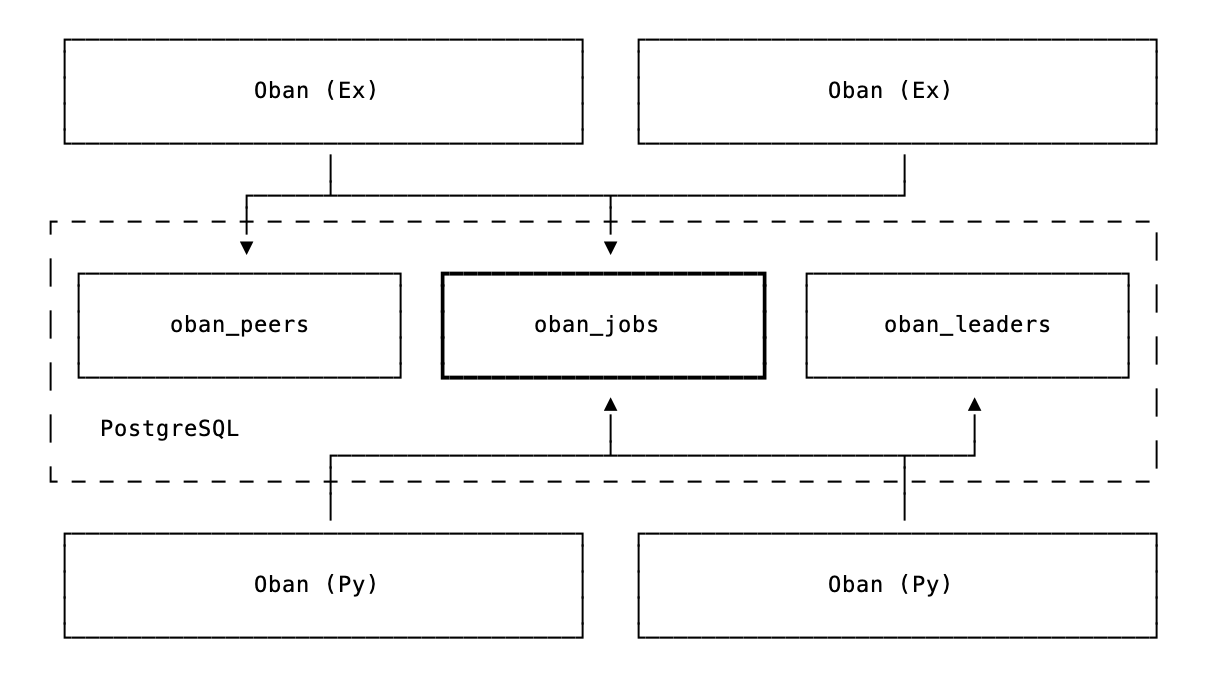
Each side maintains its own cluster leadership, so an Elixir node and a Python process won't compete for leader responsibilities. They coordinate through the jobs table, but take care of business independently.
Both sides can also exchange PubSub notifications through Postgres for real-time coordination. The importance of that tidbit will become clear soon enough.
Printing in Action
This is more of a demonstration than a tutorial. We don't expect you to build along, but we hope you'll see how little code it takes to form a bridge.
With a wee config in place and both apps pointing at the same database, we can start generating badges.
Enqueueing Jobs
Generation starts on the Elixir side. This function enqueues a batch of (fake) jobs destined for the Python worker:
def enqueue_batch(count \\ 100) do
  generate = fn _ ->
    args = %{
      id: Ecto.UUID.generate(),
      name: fake_name(),
      company: fake_company(),
      type: Enum.random(~w(attendee speaker sponsor organizer))
    }

    Oban.Job.new(args, worker: "badge_forge.generator.GenerateBadge", queue: :badges)
  end

  1..count
  |> Enum.map(generate)
  |> Oban.insert_all()
end
Notice the worker name is a string, "badge_forge.generator.GenerateBadge", matching the Python
worker's fully qualified name. The job lands in the badges queue, where a Python worker is
listening.
The Python Side
The Python worker receives badge requests and generates PDFs using WeasyPrint:
from oban import Job, Oban, worker
from weasyprint import HTML

@worker(max_attempts=5, queue="badges")
class GenerateBadge:
    async def process(self, job: Job) -> None:
        id = job.args["badge_id"]
        name = job.args["name"]
        html = render_badge_html(name, job.args["company"], job.args["type"])
        path = BADGES_DIR / f"{name}.pdf"

        # Generate the pdf content
        HTML(string=html).write_pdf(path)

        # Construct a job manually
        job = Job(
            args={"id": id, "name": name, "path": str(path)},
            queue="printing",
            worker="BadgeForge.PrintCenter",
        )

        # Use the active Oban instance and enqueue the job
        await Oban.get_instance().enqueue(job)
When a job arrives, it pulls the attendee info from the args, renders an HTML template, and writes the PDF to disk. After completion, it enqueues a confirmation job back to Elixir.
The Elixir Side
The Elixir side listens for confirmations and prints the result:
defmodule BadgeForge.PrintCenter do
  use Oban.Worker, queue: :printing

  require Logger

  @impl Oban.Worker
  def perform(%Job{args: %{"id" => id, "name" => name, "path" => path}}) do
    Logger.info("Printing badge #{id} for #{name}: #{path}...")

    do_actual_printing_here(...)

    :ok
  end
end
With that, there's two-way communication through the jobs table.
Sample Output
To print conference badges you need a conference. You should have a conference. We're printing badges for the fictional "Oban Conf" being held this year in Edinburgh. It will be both hydrating and engaging. Kicking off a batch of ten jobs from Elixir:
iex> BadgeForge.enqueue_batch(10)
:ok
On the Python side, we see automatic logging for each job with output like this (output has been prettified):
[INFO] oban: {
  "id":14,
  "worker":"badge_forge.generator.GenerateBadge",
  "queue":"badges",
  "attempt":1,
  "max_attempts":20,
  "args":{
    "id":"7bfb7c39-c354-4cce-ad5b-f1be2814b17e",
    "name":"Alasdair Fraser",
    "type":"speaker",
    "company":"Wavelength Tech"
  },
  "meta":{},
  "tags":[],
  "event":"oban.job.stop",
  "state":"completed",
  "duration":2.51,
  "queue_time":5.45
}
The job completed successfully, and back in the Elixir app, we see that the print completed:
[info] Printing badge 7bfb7c39 for Alasdair Fraser: /some/path...
The output looks something like this:

Apologies to any "Alasdair Frasers" out there, your name was pulled from the nether and there isn't a real conference. As consolation, if you contact us, you have stickers coming.
Visualizing the Activity
Seeing jobs in terminal logs is fine, but watching them flow through a dashboard is far more satisfying. We recently shipped a standalone Oban Web Docker image for situations like this; where you want monitoring without mounting it in your app. It's also useful when your primary app is actually Python...
With docker running, point the DATABASE_URL at your Oban-ified database and pull the image:
docker run -d \
  -e DATABASE_URL="postgres://user:pass@host.docker.internal:5432/badge_forge_dev" \
  -p 4000:4000 \
  ghcr.io/oban-bg/oban-dash
That starts Oban Web running in the background to monitor jobs from all connected Oban instances.
Queue activity and metrics are exchanged via PubSub, so the Web instance can store them for
visualization. Trigger a few (hundred) jobs, navigate to the dashboard on localhost:4000, and
look at 'em roll:

Bridging Both Ways
Badge Forge is whimsical, some say "useless", but the pattern is practical! When you need tools that are stronger in one ecosystem, you can bridge it. This goes both ways. A Python app can reach for Elixir's strengths just as easily.
Check out the full demo code for the boilerplate and config we rested over here.
As usual, if you have any questions or comments, ask in the Elixir Forum. For future announcements and insight into what we're working on next, subscribe to our newsletter.