<?xml version="1.0" encoding="utf-8"?>
<feed xmlns="http://www.w3.org/2005/Atom">
  <title>Oban Articles</title>
  <subtitle>Where we write about building, refining, and utilizing Oban, Web, and Pro.</subtitle>
  <id>https://oban.pro/</id>
  <link rel="alternate" type="text/html" href="https://oban.pro" />
  <link rel="self" type="application/atom+xml" href="https://oban.pro/articles" />
  <updated>2026-02-03T00:00:00Z</updated>
  <author>
    <name>Parker &amp; Shannon Selbert</name>
  </author>
  
    <entry>
      <title>Bridging Elixir and Python with Oban</title>
      <link rel="alternate" href="https://oban.pro/articles/bridging-with-oban" />
      <id>https://oban.pro/articles/bridging-with-oban</id>
      <published>2026-02-03T00:00:00Z</published>
      <updated>2026-02-03T00:00:00Z</updated>
      <summary>Using Oban to seamlessly exchange durable jobs between Elixir and Python applications through a shared PostgreSQL database.</summary>
      <content type="html"><![CDATA[<p>What choices lay before you when your Elixir app needs functionality that only exists, or is more
mature, in Python? There are machine learning models, PDF rendering libraries, and audio/video
editing tools without an Elixir equivalent (yet). You could piece together some HTTP calls, or
bring in a message queue...but there's a simpler path through Oban.</p>
<p>Whether you're enabling disparate teams to collaborate, gradually migrating from one language to
another, or leveraging packages that are lacking in one ecosystem, having a mechanism to
transparently exchange <em>durable jobs</em> between Elixir <em>and</em> Python opens up new possibilities.</p>
<p>On that tip, let's build a small example to demonstrate how trivial bridging can be. We'll call it
"Badge Forge".</p>
<h2>Forging Badges</h2>
<p>"Badge Forge," like "<a href="/articles/weaving-stories-with-cascading-workflows">Fire Saga</a>" before it, is a pair of nouns that <em>barely</em> describes what
our demo app does. But, it's balanced and why hold back on the whimsy?</p>
<p>More concretely, we're building a micro app that prints conference badges. The actual PDF
generation happens through <a href="https://weasyprint.org/">WeasyPrint</a>, a Python library that turns HTML and CSS into
print-ready documents. It's mature and easy to use. For the purpose of this demo, we'll pretend
that running <a href="https://hexdocs.pm/chromic_pdf/ChromicPDF.html">ChromaticPDF</a> is unpalatable and <a href="https://typst.app/">Typst</a> isn't available.</p>
<p>There's no web framework involved, just command-line output and job processing. Don't fret, we'll
bring in some visualization later.</p>
<h2>Sharing a Common Database</h2>
<p>Some say you're cra-zay for sharing a database between applications. We say you're already
willing to share a message queue, and now the database is your task broker, so why not? It's
happening.</p>
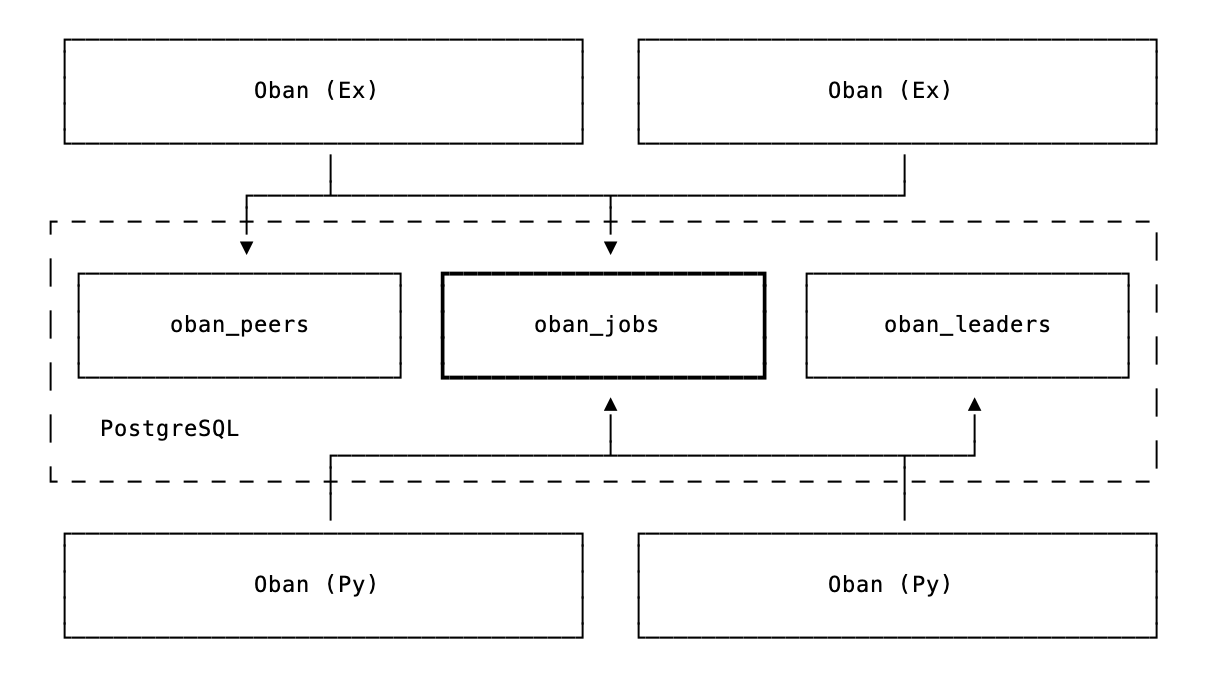
<p>Oban for Python was designed for interop with Elixir from the beginning. Both libraries read
and write to the same <code>oban_jobs</code> table, with job args stored as JSON, so they're fully
language-agnostic. When an Elixir app enqueues a job destined for a Python worker (or vice versa),
it simply writes a row. The receiving side picks it up based on the queue name, processes it, and
updates the status. That's the whole mechanism:</p>
<p><img src="/images/bridging-with-oban/elixir-python-interop.png" alt="Interop" /></p>
<p>Each side maintains its own cluster leadership, so an Elixir node and a Python process won't
compete for leader responsibilities. They coordinate through the jobs table, but <a href="https://www.elvispresleytcb.com/">take care of
business</a> independently.</p>
<p>Both sides can also exchange PubSub notifications through Postgres for real-time coordination.
The importance of that tidbit will become clear soon enough.</p>
<h2>Printing in Action</h2>
<p>This is more of a demonstration than a tutorial. We don't expect you to build along, but we hope
you'll see how little code it takes to form a bridge.</p>
<p>With a wee config in place and both apps pointing at the same database, we can start generating
badges.</p>
<h3>Enqueueing Jobs</h3>
<p>Generation starts on the Elixir side. This function enqueues a batch of (fake) jobs destined for
the Python worker:</p>
<pre class="lumis" style="color: #d8dee9; background-color: #2e3440;"><code class="language-elixir" translate="no" tabindex="0"><div class="line" data-line="1"><span style="color: #81a1c1;">def</span> <span style="color: #88c0d0;">enqueue_batch</span><span style="color: #88c0d0;">(</span><span style="color: #d8dee9; font-weight: bold;">count</span> <span style="color: #81a1c1;">\\</span> <span style="color: #b48ead;">100</span><span style="color: #88c0d0;">)</span> <span style="color: #81a1c1;">do</span>
</div><div class="line" data-line="2">  <span style="color: #d8dee9; font-weight: bold;">generate</span> <span style="color: #81a1c1;">=</span> <span style="color: #81a1c1;">fn</span> <span style="color: #616e88;">_</span> <span style="color: #81a1c1;">-></span>
</div><div class="line" data-line="3">    <span style="color: #d8dee9; font-weight: bold;">args</span> <span style="color: #81a1c1;">=</span> <span style="color: #88c0d0;">%</span><span style="color: #88c0d0;">&lbrace;</span>
</div><div class="line" data-line="4">      <span style="color: #ebcb8b;">id: </span><span style="color: #81a1c1;">Ecto.UUID</span><span style="color: #81a1c1;">.</span><span style="color: #88c0d0;">generate</span><span style="color: #88c0d0;">(</span><span style="color: #88c0d0;">)</span><span style="color: #88c0d0;">,</span>
</div><div class="line" data-line="5">      <span style="color: #ebcb8b;">name: </span><span style="color: #88c0d0;">fake_name</span><span style="color: #88c0d0;">(</span><span style="color: #88c0d0;">)</span><span style="color: #88c0d0;">,</span>
</div><div class="line" data-line="6">      <span style="color: #ebcb8b;">company: </span><span style="color: #88c0d0;">fake_company</span><span style="color: #88c0d0;">(</span><span style="color: #88c0d0;">)</span><span style="color: #88c0d0;">,</span>
</div><div class="line" data-line="7">      <span style="color: #ebcb8b;">type: </span><span style="color: #81a1c1;">Enum</span><span style="color: #81a1c1;">.</span><span style="color: #88c0d0;">random</span><span style="color: #88c0d0;">(</span><span style="color: #ebcb8b;">~</span>w<span style="color: #88c0d0;">(</span>attendee speaker sponsor organizer<span style="color: #88c0d0;">)</span><span style="color: #88c0d0;">)</span>
</div><div class="line" data-line="8">    <span style="color: #88c0d0;">&rbrace;</span>
</div><div class="line" data-line="9">
</div><div class="line" data-line="10">    <span style="color: #81a1c1;">Oban.Job</span><span style="color: #81a1c1;">.</span><span style="color: #88c0d0;">new</span><span style="color: #88c0d0;">(</span><span style="color: #d8dee9; font-weight: bold;">args</span><span style="color: #88c0d0;">,</span> <span style="color: #ebcb8b;">worker: </span><span style="color: #a3be8c;">"badge_forge.generator.GenerateBadge"</span><span style="color: #88c0d0;">,</span> <span style="color: #ebcb8b;">queue: </span><span style="color: #ebcb8b;">:badges</span><span style="color: #88c0d0;">)</span>
</div><div class="line" data-line="11">  <span style="color: #81a1c1;">end</span>
</div><div class="line" data-line="12">
</div><div class="line" data-line="13">  <span style="color: #b48ead;">1</span><span style="color: #81a1c1;">..</span><span style="color: #d8dee9; font-weight: bold;">count</span>
</div><div class="line" data-line="14">  <span style="color: #81a1c1;">|></span> <span style="color: #81a1c1;">Enum</span><span style="color: #81a1c1;">.</span><span style="color: #88c0d0;">map</span><span style="color: #88c0d0;">(</span><span style="color: #d8dee9; font-weight: bold;">generate</span><span style="color: #88c0d0;">)</span>
</div><div class="line" data-line="15">  <span style="color: #81a1c1;">|></span> <span style="color: #81a1c1;">Oban</span><span style="color: #81a1c1;">.</span><span style="color: #88c0d0;">insert_all</span><span style="color: #88c0d0;">(</span><span style="color: #88c0d0;">)</span>
</div><div class="line" data-line="16"><span style="color: #81a1c1;">end</span>
</div></code></pre>
<p>Notice the worker name is a string, "badge_forge.generator.GenerateBadge", matching the Python
worker's fully qualified name. The job lands in the <code>badges</code> queue, where a Python worker is
listening.</p>
<h3>The Python Side</h3>
<p>The Python worker receives badge requests and generates PDFs using WeasyPrint:</p>
<pre class="lumis" style="color: #d8dee9; background-color: #2e3440;"><code class="language-python" translate="no" tabindex="0"><div class="line" data-line="1"><span style="color: #81a1c1;">from</span> <span style="color: #d8dee9; font-weight: bold;">oban</span> <span style="color: #81a1c1;">import</span> <span style="color: #81a1c1;">Job</span>, <span style="color: #81a1c1;">Oban</span>, <span style="color: #d8dee9; font-weight: bold;">worker</span>
</div><div class="line" data-line="2"><span style="color: #81a1c1;">from</span> <span style="color: #d8dee9; font-weight: bold;">weasyprint</span> <span style="color: #81a1c1;">import</span> <span style="color: #ebcb8b;">HTML</span>
</div><div class="line" data-line="3">
</div><div class="line" data-line="4"><span style="color: #88c0d0;">@</span><span style="color: #88c0d0;">worker</span><span style="color: #88c0d0;">(</span><span style="color: #d8dee9; font-weight: bold;">max_attempts</span><span style="color: #81a1c1;">=</span><span style="color: #b48ead;">5</span><span style="color: #88c0d0;">, </span><span style="color: #d8dee9; font-weight: bold;">queue</span><span style="color: #81a1c1;">=</span><span style="color: #a3be8c;">"badges"</span><span style="color: #88c0d0;">)</span>
</div><div class="line" data-line="5"><span style="color: #81a1c1;">class</span> <span style="color: #81a1c1;">GenerateBadge</span>:
</div><div class="line" data-line="6">    <span style="color: #81a1c1;">async</span> <span style="color: #81a1c1;">def</span> <span style="color: #88c0d0;">process</span>(<span style="color: #d8dee9; font-weight: bold;">self</span>, <span style="color: #d8dee9; font-weight: bold;">job</span>: <span style="color: #81a1c1;">Job</span>) <span style="color: #81a1c1;">-></span> <span style="color: #8fbcbb; font-weight: bold;">None</span>:
</div><div class="line" data-line="7">        <span style="color: #d8dee9; font-weight: bold;">id</span> <span style="color: #81a1c1;">=</span> <span style="color: #d8dee9; font-weight: bold;">job</span>.<span style="color: #5e81ac;">args</span>[<span style="color: #a3be8c;">"badge_id"</span>]
</div><div class="line" data-line="8">        <span style="color: #d8dee9; font-weight: bold;">name</span> <span style="color: #81a1c1;">=</span> <span style="color: #d8dee9; font-weight: bold;">job</span>.<span style="color: #5e81ac;">args</span>[<span style="color: #a3be8c;">"name"</span>]
</div><div class="line" data-line="9">        <span style="color: #d8dee9; font-weight: bold;">html</span> <span style="color: #81a1c1;">=</span> <span style="color: #88c0d0;">render_badge_html</span>(<span style="color: #d8dee9; font-weight: bold;">name</span>, <span style="color: #d8dee9; font-weight: bold;">job</span>.<span style="color: #5e81ac;">args</span>[<span style="color: #a3be8c;">"company"</span>], <span style="color: #d8dee9; font-weight: bold;">job</span>.<span style="color: #5e81ac;">args</span>[<span style="color: #a3be8c;">"type"</span>])
</div><div class="line" data-line="10">        <span style="color: #d8dee9; font-weight: bold;">path</span> <span style="color: #81a1c1;">=</span> <span style="color: #ebcb8b;">BADGES_DIR</span> <span style="color: #81a1c1;">/</span> <span style="color: #a3be8c;">f"</span><span style="color: #88c0d0;">&lbrace;</span><span style="color: #d8dee9; font-weight: bold;">name</span><span style="color: #88c0d0;">&rbrace;</span><span style="color: #a3be8c;">.pdf"</span>
</div><div class="line" data-line="11">
</div><div class="line" data-line="12">        <span style="color: #616e88;"># Generate the pdf content</span>
</div><div class="line" data-line="13">        <span style="color: #88c0d0;">HTML</span>(<span style="color: #d8dee9; font-weight: bold;">string</span><span style="color: #81a1c1;">=</span><span style="color: #d8dee9; font-weight: bold;">html</span>).<span style="color: #5e81ac;">write_pdf</span>(<span style="color: #d8dee9; font-weight: bold;">path</span>)
</div><div class="line" data-line="14">
</div><div class="line" data-line="15">        <span style="color: #616e88;"># Construct a job manually</span>
</div><div class="line" data-line="16">        <span style="color: #d8dee9; font-weight: bold;">job</span> <span style="color: #81a1c1;">=</span> <span style="color: #88c0d0;">Job</span>(
</div><div class="line" data-line="17">            <span style="color: #d8dee9; font-weight: bold;">args</span><span style="color: #81a1c1;">=</span>&lbrace;<span style="color: #a3be8c;">"id"</span>: <span style="color: #d8dee9; font-weight: bold;">id</span>, <span style="color: #a3be8c;">"name"</span>: <span style="color: #d8dee9; font-weight: bold;">name</span>, <span style="color: #a3be8c;">"path"</span>: <span style="color: #88c0d0;">str</span>(<span style="color: #d8dee9; font-weight: bold;">path</span>)&rbrace;,
</div><div class="line" data-line="18">            <span style="color: #d8dee9; font-weight: bold;">queue</span><span style="color: #81a1c1;">=</span><span style="color: #a3be8c;">"printing"</span>,
</div><div class="line" data-line="19">            <span style="color: #d8dee9; font-weight: bold;">worker</span><span style="color: #81a1c1;">=</span><span style="color: #a3be8c;">"BadgeForge.PrintCenter"</span>,
</div><div class="line" data-line="20">        )
</div><div class="line" data-line="21">
</div><div class="line" data-line="22">        <span style="color: #616e88;"># Use the active Oban instance and enqueue the job</span>
</div><div class="line" data-line="23">        <span style="color: #81a1c1;">await</span> <span style="color: #81a1c1;">Oban</span>.<span style="color: #5e81ac;">get_instance</span>().<span style="color: #5e81ac;">enqueue</span>(<span style="color: #d8dee9; font-weight: bold;">job</span>)
</div></code></pre>
<p>When a job arrives, it pulls the attendee info from the args, renders an HTML template, and writes
the PDF to disk. After completion, it enqueues a confirmation job back to Elixir.</p>
<h3>The Elixir Side</h3>
<p>The Elixir side listens for confirmations and prints the result:</p>
<pre class="lumis" style="color: #d8dee9; background-color: #2e3440;"><code class="language-elixir" translate="no" tabindex="0"><div class="line" data-line="1"><span style="color: #81a1c1;">defmodule</span> <span style="color: #81a1c1;">BadgeForge.PrintCenter</span> <span style="color: #81a1c1;">do</span>
</div><div class="line" data-line="2">  <span style="color: #81a1c1;">use</span> <span style="color: #81a1c1;">Oban.Worker</span><span style="color: #88c0d0;">,</span> <span style="color: #ebcb8b;">queue: </span><span style="color: #ebcb8b;">:printing</span>
</div><div class="line" data-line="3">
</div><div class="line" data-line="4">  <span style="color: #81a1c1;">require</span> <span style="color: #81a1c1;">Logger</span>
</div><div class="line" data-line="5">
</div><div class="line" data-line="6">  <span style="color: #ebcb8b;">@</span><span style="color: #ebcb8b;">impl </span><span style="color: #81a1c1;">Oban.Worker</span>
</div><div class="line" data-line="7">  <span style="color: #81a1c1;">def</span> <span style="color: #88c0d0;">perform</span><span style="color: #88c0d0;">(</span><span style="color: #88c0d0;">%</span><span style="color: #81a1c1;">Job</span><span style="color: #88c0d0;">&lbrace;</span><span style="color: #ebcb8b;">args: </span><span style="color: #88c0d0;">%</span><span style="color: #88c0d0;">&lbrace;</span><span style="color: #a3be8c;">"id"</span> <span style="color: #81a1c1;">=></span> <span style="color: #d8dee9; font-weight: bold;">id</span><span style="color: #88c0d0;">,</span> <span style="color: #a3be8c;">"name"</span> <span style="color: #81a1c1;">=></span> <span style="color: #d8dee9; font-weight: bold;">name</span><span style="color: #88c0d0;">,</span> <span style="color: #a3be8c;">"path"</span> <span style="color: #81a1c1;">=></span> <span style="color: #d8dee9; font-weight: bold;">path</span><span style="color: #88c0d0;">&rbrace;</span><span style="color: #88c0d0;">&rbrace;</span><span style="color: #88c0d0;">)</span> <span style="color: #81a1c1;">do</span>
</div><div class="line" data-line="8">    <span style="color: #81a1c1;">Logger</span><span style="color: #81a1c1;">.</span><span style="color: #88c0d0;">info</span><span style="color: #88c0d0;">(</span><span style="color: #a3be8c;">"Printing badge </span><span style="color: #ebcb8b;">#&lbrace;</span><span style="color: #d8dee9; font-weight: bold;">id</span><span style="color: #ebcb8b;">&rbrace;</span><span style="color: #a3be8c;"> for </span><span style="color: #ebcb8b;">#&lbrace;</span><span style="color: #d8dee9; font-weight: bold;">name</span><span style="color: #ebcb8b;">&rbrace;</span><span style="color: #a3be8c;">: </span><span style="color: #ebcb8b;">#&lbrace;</span><span style="color: #d8dee9; font-weight: bold;">path</span><span style="color: #ebcb8b;">&rbrace;</span><span style="color: #a3be8c;">..."</span><span style="color: #88c0d0;">)</span>
</div><div class="line" data-line="9">
</div><div class="line" data-line="10">    <span style="color: #88c0d0;">do_actual_printing_here</span><span style="color: #88c0d0;">(</span><span style="color: #d8dee9; font-weight: bold;">...</span><span style="color: #88c0d0;">)</span>
</div><div class="line" data-line="11">
</div><div class="line" data-line="12">    <span style="color: #ebcb8b;">:ok</span>
</div><div class="line" data-line="13">  <span style="color: #81a1c1;">end</span>
</div><div class="line" data-line="14"><span style="color: #81a1c1;">end</span>
</div></code></pre>
<p>With that, there's two-way communication through the jobs table.</p>
<h2>Sample Output</h2>
<p>To print conference badges you need a conference. You <em>should</em> have a conference. We're printing
badges for the <em>fictional</em> "Oban Conf" being held this year in Edinburgh. It will be both
<a href="https://www.dailyrecord.co.uk/lifestyle/scottish-tap-water-considered-best-35229754">hydrating</a> and engaging. Kicking off a batch of ten jobs from Elixir:</p>
<pre class="lumis" style="color: #d8dee9; background-color: #2e3440;"><code class="language-elixir" translate="no" tabindex="0"><div class="line" data-line="1"><span style="color: #d8dee9; font-weight: bold;">iex</span><span style="color: #81a1c1;">></span> <span style="color: #81a1c1;">BadgeForge</span><span style="color: #81a1c1;">.</span><span style="color: #88c0d0;">enqueue_batch</span><span style="color: #88c0d0;">(</span><span style="color: #b48ead;">10</span><span style="color: #88c0d0;">)</span>
</div><div class="line" data-line="2"><span style="color: #ebcb8b;">:ok</span>
</div></code></pre>
<p>On the Python side, we see automatic logging for each job with output like this (output has been
prettified):</p>
<pre class="lumis" style="color: #d8dee9; background-color: #2e3440;"><code class="language-elixir" translate="no" tabindex="0"><div class="line" data-line="1"><span style="color: #88c0d0;">[</span><span style="color: #81a1c1;">INFO</span><span style="color: #88c0d0;">]</span> <span style="color: #ebcb8b;">oban: </span><span style="color: #88c0d0;">&lbrace;</span>
</div><div class="line" data-line="2">  <span style="color: #a3be8c;">"id"</span>:<span style="color: #b48ead;">14</span><span style="color: #88c0d0;">,</span>
</div><div class="line" data-line="3">  <span style="color: #ebcb8b;">"worker"</span><span style="color: #ebcb8b;">:"badge_forge.generator.GenerateBadge"</span><span style="color: #88c0d0;">,</span>
</div><div class="line" data-line="4">  <span style="color: #ebcb8b;">"queue"</span><span style="color: #ebcb8b;">:"badges"</span><span style="color: #88c0d0;">,</span>
</div><div class="line" data-line="5">  "attempt":<span style="color: #b48ead;">1</span><span style="color: #88c0d0;">,</span>
</div><div class="line" data-line="6">  "max_attempts":20,
</div><div class="line" data-line="7">  "args":&lbrace;
</div><div class="line" data-line="8">    "id":"<span style="color: #b48ead;">7</span><span style="color: #d8dee9; font-weight: bold;">bfb7c39</span><span style="color: #81a1c1;">-</span><span style="color: #88c0d0;">c354</span><span style="color: #81a1c1;">-</span><span style="color: #b48ead;">4</span><span style="color: #d8dee9; font-weight: bold;">cce</span><span style="color: #81a1c1;">-</span><span style="color: #d8dee9; font-weight: bold;">ad5b</span><span style="color: #81a1c1;">-</span><span style="color: #88c0d0;">f1be2814b17e</span><span style="color: #ebcb8b;">",
</div><div class="line" data-line="9">    "</span><span style="color: #88c0d0;">name</span><span style="color: #a3be8c;">":"</span>A<span style="color: #88c0d0;">lasdair</span> <span style="color: #81a1c1;">Fraser</span>"<span style="color: #88c0d0;">,</span>
</div><div class="line" data-line="10">    <span style="color: #ebcb8b;">"type"</span><span style="color: #ebcb8b;">:"speaker"</span><span style="color: #88c0d0;">,</span>
</div><div class="line" data-line="11">    <span style="color: #ebcb8b;">"company"</span><span style="color: #ebcb8b;">:"Wavelength Tech"</span>
</div><div class="line" data-line="12">  <span style="color: #88c0d0;">&rbrace;</span><span style="color: #88c0d0;">,</span>
</div><div class="line" data-line="13">  <span style="color: #a3be8c;">"meta"</span><span style="color: #ebcb8b;">:&lbrace;&rbrace;</span><span style="color: #88c0d0;">,</span>
</div><div class="line" data-line="14">  <span style="color: #a3be8c;">"tags"</span>:<span style="color: #88c0d0;">[</span><span style="color: #88c0d0;">]</span><span style="color: #88c0d0;">,</span>
</div><div class="line" data-line="15">  <span style="color: #a3be8c;">"event"</span><span style="color: #ebcb8b;">:"oban.job.stop"</span><span style="color: #88c0d0;">,</span>
</div><div class="line" data-line="16">  <span style="color: #a3be8c;">"state"</span><span style="color: #ebcb8b;">:"completed"</span><span style="color: #88c0d0;">,</span>
</div><div class="line" data-line="17">  <span style="color: #a3be8c;">"duration"</span>:<span style="color: #b48ead;">2.51</span><span style="color: #88c0d0;">,</span>
</div><div class="line" data-line="18">  <span style="color: #a3be8c;">"queue_time"</span>:<span style="color: #b48ead;">5.45</span>
</div><div class="line" data-line="19"><span style="color: #88c0d0;">&rbrace;</span>
</div></code></pre>
<p>The job completed successfully, and back in the Elixir app, we see that the print completed:</p>
<pre class="lumis" style="color: #d8dee9; background-color: #2e3440;"><code class="language-elixir" translate="no" tabindex="0"><div class="line" data-line="1"><span style="color: #88c0d0;">[</span><span style="color: #d8dee9; font-weight: bold;">info</span><span style="color: #88c0d0;">]</span> Printing <span style="color: #88c0d0;">badge</span> <span style="color: #b48ead;">7</span><span style="color: #88c0d0;">bfb7c39</span> <span style="color: #81a1c1;">for</span> <span style="color: #81a1c1;">Alasdair</span> <span style="color: #ebcb8b;">Fraser: </span><span style="color: #81a1c1;">/</span><span style="color: #d8dee9; font-weight: bold;">some</span><span style="color: #81a1c1;">/</span><span style="color: #88c0d0;">path</span><span style="color: #d8dee9; font-weight: bold;">...</span>
</div></code></pre>
<p>The output looks <em>something</em> like this:</p>
<p><img src="/images/bridging-with-oban/oban-conf-badge.jpg" alt="Badge Sample" /></p>
<p>Apologies to any "Alasdair Frasers" out there, your name was pulled from the nether and there
isn't a real conference. As consolation, if you contact us, you have stickers coming.</p>
<h2>Visualizing the Activity</h2>
<p>Seeing jobs in terminal logs is fine, but watching them flow through a dashboard is far more
satisfying. We recently shipped a <a href="https://hexdocs.pm/oban_web/standalone.html">standalone Oban Web</a> Docker image for situations like
this; where you want monitoring without mounting it in your app. It's also useful when your
primary app is actually Python...</p>
<p>With docker running, point the <code>DATABASE_URL</code> at your Oban-ified database and pull the image:</p>
<pre class="lumis" style="color: #d8dee9; background-color: #2e3440;"><code class="language-bash" translate="no" tabindex="0"><div class="line" data-line="1"><span style="color: #88c0d0;">docker</span> <span style="color: #d8dee9; font-weight: bold;">run</span> <span style="color: #d8dee9; font-weight: bold;">-d</span> \
</div><div class="line" data-line="2">  <span style="color: #d8dee9; font-weight: bold;">-e</span> <span style="color: #d8dee9; font-weight: bold;">DATABASE_URL=</span><span style="color: #a3be8c;">"postgres://user:pass@host.docker.internal:5432/badge_forge_dev"</span> \
</div><div class="line" data-line="3">  <span style="color: #d8dee9; font-weight: bold;">-p</span> <span style="color: #d8dee9; font-weight: bold;">4000:4000</span> \
</div><div class="line" data-line="4">  <span style="color: #d8dee9; font-weight: bold;">ghcr.io/oban-bg/oban-dash</span>
</div></code></pre>
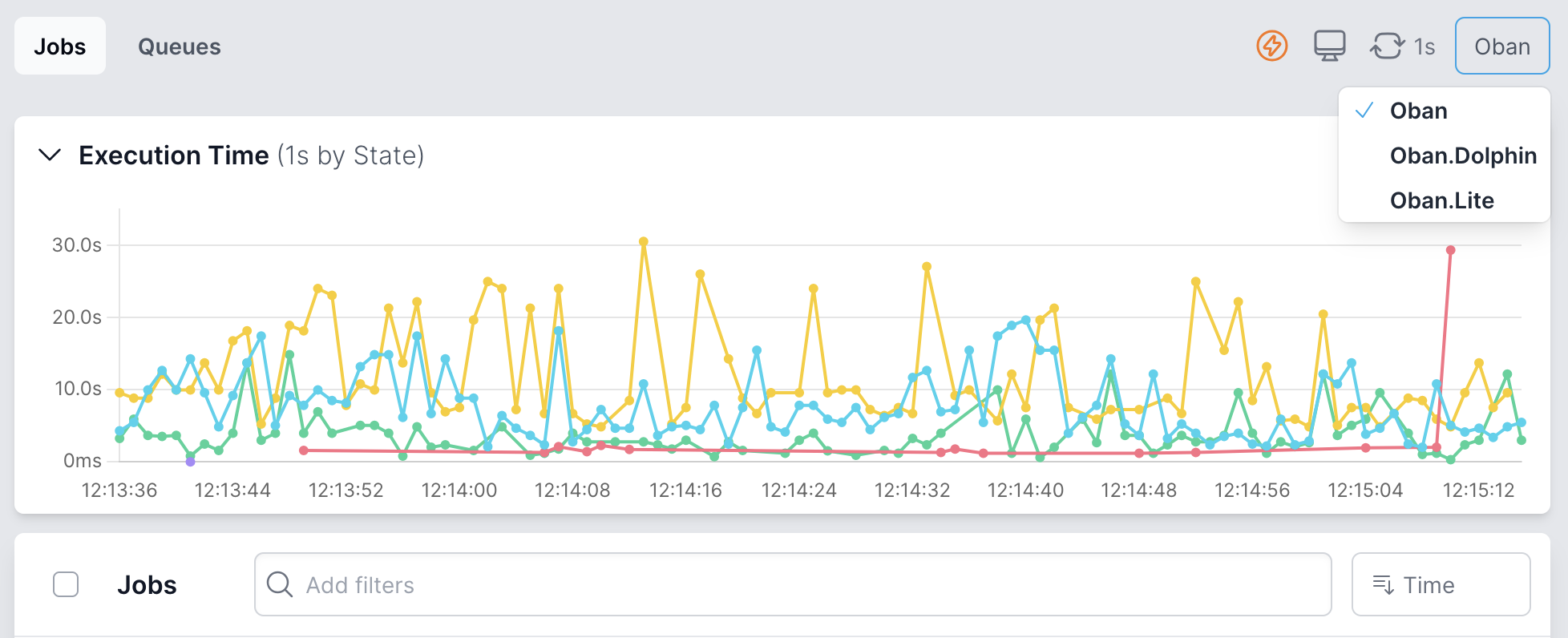
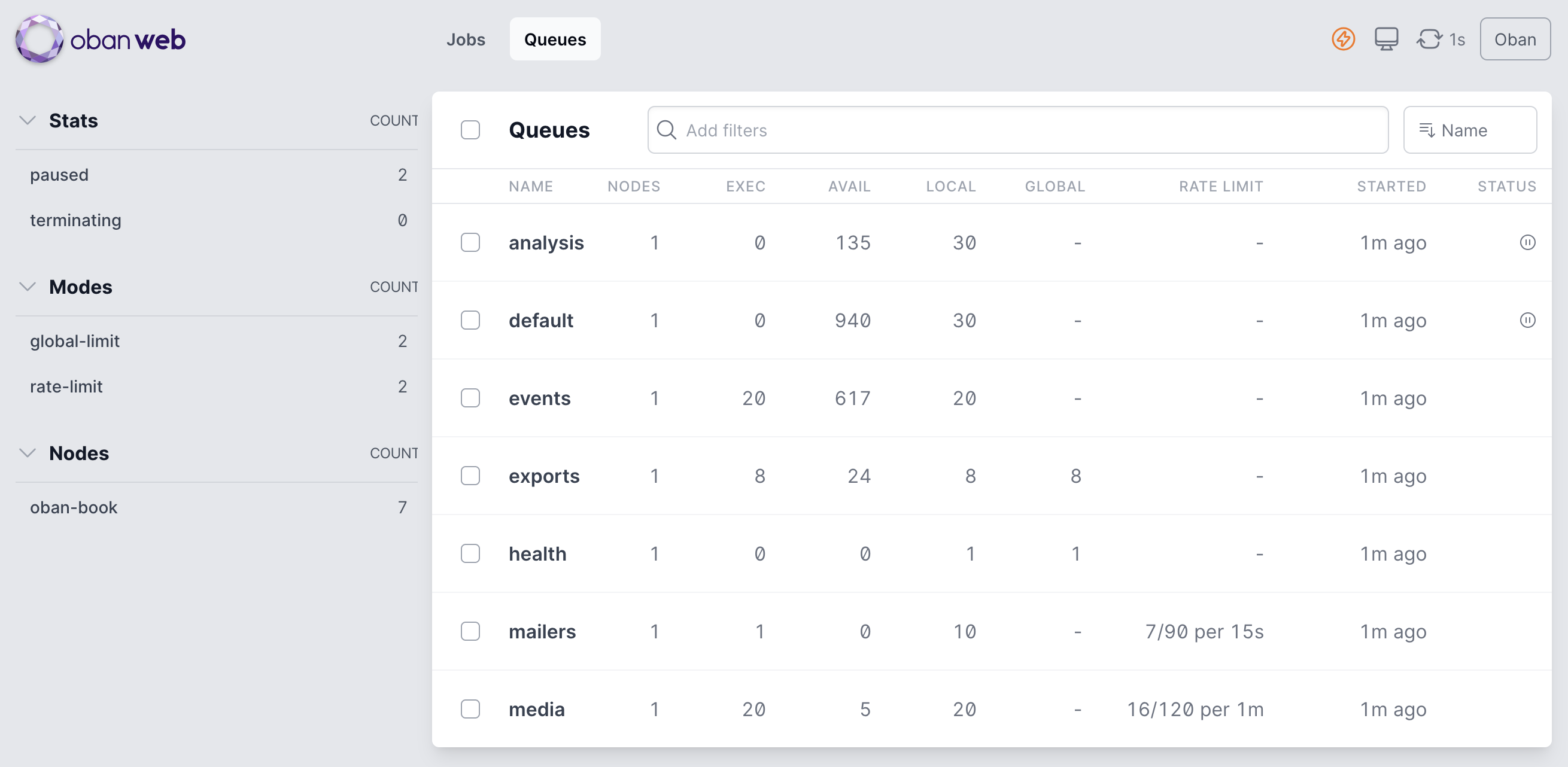
<p>That starts Oban Web running in the background to monitor jobs from all connected Oban instances.
Queue activity and metrics are exchanged via PubSub, so the Web instance can store them for
visualization. Trigger a few (hundred) jobs, navigate to the dashboard on <code>localhost:4000</code>, and
<a href="https://y.yarn.co/154d07d9-30c8-47d2-af63-f4cc69b0bca8_text.gif">look at 'em roll</a>:</p>
<video autoplay loop muted playsinline loading="lazy" preload="none" style="width: 100%; border-radius: 8px;">
  <source src="/images/bridging-with-oban/oban-web-bridged.mp4" type="video/mp4">
</video>
<h2>Bridging Both Ways</h2>
<p>Badge Forge is whimsical, some say "useless", but the pattern is practical! When you need tools
that are stronger in one ecosystem, you can bridge it. <em>This goes both ways</em>. A Python app can
reach for Elixir's strengths just as easily.</p>
<p>Check out the <a href="https://github.com/oban-bg/badge_forge">full demo</a> code for the boilerplate and config we rested over here.</p>]]></content>
    </entry>
  
    <entry>
      <title>Oban Comes to Python</title>
      <link rel="alternate" href="https://oban.pro/articles/introducing-oban-python" />
      <id>https://oban.pro/articles/introducing-oban-python</id>
      <published>2026-01-21T00:00:00Z</published>
      <updated>2026-01-21T00:00:00Z</updated>
      <summary>Introducing fully operational, PostgreSQL-backed, fully async implementations of Oban and Oban Pro for Python.</summary>
      <content type="html"><![CDATA[<p>Today we're releasing Oban for Python. Not an Oban client in Python. Not a <code>pythonx</code> wrapper
embedded in Elixir. No, it's a fully operational, PostgreSQL backed, typed, async,
pythonic-as-we-could-muster implementation of Oban in Python.</p>
<h2>Why on Earth?</h2>
<p>2025 was supposed to be <a href="https://elixir-lang.org/blog/2025/08/18/interop-and-portability/">the year of Elixir interop</a>. We're fashionably late, and what
better way to celebrate than bringing Oban to another ecosystem? Python seemed like a natural
fit. One of us, (not naming any names), wouldn't even consider Oban for Go...</p>
<p>Python is <em>undeniably</em> ubiquitous across most domains of computing. There are packages and
frameworks available in Python that are sorely missing in other ecosystems, including Elixir.</p>
<p>Oban has proven to be a valuable tool for developers looking to build reliable applications in
Elixir. So why not Python? As Elixir evangelists we recognize the value in expanding Oban into a
new community, championing Elixir, and enticing developers to consider its benefits.</p>
<h2>Oban for Python</h2>
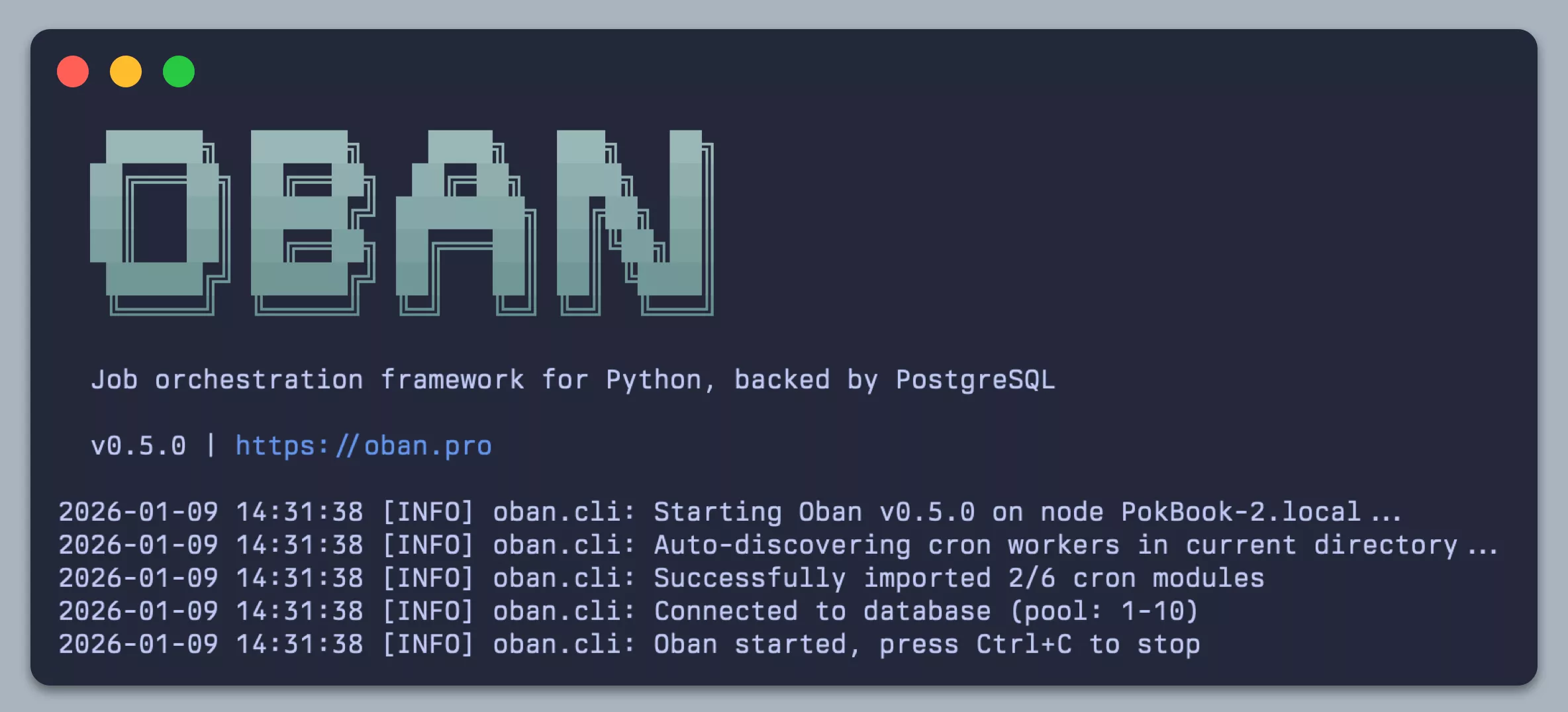
<p><img src="/images/introducing-oban-python/oban-oss-banner.webp" alt="Oban CLI" /></p>
<p>The OSS <code>oban-py</code> package is <a href="https://github.com/oban-bg/oban-py">available on GitHub</a>, <a href="https://pypi.org/project/oban">published to PyPI</a>, and the
<a href="https://oban.pro/docs/py">documentation is hosted here</a>. The initial release is v0.5.0; it's not yet v1.0 but full
featured enough that we shan't call it a v0.1.</p>
<p>If you're coming from any one of the other Python background job systems, some of the standouts of
Oban in Python are below (if you're an Elixirist familiar with Oban, skip beyond the bullet list):</p>
<ul>
<li>
<p><strong>No message broker</strong> — Just PostgreSQL. No Redis, no RabbitMQ, no separate infrastructure to
manage. Jobs live in the same database as your application data.</p>
</li>
<li>
<p><strong>Historic job retention</strong> — Oban keeps jobs after execution rather than immediately deleting
them — completed, failed, cancelled, all of it. You receive a full audit trail and can query job
history.</p>
</li>
<li>
<p><strong>Independent concurrency</strong> — Each queue has its own concurrency limit. Configure <code>emails</code> at 5,
<code>reports</code> at 2 and they won't compete for a shared worker pool. A slow report can't starve your
email queue.</p>
</li>
<li>
<p><strong>Runtime queue control</strong> — Pause, resume, or scale queue concurrency without restarting
workers. Especially useful for maintenance windows or throttling during incidents.</p>
</li>
<li>
<p><strong>The CLI</strong> — This one's not a surprise, but we're super keen on it. The schmancy CLI shown above handles
installation, upgrades, and running worker processes with auto-discovery of workers and cron
schedules.</p>
</li>
</ul>
<p>We encourage you to give it a go! Clock the docs, kick the tires, peruse the source, throw your
agents at it, and interrogate us (via email only).</p>
<h2>Oban Pro for Python</h2>
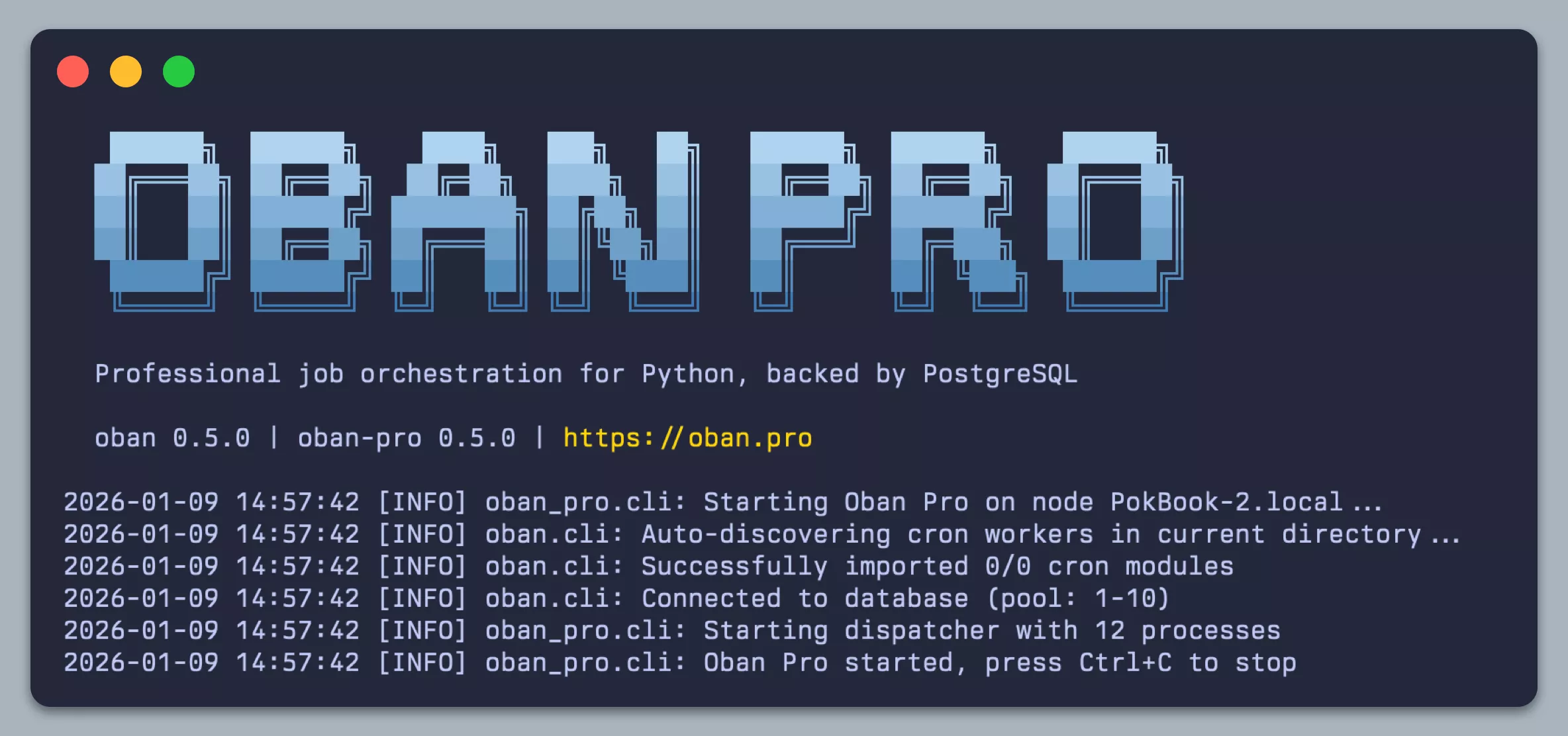
<p><img src="/images/introducing-oban-python/oban-pro-banner.webp" alt="Oban Pro CLI" /></p>
<p>Yes, we're dropping Oban Pro for Python at the same time. The initial Pro release is also v0.5.0,
and <a href="https://oban.pro/docs/py_pro">the docs are here</a>. It ships with some of our favorite Pro features and something
<em>BEAM-ish</em>:</p>
<ul>
<li>
<p><strong>Workflows</strong> — Durable job composition with sequential, fan-out, and fan-in patterns. Nest
sub-workflows, pass results downstream automatically, or graft new jobs onto running workflows at
runtime. State lives in Postgres, not memory.</p>
</li>
<li>
<p><strong>Smart concurrency</strong> — Rate limit jobs globally across your cluster (e.g., 60 API calls per
minute, enforced across all nodes), or partition queues to apply limits per worker, tenant, or
any argument you choose.</p>
</li>
<li>
<p><strong>Multi-process execution</strong> — Call it "<a href="https://en.wikipedia.org/wiki/BEAM_(Erlang_virtual_machine)">BEAM mode</a>" for Python. Bypass the GIL and allow
jobs to fan out across all processors, using available CPU cores automatically.</p>
</li>
</ul>
<p>Oban Pro for Python is its own product with its own license. If you've purchased Pro for Elixir,
the pricing and flow is similar if not intuitive.</p>
<p>We're launching in beta, and the <a href="https://oban.pro/pricing">first 10 subscribers</a> that use the coupon code
<code>OBAN4PY</code> will be <em>grandmothered</em> in at <strong>50% off</strong> for the lifetime of their Oban Pro for
Python subscription.</p>
<h2>Elixir Interop</h2>
<p>From the outset we were determined to make the Elixir and Python implementations fully compatible.
This is about interop and expansion after all! To that end, the underlying table structures are
<em>nearly identical</em> (some column types are subtly different for the sake of optimization).</p>
<p>It's entirely possible to enqueue jobs from an Oban instance running in Elixir <em>and run them</em> in
Python, or vice-versa!</p>
<p>In fact, recorded job output is stored in <a href="https://github.com/discord/erlpack">erlang term format</a>, so you can retrieve
output from jobs run in an entirely different platform. Since the PubSub notification format is
identical, it's even conceivable to pause/resume/scale queues running on heterogeneous nodes.</p>
<p>Building Oban for Python encouraged us to revisit legacy decisions baked into the Elixir
implementation. The exercise will inform Oban 3.0 and Pro 2.0. Interop goes both ways.</p>
<h2>To the Future</h2>
<p>This is a v0.5, <em>not</em> a v1.0. There's much more to design and build—full parity with Oban, missing
Pro features, complete interop with the Oban Web dashboard. Perhaps alternate database support?
We're working on it!</p>
<p>Building Oban for Python was a significant undertaking, and we're genuinely excited to see what
people do with it. If you try it out, do let us know how it goes.</p>]]></content>
    </entry>
  
    <entry>
      <title>Unlocking Agentic Workflows with Oban Pro</title>
      <link rel="alternate" href="https://oban.pro/articles/unlocking-agentic-workflows-with-oban-pro" />
      <id>https://oban.pro/articles/unlocking-agentic-workflows-with-oban-pro</id>
      <published>2025-09-18T00:00:00Z</published>
      <updated>2025-09-18T00:00:00Z</updated>
      <summary>Reliable agentic workflows in Oban Pro: cascading jobs, human-in-the-loop checkpoints, dynamic grafting, and transactional guarantees.</summary>
      <content type="html"><![CDATA[<p>New workflow engines keep popping up everywhere lately (no, we're not linking you to them, keep
your eyes up here). Some focus on chaining LLM calls, others on orchestration across APIs, and a
few sprinkle in human-in-the-loop checkpoints. They're fun to explore, but most fall short on the
fundamentals <em>we</em> think are table stakes for real workloads—self-hosting, transactional
guarantees, reliability, ergonomics.</p>
<p>The good news? With the release of <a href="https://github.com/oban-bg/oban/releases/tag/v2.20.0">Oban v2.20</a> and <a href="/articles/pro-1-6-0-rc-released">Oban Pro v1.6</a>, you get it
all. Anything they can do, we can do <del>better</del> too. LLM call chaining? Dynamic expansion at
runtime? Pausing for human feedback? <a href="https://en.wikipedia.org/wiki/Anything_You_Can_Do_%28I_Can_Do_Better%29">Yes we can</a> and did.</p>
<p>In fact, you can compose functional workflows, graft sub-workflows on the fly, and pause mid-flow
to get a human involved—all without giving up durability and transparency from the comfort of your
own app.</p>
<h2>Cascading Workflows</h2>
<p>Cascading workflows are undoubtedly the most useful tool in the agentic workflow toolbox. But we
wrote <a href="/articles/weaving-stories-with-cascading-workflows">an entire article touting the power of cascading workflows</a> and why you should use
them, so we won't bore you by repeating ourselves.</p>
<p>They're a dead simple way to link functions together with shared context, automatic
retries, and distributed across nodes. They look like this:</p>
<pre class="lumis" style="color: #d8dee9; background-color: #2e3440;"><code class="language-elixir" translate="no" tabindex="0"><div class="line" data-line="1"><span style="color: #81a1c1;">def</span> <span style="color: #88c0d0;">invoke</span><span style="color: #88c0d0;">(</span><span style="color: #88c0d0;">%</span><span style="color: #88c0d0;">&lbrace;</span><span style="color: #ebcb8b;">user_id: </span><span style="color: #d8dee9; font-weight: bold;">user_id</span><span style="color: #88c0d0;">,</span> <span style="color: #ebcb8b;">query: </span><span style="color: #d8dee9; font-weight: bold;">query</span><span style="color: #88c0d0;">&rbrace;</span> <span style="color: #81a1c1;">=</span> <span style="color: #d8dee9; font-weight: bold;">source</span><span style="color: #88c0d0;">)</span> <span style="color: #81a1c1;">do</span>
</div><div class="line" data-line="2">  <span style="color: #81a1c1;">Workflow</span><span style="color: #81a1c1;">.</span><span style="color: #88c0d0;">new</span><span style="color: #88c0d0;">(</span><span style="color: #88c0d0;">)</span>
</div><div class="line" data-line="3">  <span style="color: #81a1c1;">|></span> <span style="color: #81a1c1;">Workflow</span><span style="color: #81a1c1;">.</span><span style="color: #88c0d0;">put_context</span><span style="color: #88c0d0;">(</span><span style="color: #88c0d0;">%</span><span style="color: #88c0d0;">&lbrace;</span><span style="color: #ebcb8b;">source: </span><span style="color: #d8dee9; font-weight: bold;">source</span><span style="color: #88c0d0;">,</span> <span style="color: #ebcb8b;">user_id: </span><span style="color: #d8dee9; font-weight: bold;">user_id</span><span style="color: #88c0d0;">,</span> <span style="color: #ebcb8b;">model: </span><span style="color: #a3be8c;">"gpt-4o-mini"</span><span style="color: #88c0d0;">&rbrace;</span><span style="color: #88c0d0;">)</span>
</div><div class="line" data-line="4">  <span style="color: #81a1c1;">|></span> <span style="color: #81a1c1;">Workflow</span><span style="color: #81a1c1;">.</span><span style="color: #88c0d0;">add_cascade</span><span style="color: #88c0d0;">(</span><span style="color: #ebcb8b;">:plan</span><span style="color: #88c0d0;">,</span> <span style="color: #81a1c1;">&amp;</span><span style="color: #88c0d0;">plan</span><span style="color: #81a1c1;">/</span><span style="color: #81a1c1;">1</span><span style="color: #88c0d0;">)</span>
</div><div class="line" data-line="5">  <span style="color: #81a1c1;">|></span> <span style="color: #81a1c1;">Workflow</span><span style="color: #81a1c1;">.</span><span style="color: #88c0d0;">add_cascade</span><span style="color: #88c0d0;">(</span><span style="color: #ebcb8b;">:draft</span><span style="color: #88c0d0;">,</span> <span style="color: #81a1c1;">&amp;</span><span style="color: #88c0d0;">draft</span><span style="color: #81a1c1;">/</span><span style="color: #81a1c1;">1</span><span style="color: #88c0d0;">,</span> <span style="color: #ebcb8b;">deps: </span><span style="color: #ebcb8b;">:plan</span><span style="color: #88c0d0;">)</span>
</div><div class="line" data-line="6">  <span style="color: #81a1c1;">|></span> <span style="color: #81a1c1;">Workflow</span><span style="color: #81a1c1;">.</span><span style="color: #88c0d0;">add_cascade</span><span style="color: #88c0d0;">(</span><span style="color: #ebcb8b;">:revise</span><span style="color: #88c0d0;">,</span> <span style="color: #81a1c1;">&amp;</span><span style="color: #88c0d0;">revise</span><span style="color: #81a1c1;">/</span><span style="color: #81a1c1;">1</span><span style="color: #88c0d0;">,</span> <span style="color: #ebcb8b;">deps: </span><span style="color: #ebcb8b;">:draft</span><span style="color: #88c0d0;">)</span>
</div><div class="line" data-line="7">  <span style="color: #81a1c1;">|></span> <span style="color: #81a1c1;">Workflow</span><span style="color: #81a1c1;">.</span><span style="color: #88c0d0;">add_cascade</span><span style="color: #88c0d0;">(</span><span style="color: #ebcb8b;">:persist</span><span style="color: #88c0d0;">,</span> <span style="color: #81a1c1;">&amp;</span><span style="color: #88c0d0;">persist</span><span style="color: #81a1c1;">/</span><span style="color: #81a1c1;">1</span><span style="color: #88c0d0;">,</span> <span style="color: #ebcb8b;">deps: </span><span style="color: #ebcb8b;">:revise</span><span style="color: #88c0d0;">)</span>
</div><div class="line" data-line="8">  <span style="color: #81a1c1;">|></span> <span style="color: #81a1c1;">Oban</span><span style="color: #81a1c1;">.</span><span style="color: #88c0d0;">insert_all</span><span style="color: #88c0d0;">(</span><span style="color: #88c0d0;">)</span>
</div><div class="line" data-line="9"><span style="color: #81a1c1;">end</span>
</div></code></pre>
<p>Each of the steps is a plain elixir function that receives a cumulative context map. Bosh. That's it. On
to the other new stuff!</p>
<h2>Hold for Human</h2>
<p>Not every workflow can, or should, be fully automated. Sometimes you <em>need</em> to pause to get a human
in the loop. There are high-stakes, high-risk, or irreversible actions where mistakes become
costly in money or trust. Or maybe you're one of those control freaks that like to <a href="https://hai.stanford.edu/news/ai-trial-legal-models-hallucinate-1-out-6-or-more-benchmarking-queries">verify
citations before publishing a legal document</a>.</p>
<p>Thanks to the recent addition of <a href="https://hexdocs.pm/oban/Oban.html#update_job/3"><code>Oban.update_job/3</code></a>, it's trivial to pause an in-progress
workflow and await human intervention.</p>
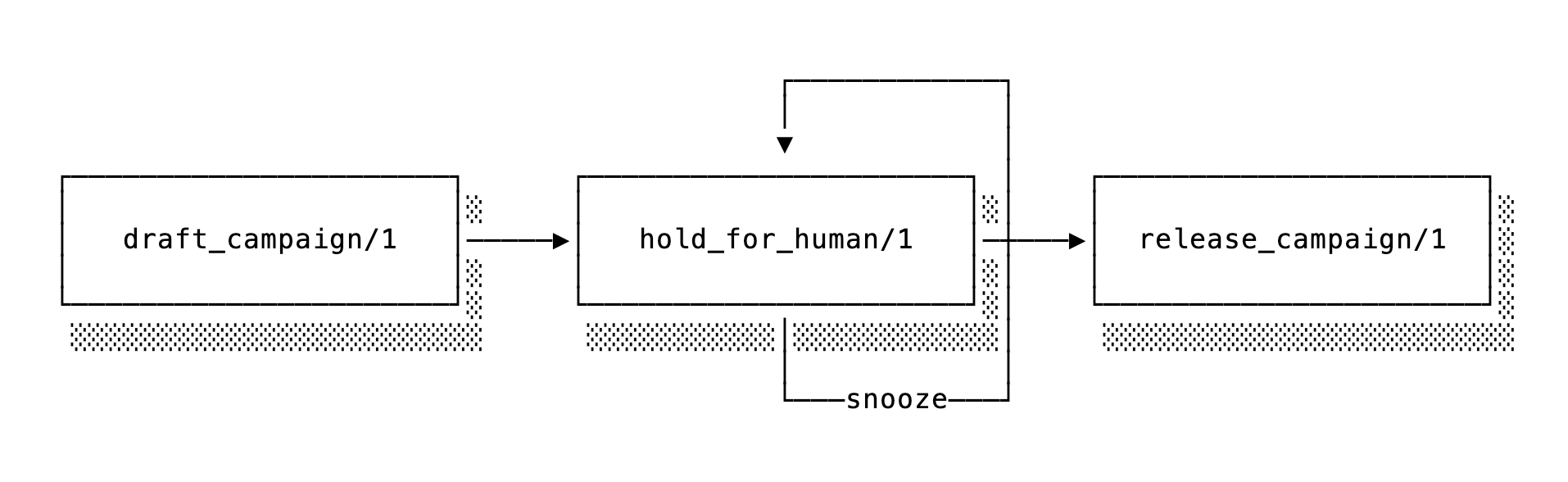
<p>Imagine a marketing campaign pipeline that will draft an email, pass it off to a human for review,
and deliver it upon approval. For the initial hold, we can make use of tags on the current job and
start by notifying somebody that the job needs attention then enter a snooze loop to wait:</p>
<pre class="lumis" style="color: #d8dee9; background-color: #2e3440;"><code class="language-elixir" translate="no" tabindex="0"><div class="line" data-line="1"><span style="color: #616e88;"># This injects the `current_job/0` helper used to retrieve the job later</span>
</div><div class="line" data-line="2"><span style="color: #81a1c1;">use</span> <span style="color: #81a1c1;">Oban.Pro.Decorator</span>
</div><div class="line" data-line="3">
</div><div class="line" data-line="4"><span style="color: #81a1c1;">def</span> <span style="color: #88c0d0;">hold_for_human</span><span style="color: #88c0d0;">(</span><span style="color: #616e88;">_context</span><span style="color: #88c0d0;">)</span> <span style="color: #81a1c1;">do</span>
</div><div class="line" data-line="5">  <span style="color: #d8dee9; font-weight: bold;">job</span> <span style="color: #81a1c1;">=</span> <span style="color: #88c0d0;">current_job</span><span style="color: #88c0d0;">(</span><span style="color: #88c0d0;">)</span>
</div><div class="line" data-line="6">
</div><div class="line" data-line="7">  <span style="color: #81a1c1;">case</span> <span style="color: #d8dee9; font-weight: bold;">job</span><span style="color: #81a1c1;">.</span><span style="color: #d8dee9; font-weight: bold;">tags</span> <span style="color: #81a1c1;">do</span>
</div><div class="line" data-line="8">    <span style="color: #88c0d0;">[</span><span style="color: #a3be8c;">"approved"</span><span style="color: #88c0d0;">]</span> <span style="color: #81a1c1;">-></span>
</div><div class="line" data-line="9">      <span style="color: #ebcb8b;">:ok</span>
</div><div class="line" data-line="10">
</div><div class="line" data-line="11">    <span style="color: #88c0d0;">[</span><span style="color: #a3be8c;">"denied"</span><span style="color: #88c0d0;">]</span> <span style="color: #81a1c1;">-></span>
</div><div class="line" data-line="12">      <span style="color: #88c0d0;">&lbrace;</span><span style="color: #ebcb8b;">:cancel</span><span style="color: #88c0d0;">,</span> <span style="color: #a3be8c;">"the human said so"</span><span style="color: #88c0d0;">&rbrace;</span>
</div><div class="line" data-line="13">
</div><div class="line" data-line="14">    <span style="color: #616e88;">_</span> <span style="color: #81a1c1;">-></span>
</div><div class="line" data-line="15">      <span style="color: #81a1c1;">MyApp.Campaign</span><span style="color: #81a1c1;">.</span><span style="color: #88c0d0;">notify_a_human</span><span style="color: #88c0d0;">(</span><span style="color: #d8dee9; font-weight: bold;">job</span><span style="color: #88c0d0;">)</span>
</div><div class="line" data-line="16">
</div><div class="line" data-line="17">      <span style="color: #88c0d0;">&lbrace;</span><span style="color: #ebcb8b;">:snooze</span><span style="color: #88c0d0;">,</span> <span style="color: #88c0d0;">&lbrace;</span><span style="color: #b48ead;">1</span><span style="color: #88c0d0;">,</span> <span style="color: #ebcb8b;">:hour</span><span style="color: #88c0d0;">&rbrace;</span><span style="color: #88c0d0;">&rbrace;</span>
</div><div class="line" data-line="18">  <span style="color: #81a1c1;">end</span>
</div><div class="line" data-line="19"><span style="color: #81a1c1;">end</span>
</div></code></pre>
<p>Later, after the human has reviewed the details, they will approve or deny the rest of the
workflow by tagging the job accordingly, then tell it to stop snoozing:</p>
<pre class="lumis" style="color: #d8dee9; background-color: #2e3440;"><code class="language-elixir" translate="no" tabindex="0"><div class="line" data-line="1"><span style="color: #81a1c1;">def</span> <span style="color: #88c0d0;">resume_by_human</span><span style="color: #88c0d0;">(</span><span style="color: #d8dee9; font-weight: bold;">job_id</span><span style="color: #88c0d0;">,</span> <span style="color: #d8dee9; font-weight: bold;">status</span><span style="color: #88c0d0;">)</span> <span style="color: #81a1c1;">when</span> <span style="color: #d8dee9; font-weight: bold;">status</span> <span style="color: #88c0d0;">in</span> <span style="color: #ebcb8b;">~</span>w<span style="color: #88c0d0;">(</span>approved denied<span style="color: #88c0d0;">)</span> <span style="color: #81a1c1;">do</span>
</div><div class="line" data-line="2">  <span style="color: #81a1c1;">with</span> <span style="color: #88c0d0;">&lbrace;</span><span style="color: #ebcb8b;">:ok</span><span style="color: #88c0d0;">,</span> <span style="color: #d8dee9; font-weight: bold;">job</span><span style="color: #88c0d0;">&rbrace;</span> <span style="color: #81a1c1;"><-</span> <span style="color: #81a1c1;">Oban</span><span style="color: #81a1c1;">.</span><span style="color: #88c0d0;">update_job</span><span style="color: #88c0d0;">(</span><span style="color: #d8dee9; font-weight: bold;">job_id</span><span style="color: #88c0d0;">,</span> <span style="color: #81a1c1;">&amp;</span><span style="color: #88c0d0;">%</span><span style="color: #88c0d0;">&lbrace;</span><span style="color: #ebcb8b;">tags: </span><span style="color: #88c0d0;">[</span><span style="color: #d8dee9; font-weight: bold;">status</span> <span style="color: #81a1c1;">|</span> <span style="color: #81a1c1;">&amp;</span><span style="color: #81a1c1;">1</span><span style="color: #81a1c1;">.</span><span style="color: #d8dee9; font-weight: bold;">tags</span><span style="color: #88c0d0;">]</span><span style="color: #88c0d0;">&rbrace;</span><span style="color: #88c0d0;">)</span> <span style="color: #81a1c1;">do</span>
</div><div class="line" data-line="3">    <span style="color: #81a1c1;">Oban</span><span style="color: #81a1c1;">.</span><span style="color: #88c0d0;">retry_job</span><span style="color: #88c0d0;">(</span><span style="color: #d8dee9; font-weight: bold;">job</span><span style="color: #88c0d0;">)</span>
</div><div class="line" data-line="4">  <span style="color: #81a1c1;">end</span>
</div><div class="line" data-line="5"><span style="color: #81a1c1;">end</span>
</div></code></pre>
<p>At that point, the job will complete and the rest of the workflow can continue on its merry way.</p>
<div class="bg-white p-3 rounded-lg">
<p><img src="/images/unlocking-agentic-workflows/human-in-loop.png" alt="Human in the Loop" /></p>
</div>
<p>This is a powerful pattern that's useful for agent and non-agentic workflows alike.</p>
<h2>Workflow Grafting</h2>
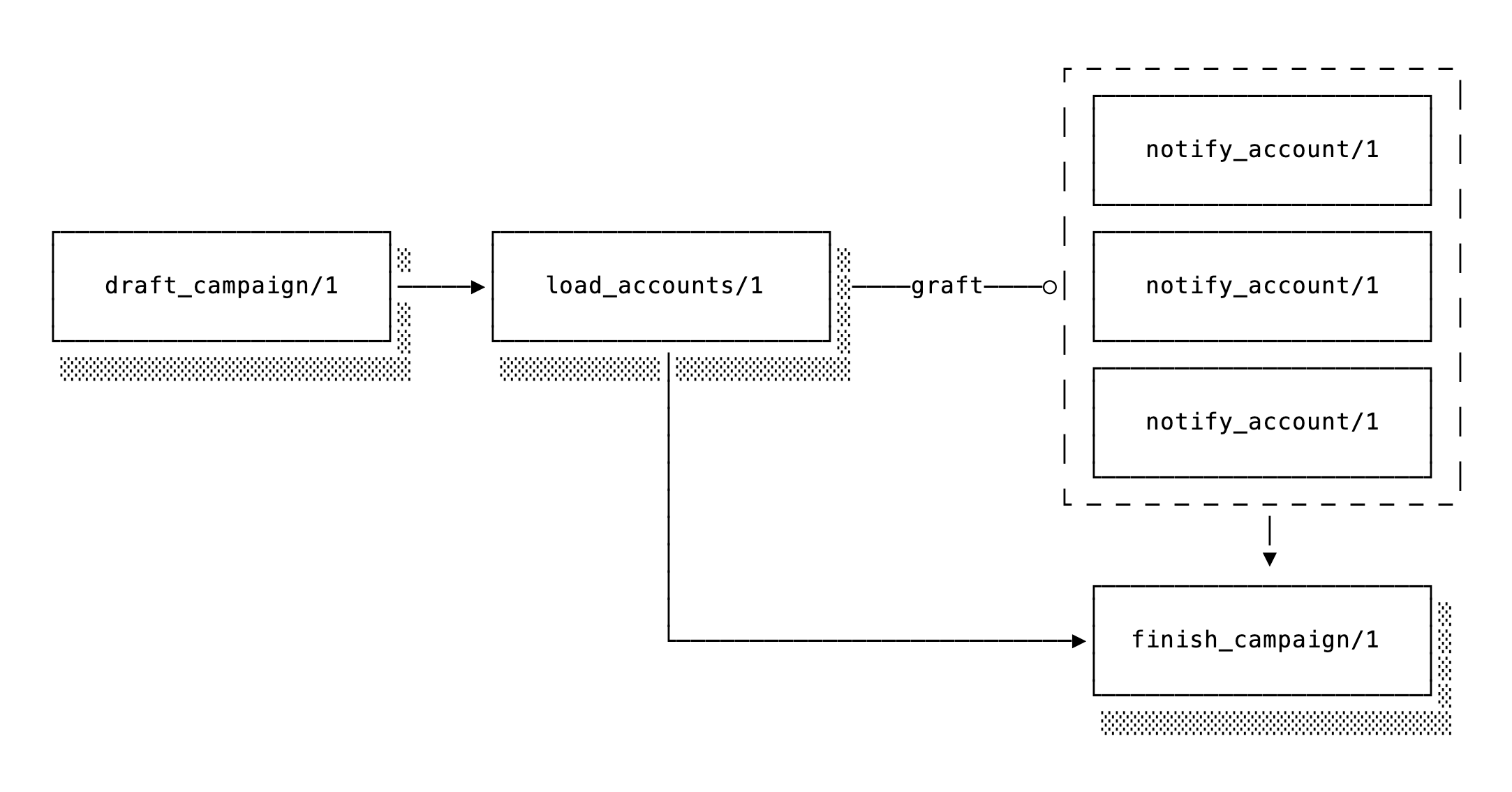
<p>Grafting lets you <a href="/docs/pro/1.6.4/Oban.Pro.Workflow.html#module-grafting-sub-workflows">define a placeholder in a workflow, then expand it into a sub-workflow</a>
after the workflow has already started. Those placeholders are called grafts, and the expansion is
the grafting bit.</p>
<p>The beauty of grafting is that downstream jobs that depend on the graft will automatically depend
on the expanded sub-workflow as well. That means <em>downstream jobs won't run</em> until both the graft
and the grafted sub-workflow have completed.</p>
<p>Let's expand on the "human in the loop" example above to demonstrate. Imagine that we don't know
the recipients of the marketing email until the workflow is already running:</p>
<pre class="lumis" style="color: #d8dee9; background-color: #2e3440;"><code class="language-elixir" translate="no" tabindex="0"><div class="line" data-line="1"><span style="color: #81a1c1;">def</span> <span style="color: #88c0d0;">start</span><span style="color: #88c0d0;">(</span><span style="color: #d8dee9; font-weight: bold;">campaign_id</span><span style="color: #88c0d0;">)</span> <span style="color: #81a1c1;">do</span>
</div><div class="line" data-line="2">  <span style="color: #81a1c1;">Workflow</span><span style="color: #81a1c1;">.</span><span style="color: #88c0d0;">new</span><span style="color: #88c0d0;">(</span><span style="color: #88c0d0;">)</span>
</div><div class="line" data-line="3">  <span style="color: #81a1c1;">|></span> <span style="color: #81a1c1;">Workflow</span><span style="color: #81a1c1;">.</span><span style="color: #88c0d0;">put_context</span><span style="color: #88c0d0;">(</span><span style="color: #88c0d0;">%</span><span style="color: #88c0d0;">&lbrace;</span><span style="color: #ebcb8b;">campaign_id: </span><span style="color: #d8dee9; font-weight: bold;">campaign_id</span><span style="color: #88c0d0;">&rbrace;</span><span style="color: #88c0d0;">)</span>
</div><div class="line" data-line="4">  <span style="color: #81a1c1;">|></span> <span style="color: #81a1c1;">Workflow</span><span style="color: #81a1c1;">.</span><span style="color: #88c0d0;">add_cascade</span><span style="color: #88c0d0;">(</span><span style="color: #ebcb8b;">:draft</span><span style="color: #88c0d0;">,</span> <span style="color: #81a1c1;">&amp;</span><span style="color: #88c0d0;">draft_campaign</span><span style="color: #81a1c1;">/</span><span style="color: #81a1c1;">1</span><span style="color: #88c0d0;">)</span>
</div><div class="line" data-line="5">  <span style="color: #81a1c1;">|></span> <span style="color: #81a1c1;">Workflow</span><span style="color: #81a1c1;">.</span><span style="color: #88c0d0;">add_graft</span><span style="color: #88c0d0;">(</span><span style="color: #ebcb8b;">:load</span><span style="color: #88c0d0;">,</span> <span style="color: #81a1c1;">&amp;</span><span style="color: #88c0d0;">load_accounts</span><span style="color: #81a1c1;">/</span><span style="color: #81a1c1;">1</span><span style="color: #88c0d0;">,</span> <span style="color: #ebcb8b;">deps: </span><span style="color: #ebcb8b;">:draft</span><span style="color: #88c0d0;">)</span>
</div><div class="line" data-line="6">  <span style="color: #81a1c1;">|></span> <span style="color: #81a1c1;">Workflow</span><span style="color: #81a1c1;">.</span><span style="color: #88c0d0;">add_cascade</span><span style="color: #88c0d0;">(</span><span style="color: #ebcb8b;">:finish</span><span style="color: #88c0d0;">,</span> <span style="color: #81a1c1;">&amp;</span><span style="color: #88c0d0;">finish_campaign</span><span style="color: #81a1c1;">/</span><span style="color: #81a1c1;">1</span><span style="color: #88c0d0;">,</span> <span style="color: #ebcb8b;">deps: </span><span style="color: #88c0d0;">[</span><span style="color: #ebcb8b;">:draft</span><span style="color: #88c0d0;">,</span> <span style="color: #ebcb8b;">:load</span><span style="color: #88c0d0;">]</span><span style="color: #88c0d0;">)</span>
</div><div class="line" data-line="7">  <span style="color: #81a1c1;">|></span> <span style="color: #81a1c1;">Workflow</span><span style="color: #81a1c1;">.</span><span style="color: #88c0d0;">insert</span><span style="color: #88c0d0;">(</span><span style="color: #88c0d0;">)</span>
</div><div class="line" data-line="8"><span style="color: #81a1c1;">end</span>
</div></code></pre>
<p>That builds out a cascade, and sticks a graft into the middle. When that runs, it calls
<code>load_accounts/1</code> to create a sub-workflow of all the notification jobs for each account
dynamically:</p>
<pre class="lumis" style="color: #d8dee9; background-color: #2e3440;"><code class="language-elixir" translate="no" tabindex="0"><div class="line" data-line="1"><span style="color: #81a1c1;">def</span> <span style="color: #88c0d0;">load_accounts</span><span style="color: #88c0d0;">(</span><span style="color: #88c0d0;">%</span><span style="color: #88c0d0;">&lbrace;</span><span style="color: #ebcb8b;">campaign_id: </span><span style="color: #d8dee9; font-weight: bold;">campaign_id</span><span style="color: #88c0d0;">,</span> <span style="color: #ebcb8b;">draft: </span><span style="color: #d8dee9; font-weight: bold;">draft</span><span style="color: #88c0d0;">&rbrace;</span><span style="color: #88c0d0;">)</span> <span style="color: #81a1c1;">do</span>
</div><div class="line" data-line="2">  <span style="color: #d8dee9; font-weight: bold;">account_ids</span> <span style="color: #81a1c1;">=</span> <span style="color: #81a1c1;">MyApp.Campaign</span><span style="color: #81a1c1;">.</span><span style="color: #88c0d0;">recipients_for_campaign</span><span style="color: #88c0d0;">(</span><span style="color: #d8dee9; font-weight: bold;">campaign_id</span><span style="color: #88c0d0;">,</span> <span style="color: #d8dee9; font-weight: bold;">draft</span><span style="color: #88c0d0;">)</span>
</div><div class="line" data-line="3">
</div><div class="line" data-line="4">  <span style="color: #88c0d0;">&lbrace;</span><span style="color: #d8dee9; font-weight: bold;">account_ids</span><span style="color: #88c0d0;">,</span> <span style="color: #81a1c1;">&amp;</span><span style="color: #88c0d0;">notify_account</span><span style="color: #81a1c1;">/</span><span style="color: #81a1c1;">2</span><span style="color: #88c0d0;">&rbrace;</span>
</div><div class="line" data-line="5">  <span style="color: #81a1c1;">|></span> <span style="color: #81a1c1;">Workflow</span><span style="color: #81a1c1;">.</span><span style="color: #88c0d0;">apply_graft</span><span style="color: #88c0d0;">(</span><span style="color: #88c0d0;">)</span>
</div><div class="line" data-line="6">  <span style="color: #81a1c1;">|></span> <span style="color: #81a1c1;">Oban</span><span style="color: #81a1c1;">.</span><span style="color: #88c0d0;">insert_all</span><span style="color: #88c0d0;">(</span><span style="color: #88c0d0;">)</span>
</div><div class="line" data-line="7"><span style="color: #81a1c1;">end</span>
</div></code></pre>
<p>The final job will still wait for both the <code>load_accounts/1</code> job and the grafted
<code>notify_account/2</code> sub-workflow to complete.</p>
<p><img src="/images/unlocking-agentic-workflows/workflow-grafting.png" alt="Workflow Grafting" /></p>
<p>So grafting allows <em>dynamic</em> expansion of workflows-you don't have to know up front which (or how
many) jobs need to run, only that at some point during the workflow you'll figure it out.</p>
<p>For more involved pipelines, this type of dynamically constructed workflow is virtually impossible
(or highly invasive) to manage without grafting!</p>
<h2>The More You Know</h2>
<p>With cascades, complex workflows become a reliable chain of functions. With human-in-the-loop
holds, you can instill human expertise and comingle it with automation. And with grafting, a new type of dynamic
workflow is possible sans <a href="https://www.youtube.com/watch?v=yOEe1uzurKo">duct-tape</a> and black magic.</p>
<p>The patterns we've highlighted are necessary for agentic workflows, but they're equally powerful
for regular, non-agentic workloads if "determinism" is your thang.</p>
<p>We're excited to see how you build your workflows. How have <em>you</em> worked humans into them?
Has grafting changed what you build? <a href="mailto:support@oban.pro">Drop us a line</a> and share—your patterns might
inspire the next wave of features.</p>]]></content>
    </entry>
  
    <entry>
      <title>Weaving Stories with Cascading Workflows</title>
      <link rel="alternate" href="https://oban.pro/articles/weaving-stories-with-cascading-workflows" />
      <id>https://oban.pro/articles/weaving-stories-with-cascading-workflows</id>
      <published>2025-04-21T00:00:00Z</published>
      <updated>2025-04-21T00:00:00Z</updated>
      <summary>Using cascading workflows with context sharing pipelines to generate a collection of illustrated children's stories.</summary>
      <content type="html"><![CDATA[<p>The recently announced <a href="/articles/pro-1-6-0-rc-released">Pro v1.6 RC</a> introduced a treasure trove of new workflow features.
That calls for a pageant of the new silky smooth approach is to building workflows.</p>
<p>Said pageant doesn't require any domain knowledge or business logic; just some whimsy and a
<em>really</em> loose understanding of graphs. On to the Fire Saga!</p>
<h2>Say What About a Fire Saga?</h2>
<p>It's called "Fire Saga" (🔥📖), because we like <a href="https://en.wikipedia.org/wiki/Eurovision_Song_Contest:_The_Story_of_Fire_Saga">Eurovision</a> and thought it sounded catchy.
A saga is an epic story, they're both nouns...<a href="https://www.youtube.com/watch?v=3toGEwAco8U">it's awesome</a>. Don't get too wrapped up in
the name.</p>
<p>Anyhow, <code>FireSaga</code> is a workflow that generates a collection of children's stories based on a topic
using generative AI. The authors are selected at random, then a short children's story and an
illustration are generated for each author before it's all packaged together with cover art in a
tidy markdown file.</p>
<p>It's all coordinated using an <a href="https://oban.pro/docs/pro/1.6.0-rc.3/Oban.Pro.Workflow.html">Oban Workflow</a>.</p>
<h2>Why Oban Workflows?</h2>
<p>Performing a set of coordinated tasks with dependencies between them is precisely what workflows
are meant to do. Think of workflows as a pipe operator for directed, distributed, persistent
map-reduce.</p>
<p>Let's break that buzzword soup down:</p>
<ul>
<li>
<p><strong>Directed</strong>-jobs progress in a fixed order, whether running linearly, fanning out, fanning in,
or running in parallel.</p>
</li>
<li>
<p><strong>Distributed</strong>-jobs run seamlessly on all available nodes transparently, without extra
coordination from your application.</p>
</li>
<li>
<p><strong>Persistent</strong>-processes crash, applications restart, and a workflow must be able to pick up
where it left off.</p>
</li>
</ul>
<p>A few more essential traits for good measure:</p>
<ul>
<li>
<p><strong>Retryable</strong>-LLMs are notoriously unreliable, whether from timeouts, rate limiting, or
unexpected nonsense responses. Retries are crucial to having reliable output.</p>
</li>
<li>
<p><strong>Introspection</strong>-you need to track progress to see how a workflow is progressing, check timing
information, and see errors wreaking havoc on the pipeline.</p>
</li>
</ul>
<p>See? Some say, workflows are a perfect fit for a multi-stage, interdependent, story generating pipeline
making unreliable API calls. Well, we do.</p>
<h2>Building the Workflow</h2>
<p>It would be possible to build <code>FireSaga</code> using standard jobs in older style workflows. In that
case, each job would be in a separate module, and you would use <code>Workflow</code> functions to <a href="https://oban.pro/docs/pro/1.6.0-rc.3/Oban.Pro.Workflow.html#all_recorded/3">manually
fetch</a> recorded output from upstream dependencies and weave it all together.</p>
<p>That'd be fine...but Pro v1.6 introduced <a href="https://oban.pro/docs/pro/1.6.0-rc.3/Oban.Pro.Workflow.html#put_context/2">context sharing</a>, <a href="https://oban.pro/docs/pro/1.6.0-rc.3/Oban.Pro.Workflow.html#module-cascading-functions">cascade mode</a>, and <a href="https://oban.pro/docs/pro/1.6.0-rc.3/Oban.Pro.Workflow.html#module-sub-workflows">sub
workflows</a>, which <em>automates all of that</em>.</p>
<p>To make a long saga short, "cascade mode" streamlines defining a workflow by passing accumulated context to
each step. A context map, as well as output from each dependency, are passed to every function.</p>
<p>Kick it off with a workflow building function named <code>build/1</code>:</p>
<pre class="lumis" style="color: #d8dee9; background-color: #2e3440;"><code class="language-elixir" translate="no" tabindex="0"><div class="line" data-line="1"><span style="color: #81a1c1;">def</span> <span style="color: #88c0d0;">build</span><span style="color: #88c0d0;">(</span><span style="color: #d8dee9; font-weight: bold;">opts</span><span style="color: #88c0d0;">)</span> <span style="color: #81a1c1;">when</span> <span style="color: #88c0d0;">is_list</span><span style="color: #88c0d0;">(</span><span style="color: #d8dee9; font-weight: bold;">opts</span><span style="color: #88c0d0;">)</span> <span style="color: #81a1c1;">do</span>
</div><div class="line" data-line="2">  <span style="color: #d8dee9; font-weight: bold;">topic</span> <span style="color: #81a1c1;">=</span> <span style="color: #81a1c1;">Keyword</span><span style="color: #81a1c1;">.</span><span style="color: #88c0d0;">fetch!</span><span style="color: #88c0d0;">(</span><span style="color: #d8dee9; font-weight: bold;">opts</span><span style="color: #88c0d0;">,</span> <span style="color: #ebcb8b;">:topic</span><span style="color: #88c0d0;">)</span>
</div><div class="line" data-line="3">  <span style="color: #d8dee9; font-weight: bold;">count</span> <span style="color: #81a1c1;">=</span> <span style="color: #81a1c1;">Keyword</span><span style="color: #81a1c1;">.</span><span style="color: #88c0d0;">fetch!</span><span style="color: #88c0d0;">(</span><span style="color: #d8dee9; font-weight: bold;">opts</span><span style="color: #88c0d0;">,</span> <span style="color: #ebcb8b;">:chapters</span><span style="color: #88c0d0;">)</span>
</div><div class="line" data-line="4">  <span style="color: #d8dee9; font-weight: bold;">range</span> <span style="color: #81a1c1;">=</span> <span style="color: #b48ead;">0</span><span style="color: #81a1c1;">..</span><span style="color: #88c0d0;">(</span><span style="color: #d8dee9; font-weight: bold;">count</span> <span style="color: #81a1c1;">-</span> <span style="color: #b48ead;">1</span><span style="color: #88c0d0;">)</span>
</div><div class="line" data-line="5">
</div><div class="line" data-line="6">  <span style="color: #81a1c1;">Workflow</span><span style="color: #81a1c1;">.</span><span style="color: #88c0d0;">new</span><span style="color: #88c0d0;">(</span><span style="color: #88c0d0;">)</span>
</div><div class="line" data-line="7">  <span style="color: #81a1c1;">|></span> <span style="color: #81a1c1;">Workflow</span><span style="color: #81a1c1;">.</span><span style="color: #88c0d0;">put_context</span><span style="color: #88c0d0;">(</span><span style="color: #88c0d0;">%</span><span style="color: #88c0d0;">&lbrace;</span><span style="color: #ebcb8b;">count: </span><span style="color: #d8dee9; font-weight: bold;">count</span><span style="color: #88c0d0;">,</span> <span style="color: #ebcb8b;">topic: </span><span style="color: #d8dee9; font-weight: bold;">topic</span><span style="color: #88c0d0;">&rbrace;</span><span style="color: #88c0d0;">)</span>
</div><div class="line" data-line="8">  <span style="color: #81a1c1;">|></span> <span style="color: #81a1c1;">Workflow</span><span style="color: #81a1c1;">.</span><span style="color: #88c0d0;">add_cascade</span><span style="color: #88c0d0;">(</span><span style="color: #ebcb8b;">:authors</span><span style="color: #88c0d0;">,</span> <span style="color: #81a1c1;">&amp;</span><span style="color: #88c0d0;">gen_authors</span><span style="color: #81a1c1;">/</span><span style="color: #81a1c1;">1</span><span style="color: #88c0d0;">)</span>
</div><div class="line" data-line="9">  <span style="color: #81a1c1;">|></span> <span style="color: #81a1c1;">Workflow</span><span style="color: #81a1c1;">.</span><span style="color: #88c0d0;">add_cascade</span><span style="color: #88c0d0;">(</span><span style="color: #ebcb8b;">:stories</span><span style="color: #88c0d0;">,</span> <span style="color: #88c0d0;">&lbrace;</span><span style="color: #d8dee9; font-weight: bold;">range</span><span style="color: #88c0d0;">,</span> <span style="color: #81a1c1;">&amp;</span><span style="color: #88c0d0;">gen_story</span><span style="color: #81a1c1;">/</span><span style="color: #81a1c1;">2</span><span style="color: #88c0d0;">&rbrace;</span><span style="color: #88c0d0;">,</span> <span style="color: #ebcb8b;">deps: </span><span style="color: #ebcb8b;">:authors</span><span style="color: #88c0d0;">)</span>
</div><div class="line" data-line="10">  <span style="color: #81a1c1;">|></span> <span style="color: #81a1c1;">Workflow</span><span style="color: #81a1c1;">.</span><span style="color: #88c0d0;">add_cascade</span><span style="color: #88c0d0;">(</span><span style="color: #ebcb8b;">:images</span><span style="color: #88c0d0;">,</span> <span style="color: #88c0d0;">&lbrace;</span><span style="color: #d8dee9; font-weight: bold;">range</span><span style="color: #88c0d0;">,</span> <span style="color: #81a1c1;">&amp;</span><span style="color: #88c0d0;">gen_image</span><span style="color: #81a1c1;">/</span><span style="color: #81a1c1;">2</span><span style="color: #88c0d0;">&rbrace;</span><span style="color: #88c0d0;">,</span> <span style="color: #ebcb8b;">deps: </span><span style="color: #ebcb8b;">~</span>w<span style="color: #88c0d0;">(</span>authors stories<span style="color: #88c0d0;">)</span><span style="color: #88c0d0;">)</span>
</div><div class="line" data-line="11">  <span style="color: #81a1c1;">|></span> <span style="color: #81a1c1;">Workflow</span><span style="color: #81a1c1;">.</span><span style="color: #88c0d0;">add_cascade</span><span style="color: #88c0d0;">(</span><span style="color: #ebcb8b;">:title</span><span style="color: #88c0d0;">,</span> <span style="color: #81a1c1;">&amp;</span><span style="color: #88c0d0;">gen_title</span><span style="color: #81a1c1;">/</span><span style="color: #81a1c1;">1</span><span style="color: #88c0d0;">,</span> <span style="color: #ebcb8b;">deps: </span><span style="color: #ebcb8b;">:stories</span><span style="color: #88c0d0;">)</span>
</div><div class="line" data-line="12">  <span style="color: #81a1c1;">|></span> <span style="color: #81a1c1;">Workflow</span><span style="color: #81a1c1;">.</span><span style="color: #88c0d0;">add_cascade</span><span style="color: #88c0d0;">(</span><span style="color: #ebcb8b;">:cover</span><span style="color: #88c0d0;">,</span> <span style="color: #81a1c1;">&amp;</span><span style="color: #88c0d0;">gen_cover</span><span style="color: #81a1c1;">/</span><span style="color: #81a1c1;">1</span><span style="color: #88c0d0;">,</span> <span style="color: #ebcb8b;">deps: </span><span style="color: #ebcb8b;">:stories</span><span style="color: #88c0d0;">)</span>
</div><div class="line" data-line="13">  <span style="color: #81a1c1;">|></span> <span style="color: #81a1c1;">Workflow</span><span style="color: #81a1c1;">.</span><span style="color: #88c0d0;">add_cascade</span><span style="color: #88c0d0;">(</span><span style="color: #ebcb8b;">:print</span><span style="color: #88c0d0;">,</span> <span style="color: #81a1c1;">&amp;</span><span style="color: #88c0d0;">print</span><span style="color: #81a1c1;">/</span><span style="color: #81a1c1;">1</span><span style="color: #88c0d0;">,</span> <span style="color: #ebcb8b;">deps: </span><span style="color: #ebcb8b;">~</span>w<span style="color: #88c0d0;">(</span>authors cover images stories title<span style="color: #88c0d0;">)</span><span style="color: #88c0d0;">)</span>
</div><div class="line" data-line="14"><span style="color: #81a1c1;">end</span>
</div></code></pre>
<p>There's a lot going on in there:</p>
<ul>
<li>
<p>We stash a context map containing the number of chapters and chosen topic with <code>put_context/2</code>
to share data with all workflow steps.</p>
</li>
<li>
<p>We're using <code>add_cascade/4</code> to create steps that receive both the context map and the output
from their dependencies.</p>
</li>
<li>
<p>The function captures (e.g., <code>&amp;gen_authors/1</code>) define the actual work performed at each step.
That way, the compiler can verify functions exist and <code>add_cascade/4</code> verifies they have the
correct arity.</p>
</li>
<li>
<p>For the <code>:stories</code> and <code>:images</code> steps, we use the <code>&lbrace;enum, capture&rbrace;</code> variant of <code>add_cascade/4</code>
to create sub-workflows that fan out across our range of chapters.</p>
</li>
<li>
<p>Dependencies are clearly specified with the <code>deps</code> option, ensuring steps only run after their
prerequisites complete, (including deps on an entire sub-workflow).</p>
</li>
<li>
<p>The final <code>:print</code> step has dependencies on all previous steps, ensuring it only runs once
everything else is complete.</p>
</li>
</ul>
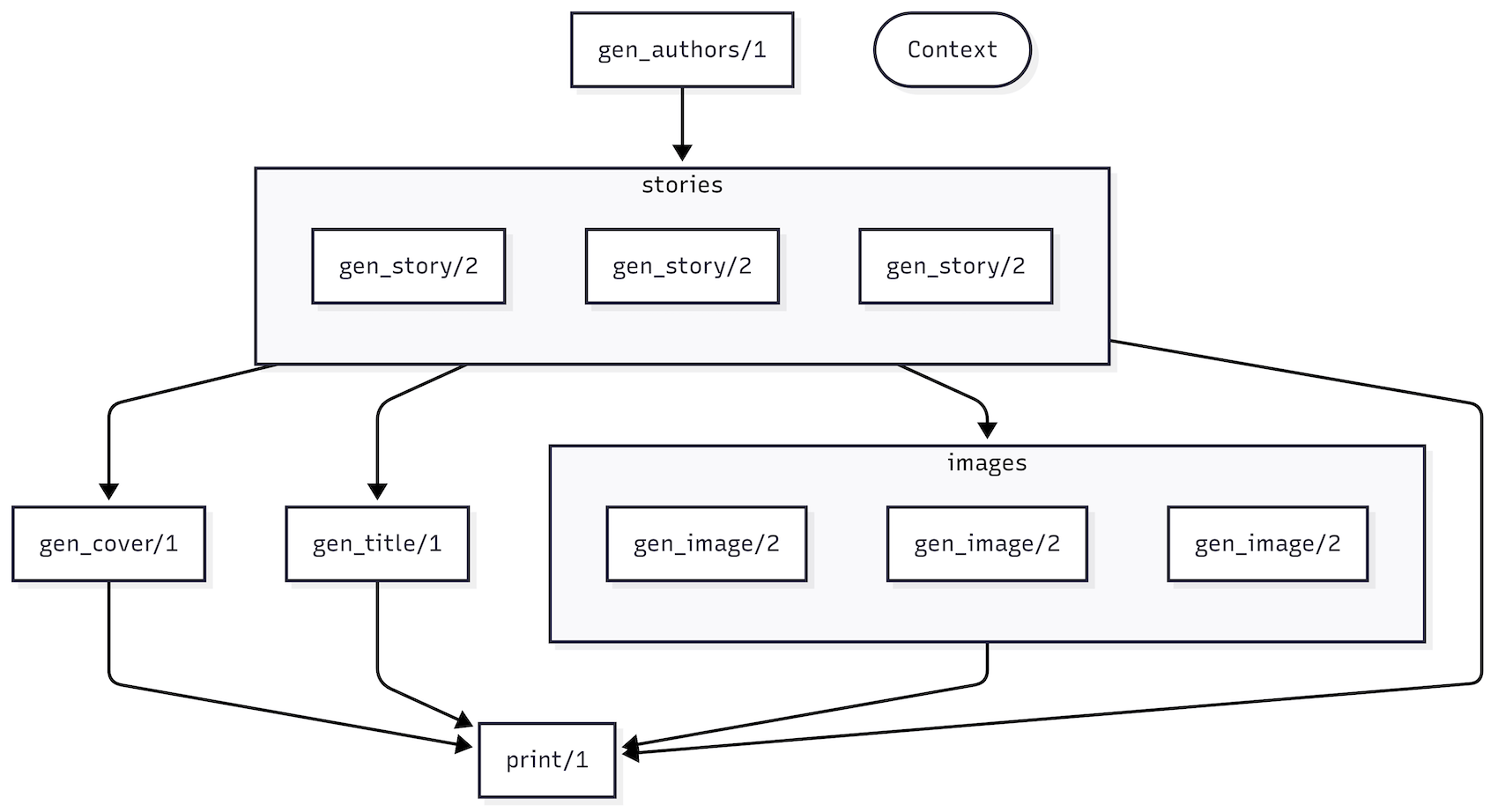
<p>It's easier to understand the flow of data with some visualization. Time for <code>to_mermaid/1</code>:</p>
<pre class="lumis" style="color: #d8dee9; background-color: #2e3440;"><code class="language-elixir" translate="no" tabindex="0"><div class="line" data-line="1"><span style="color: #88c0d0;">[</span><span style="color: #ebcb8b;">chapters: </span><span style="color: #b48ead;">3</span><span style="color: #88c0d0;">,</span> <span style="color: #ebcb8b;">topic: </span><span style="color: #a3be8c;">"hamsters and gooey kablooies"</span><span style="color: #88c0d0;">]</span>
</div><div class="line" data-line="2"><span style="color: #81a1c1;">|></span> <span style="color: #81a1c1;">FireSaga</span><span style="color: #81a1c1;">.</span><span style="color: #88c0d0;">build</span><span style="color: #88c0d0;">(</span><span style="color: #88c0d0;">)</span>
</div><div class="line" data-line="3"><span style="color: #81a1c1;">|></span> <span style="color: #81a1c1;">Oban.Pro.Workflow</span><span style="color: #81a1c1;">.</span><span style="color: #88c0d0;">to_mermaid</span><span style="color: #88c0d0;">(</span><span style="color: #88c0d0;">)</span>
</div></code></pre>
<p>Passing the output through to <a href="https://mermaid.live/">mermaid</a> outputs a spiffy, helpful diagram:</p>
<div class="bg-white p-3 rounded-lg">
<p><img src="/images/weaving-stories-with-cascading-workflows/workflow-mermaid.png" alt="Mermaid Diagram" /></p>
</div>
<p>That's all for the workflow. On to the actual functions.</p>
<h2>Cascade Functions</h2>
<p>Cascade functions are surprisingly simple—they're just regular functions that accept a context map
as their single argument. You can define them in any module without special annotations or
boilerplate.</p>
<p>Let's check out the <code>gen_authors/1</code> implementation:</p>
<pre class="lumis" style="color: #d8dee9; background-color: #2e3440;"><code class="language-elixir" translate="no" tabindex="0"><div class="line" data-line="1"><span style="color: #81a1c1;">def</span> <span style="color: #88c0d0;">gen_authors</span><span style="color: #88c0d0;">(</span><span style="color: #88c0d0;">%</span><span style="color: #88c0d0;">&lbrace;</span><span style="color: #ebcb8b;">count: </span><span style="color: #d8dee9; font-weight: bold;">count</span><span style="color: #88c0d0;">&rbrace;</span><span style="color: #88c0d0;">)</span> <span style="color: #81a1c1;">do</span>
</div><div class="line" data-line="2">  <span style="color: #d8dee9; font-weight: bold;">prompt</span> <span style="color: #81a1c1;">=</span> <span style="color: #a3be8c;">"""
</div><div class="line" data-line="3">  Generate an unordered list of thirty prominent children's authors.
</div><div class="line" data-line="4">  Use a leading hyphen rather than numbers for each list item.
</div><div class="line" data-line="5">  """</span>
</div><div class="line" data-line="6">
</div><div class="line" data-line="7">  <span style="color: #d8dee9; font-weight: bold;">prompt</span>
</div><div class="line" data-line="8">  <span style="color: #81a1c1;">|></span> <span style="color: #81a1c1;">LLM</span><span style="color: #81a1c1;">.</span><span style="color: #88c0d0;">chat!</span><span style="color: #88c0d0;">(</span><span style="color: #88c0d0;">)</span>
</div><div class="line" data-line="9">  <span style="color: #81a1c1;">|></span> <span style="color: #81a1c1;">String</span><span style="color: #81a1c1;">.</span><span style="color: #88c0d0;">split</span><span style="color: #88c0d0;">(</span><span style="color: #a3be8c;">"</span><span style="color: #b48ead;">\n</span><span style="color: #a3be8c;">"</span><span style="color: #88c0d0;">,</span> <span style="color: #ebcb8b;">trim: </span><span style="color: #81a1c1; font-weight: bold;">true</span><span style="color: #88c0d0;">)</span>
</div><div class="line" data-line="10">  <span style="color: #81a1c1;">|></span> <span style="color: #81a1c1;">Enum</span><span style="color: #81a1c1;">.</span><span style="color: #88c0d0;">map</span><span style="color: #88c0d0;">(</span><span style="color: #81a1c1;">&amp;</span><span style="color: #81a1c1;">String</span><span style="color: #81a1c1;">.</span><span style="color: #88c0d0;">trim_leading</span><span style="color: #88c0d0;">(</span><span style="color: #81a1c1;">&amp;</span><span style="color: #81a1c1;">1</span><span style="color: #88c0d0;">,</span> <span style="color: #a3be8c;">"- "</span><span style="color: #88c0d0;">)</span><span style="color: #88c0d0;">)</span>
</div><div class="line" data-line="11">  <span style="color: #81a1c1;">|></span> <span style="color: #81a1c1;">Enum</span><span style="color: #81a1c1;">.</span><span style="color: #88c0d0;">take_random</span><span style="color: #88c0d0;">(</span><span style="color: #d8dee9; font-weight: bold;">count</span><span style="color: #88c0d0;">)</span>
</div><div class="line" data-line="12"><span style="color: #81a1c1;">end</span>
</div></code></pre>
<p>It's using a simple <code>LLM</code> module to call a chat endpoint (you can check it out on GitHub). The
output is a list of authors (Beverly Cleary, Shel Silverstein, etc.), which is recorded and made
available in the downstream functions.</p>
<p>Next downstream is <code>gen_story/2</code>, which runs as part of a sub-workflow and receives slightly
different arguments. The first argument is an element from the enumerable (in this case, the
<code>index</code>), followed by the accumulated context:</p>
<pre class="lumis" style="color: #d8dee9; background-color: #2e3440;"><code class="language-elixir" translate="no" tabindex="0"><div class="line" data-line="1"><span style="color: #81a1c1;">def</span> <span style="color: #88c0d0;">gen_story</span><span style="color: #88c0d0;">(</span><span style="color: #d8dee9; font-weight: bold;">index</span><span style="color: #88c0d0;">,</span> <span style="color: #88c0d0;">%</span><span style="color: #88c0d0;">&lbrace;</span><span style="color: #ebcb8b;">authors: </span><span style="color: #d8dee9; font-weight: bold;">authors</span><span style="color: #88c0d0;">,</span> <span style="color: #ebcb8b;">topic: </span><span style="color: #d8dee9; font-weight: bold;">topic</span><span style="color: #88c0d0;">&rbrace;</span><span style="color: #88c0d0;">)</span> <span style="color: #81a1c1;">do</span>
</div><div class="line" data-line="2">  <span style="color: #d8dee9; font-weight: bold;">author</span> <span style="color: #81a1c1;">=</span> <span style="color: #81a1c1;">Enum</span><span style="color: #81a1c1;">.</span><span style="color: #88c0d0;">at</span><span style="color: #88c0d0;">(</span><span style="color: #d8dee9; font-weight: bold;">authors</span><span style="color: #88c0d0;">,</span> <span style="color: #d8dee9; font-weight: bold;">index</span><span style="color: #88c0d0;">)</span>
</div><div class="line" data-line="3">
</div><div class="line" data-line="4">  <span style="color: #81a1c1;">LLM</span><span style="color: #81a1c1;">.</span><span style="color: #88c0d0;">chat!</span><span style="color: #88c0d0;">(</span><span style="color: #a3be8c;">"""
</div><div class="line" data-line="5">  You are </span><span style="color: #ebcb8b;">#&lbrace;</span><span style="color: #d8dee9; font-weight: bold;">author</span><span style="color: #ebcb8b;">&rbrace;</span><span style="color: #a3be8c;">. Write a one paragraph story about "</span><span style="color: #ebcb8b;">#&lbrace;</span><span style="color: #d8dee9; font-weight: bold;">topic</span><span style="color: #ebcb8b;">&rbrace;</span><span style="color: #a3be8c;">" including a title.
</div><div class="line" data-line="6">  """</span><span style="color: #88c0d0;">)</span>
</div><div class="line" data-line="7"><span style="color: #81a1c1;">end</span>
</div></code></pre>
<p>The <code>gen_image/2</code> function is another sub-workflow step that receives two arguments. Since the
<code>images</code> step depends on both <code>authors</code> and <code>stories</code>, it has access to their outputs in the
context map. This allows it to generate an illustration specifically tailored to each author's
story (um, usually, it <em>stinks</em> at Shel Silverstein):</p>
<pre class="lumis" style="color: #d8dee9; background-color: #2e3440;"><code class="language-elixir" translate="no" tabindex="0"><div class="line" data-line="1"><span style="color: #81a1c1;">def</span> <span style="color: #88c0d0;">gen_image</span><span style="color: #88c0d0;">(</span><span style="color: #d8dee9; font-weight: bold;">index</span><span style="color: #88c0d0;">,</span> <span style="color: #88c0d0;">%</span><span style="color: #88c0d0;">&lbrace;</span><span style="color: #ebcb8b;">authors: </span><span style="color: #d8dee9; font-weight: bold;">authors</span><span style="color: #88c0d0;">,</span> <span style="color: #ebcb8b;">stories: </span><span style="color: #d8dee9; font-weight: bold;">stories</span><span style="color: #88c0d0;">&rbrace;</span><span style="color: #88c0d0;">)</span> <span style="color: #81a1c1;">do</span>
</div><div class="line" data-line="2">  <span style="color: #d8dee9; font-weight: bold;">author</span> <span style="color: #81a1c1;">=</span> <span style="color: #81a1c1;">Enum</span><span style="color: #81a1c1;">.</span><span style="color: #88c0d0;">at</span><span style="color: #88c0d0;">(</span><span style="color: #d8dee9; font-weight: bold;">authors</span><span style="color: #88c0d0;">,</span> <span style="color: #d8dee9; font-weight: bold;">index</span><span style="color: #88c0d0;">)</span>
</div><div class="line" data-line="3">  <span style="color: #d8dee9; font-weight: bold;">story</span> <span style="color: #81a1c1;">=</span> <span style="color: #81a1c1;">Map</span><span style="color: #81a1c1;">.</span><span style="color: #88c0d0;">get</span><span style="color: #88c0d0;">(</span><span style="color: #d8dee9; font-weight: bold;">stories</span><span style="color: #88c0d0;">,</span> <span style="color: #88c0d0;">to_string</span><span style="color: #88c0d0;">(</span><span style="color: #d8dee9; font-weight: bold;">index</span><span style="color: #88c0d0;">)</span><span style="color: #88c0d0;">)</span>
</div><div class="line" data-line="4">
</div><div class="line" data-line="5">  <span style="color: #81a1c1;">LLM</span><span style="color: #81a1c1;">.</span><span style="color: #88c0d0;">image!</span><span style="color: #88c0d0;">(</span><span style="color: #a3be8c;">"""
</div><div class="line" data-line="6">  You are </span><span style="color: #ebcb8b;">#&lbrace;</span><span style="color: #d8dee9; font-weight: bold;">author</span><span style="color: #ebcb8b;">&rbrace;</span><span style="color: #a3be8c;">. Create an illustration for the children's story: </span><span style="color: #ebcb8b;">#&lbrace;</span><span style="color: #d8dee9; font-weight: bold;">story</span><span style="color: #ebcb8b;">&rbrace;</span><span style="color: #a3be8c;">
</div><div class="line" data-line="7">  """</span><span style="color: #88c0d0;">)</span>
</div><div class="line" data-line="8"><span style="color: #81a1c1;">end</span>
</div></code></pre>
<p>Both <code>gen_title/1</code> and <code>gen_cover/1</code> follow a similar structure, using output from dependencies
and making <code>LLM</code> calls, so we'll omit them here. Finally, the <code>print/1</code> function pulls it all
together:</p>
<pre class="lumis" style="color: #d8dee9; background-color: #2e3440;"><code class="language-elixir" translate="no" tabindex="0"><div class="line" data-line="1"><span style="color: #81a1c1;">def</span> <span style="color: #88c0d0;">print</span><span style="color: #88c0d0;">(</span><span style="color: #d8dee9; font-weight: bold;">context</span><span style="color: #88c0d0;">)</span> <span style="color: #81a1c1;">do</span>
</div><div class="line" data-line="2">  <span style="color: #d8dee9; font-weight: bold;">context</span><span style="color: #81a1c1;">.</span><span style="color: #d8dee9; font-weight: bold;">images</span>
</div><div class="line" data-line="3">  <span style="color: #81a1c1;">|></span> <span style="color: #81a1c1;">Enum</span><span style="color: #81a1c1;">.</span><span style="color: #88c0d0;">map</span><span style="color: #88c0d0;">(</span><span style="color: #81a1c1;">fn</span> <span style="color: #88c0d0;">&lbrace;</span><span style="color: #d8dee9; font-weight: bold;">idx</span><span style="color: #88c0d0;">,</span> <span style="color: #d8dee9; font-weight: bold;">url</span><span style="color: #88c0d0;">&rbrace;</span> <span style="color: #81a1c1;">-></span> <span style="color: #88c0d0;">&lbrace;</span><span style="color: #d8dee9; font-weight: bold;">url</span><span style="color: #88c0d0;">,</span> <span style="color: #a3be8c;">"image_</span><span style="color: #ebcb8b;">#&lbrace;</span><span style="color: #d8dee9; font-weight: bold;">idx</span><span style="color: #ebcb8b;">&rbrace;</span><span style="color: #a3be8c;">.png"</span><span style="color: #88c0d0;">&rbrace;</span> <span style="color: #81a1c1;">end</span><span style="color: #88c0d0;">)</span>
</div><div class="line" data-line="4">  <span style="color: #81a1c1;">|></span> <span style="color: #81a1c1;">Enum</span><span style="color: #81a1c1;">.</span><span style="color: #88c0d0;">concat</span><span style="color: #88c0d0;">(</span><span style="color: #88c0d0;">[</span><span style="color: #88c0d0;">&lbrace;</span><span style="color: #d8dee9; font-weight: bold;">context</span><span style="color: #81a1c1;">.</span><span style="color: #d8dee9; font-weight: bold;">cover</span><span style="color: #88c0d0;">,</span> <span style="color: #a3be8c;">"cover.png"</span><span style="color: #88c0d0;">&rbrace;</span><span style="color: #88c0d0;">]</span><span style="color: #88c0d0;">)</span>
</div><div class="line" data-line="5">  <span style="color: #81a1c1;">|></span> <span style="color: #81a1c1;">Enum</span><span style="color: #81a1c1;">.</span><span style="color: #88c0d0;">each</span><span style="color: #88c0d0;">(</span><span style="color: #81a1c1;">fn</span> <span style="color: #88c0d0;">&lbrace;</span><span style="color: #d8dee9; font-weight: bold;">url</span><span style="color: #88c0d0;">,</span> <span style="color: #d8dee9; font-weight: bold;">path</span><span style="color: #88c0d0;">&rbrace;</span> <span style="color: #81a1c1;">-></span> <span style="color: #81a1c1;">Req</span><span style="color: #81a1c1;">.</span><span style="color: #88c0d0;">get!</span><span style="color: #88c0d0;">(</span><span style="color: #d8dee9; font-weight: bold;">url</span><span style="color: #88c0d0;">,</span> <span style="color: #ebcb8b;">into: </span><span style="color: #81a1c1;">File</span><span style="color: #81a1c1;">.</span><span style="color: #88c0d0;">stream!</span><span style="color: #88c0d0;">(</span><span style="color: #d8dee9; font-weight: bold;">path</span><span style="color: #88c0d0;">)</span><span style="color: #88c0d0;">)</span> <span style="color: #81a1c1;">end</span><span style="color: #88c0d0;">)</span>
</div><div class="line" data-line="6">
</div><div class="line" data-line="7">  <span style="color: #ebcb8b;">@</span><span style="color: #ebcb8b;">template</span>
</div><div class="line" data-line="8">  <span style="color: #81a1c1;">|></span> <span style="color: #81a1c1;">EEx</span><span style="color: #81a1c1;">.</span><span style="color: #88c0d0;">eval_string</span><span style="color: #88c0d0;">(</span><span style="color: #81a1c1;">Keyword</span><span style="color: #81a1c1;">.</span><span style="color: #88c0d0;">new</span><span style="color: #88c0d0;">(</span><span style="color: #d8dee9; font-weight: bold;">context</span><span style="color: #88c0d0;">)</span><span style="color: #88c0d0;">)</span>
</div><div class="line" data-line="9">  <span style="color: #81a1c1;">|></span> <span style="color: #88c0d0;">then</span><span style="color: #88c0d0;">(</span><span style="color: #81a1c1;">&amp;</span><span style="color: #81a1c1;">File</span><span style="color: #81a1c1;">.</span><span style="color: #88c0d0;">write!</span><span style="color: #88c0d0;">(</span><span style="color: #a3be8c;">"story.md"</span><span style="color: #88c0d0;">,</span> <span style="color: #81a1c1;">&amp;</span><span style="color: #81a1c1;">1</span><span style="color: #88c0d0;">)</span><span style="color: #88c0d0;">)</span>
</div><div class="line" data-line="10"><span style="color: #81a1c1;">end</span>
</div></code></pre>
<p>We love it when a plan comes together.</p>
<h2>What About the Output?</h2>
<p>How entertaining is a story-generating pipeline without some sample output? (Very little, unless you
<em>really</em> like mermaid diagrams. You know who you are 😉)</p>
<p>Here's a sample chapter that <code>FireSaga</code> generated about the topic "bento box lunches" in the style
of <a href="https://pilkey.com/">Dav Pilkey</a>:</p>
<div class="pb-2 px-6 bg-white text-base leading-loose rounded-lg shadow-md">
  <br />
  <h3 class="mt-2 text-xl font-semibold text-center not-prose">Bento Box Adventures: Lunchables in Imagination!</h3>
<p><img src="/images/weaving-stories-with-cascading-workflows/image_0.jpg" alt="Dav Pilkey" /></p>
<p><em>Inspired By: Dav Pilkey</em></p>
<p>In a school where lunchboxes were portals to adventure, Benny the brave bento box dreamed of a day
when he would be filled with extraordinary foods. One sunny morning, he woke up to find his lid
popped open, revealing a colorful array of sushi-shaped gummy candies, rainbow rice, and tiny
veggie heroes ready to save lunchtime! As Benny rolled into the cafeteria, he teamed up with Tina
the trendy thermos and Sammy the snack-sized container...</p>
</div>
<p>Captivating stuff. Gummy candies <em>and</em> veggie heroes you say!?</p>
<h2>Workflows in Action</h2>
<p>So, that's cascading workflows. They eliminate all the boilerplate of multiple workers and
collocate an entire pipeline of functions into a single module. It's a much more convenient - dare
we say, "elegant" - way to build workflows.</p>
<p>If you'd like to experiment with <code>FireSaga</code> yourself, check out <a href="https://github.com/oban-bg/firesaga">the repository</a>.
(You'll need two things to get started—an Oban Pro license and some OpenAI keys).</p>]]></content>
    </entry>
  
    <entry>
      <title>Oban Pro v1.6 Released</title>
      <link rel="alternate" href="https://oban.pro/articles/pro-1-6-0-rc-released" />
      <id>https://oban.pro/articles/pro-1-6-0-rc-released</id>
      <published>2025-03-31T00:00:00Z</published>
      <updated>2025-03-31T00:00:00Z</updated>
      <summary>The Pro v1.6 release candidate adds sub-workflows, overhauled partitioning,
  global burst mode, and much more.</summary>
      <content type="html"><![CDATA[<p>The first Oban Pro v1.6 release candidate is out! It introduces major workflow improvements like
sub-workflows and context sharing, along with overhauled queue partitioning for better
performance, and various usability improvements.</p>
<p>⚠️ <em>This release includes a required (and extremely helpful) migration. Follow the <a href="https://oban.pro/docs/pro/1.6.0-rc.1/v1-6.html">upgrade
guide</a> closely!</em></p>
<p>First up, our favorite addition...</p>
<h3>🗂️ Sub-Workflows</h3>
<p>Workflows gain powerful new capabilities for organizing complex job relationships with two major
enhancements: <code>add_workflow/4</code> and <code>add_many/4</code>.</p>
<p>Use <code>add_workflow/4</code> to nest entire workflows within others to create hierarchical job
dependencies. This makes complex workflows more maintainable by grouping related jobs together:</p>
<pre class="lumis" style="color: #d8dee9; background-color: #2e3440;"><code class="language-elixir" translate="no" tabindex="0"><div class="line" data-line="1"><span style="color: #d8dee9; font-weight: bold;">extr_flow</span> <span style="color: #81a1c1;">=</span> 
</div><div class="line" data-line="2">  <span style="color: #81a1c1;">Workflow</span><span style="color: #81a1c1;">.</span><span style="color: #88c0d0;">new</span><span style="color: #88c0d0;">(</span><span style="color: #ebcb8b;">workflow_name: </span><span style="color: #a3be8c;">"extract"</span><span style="color: #88c0d0;">)</span>
</div><div class="line" data-line="3">  <span style="color: #81a1c1;">|></span> <span style="color: #81a1c1;">Workflow</span><span style="color: #81a1c1;">.</span><span style="color: #88c0d0;">add</span><span style="color: #88c0d0;">(</span><span style="color: #ebcb8b;">:extract</span><span style="color: #88c0d0;">,</span> <span style="color: #81a1c1;">WorkerA</span><span style="color: #81a1c1;">.</span><span style="color: #88c0d0;">new</span><span style="color: #88c0d0;">(</span><span style="color: #88c0d0;">%</span><span style="color: #88c0d0;">&lbrace;</span><span style="color: #ebcb8b;">source: </span><span style="color: #a3be8c;">"database"</span><span style="color: #88c0d0;">&rbrace;</span><span style="color: #88c0d0;">)</span><span style="color: #88c0d0;">)</span>
</div><div class="line" data-line="4">  <span style="color: #81a1c1;">|></span> <span style="color: #81a1c1;">Workflow</span><span style="color: #81a1c1;">.</span><span style="color: #88c0d0;">add</span><span style="color: #88c0d0;">(</span><span style="color: #ebcb8b;">:transform</span><span style="color: #88c0d0;">,</span> <span style="color: #81a1c1;">WorkerB</span><span style="color: #81a1c1;">.</span><span style="color: #88c0d0;">new</span><span style="color: #88c0d0;">(</span><span style="color: #88c0d0;">%</span><span style="color: #88c0d0;">&lbrace;</span><span style="color: #88c0d0;">&rbrace;</span><span style="color: #88c0d0;">)</span><span style="color: #88c0d0;">,</span> <span style="color: #ebcb8b;">deps: </span><span style="color: #ebcb8b;">:extract</span><span style="color: #88c0d0;">)</span>
</div><div class="line" data-line="5">
</div><div class="line" data-line="6"><span style="color: #616e88;"># Add sub-workflow as a dependency</span>
</div><div class="line" data-line="7"><span style="color: #81a1c1;">Workflow</span><span style="color: #81a1c1;">.</span><span style="color: #88c0d0;">new</span><span style="color: #88c0d0;">(</span><span style="color: #88c0d0;">)</span>
</div><div class="line" data-line="8"><span style="color: #81a1c1;">|></span> <span style="color: #81a1c1;">Workflow</span><span style="color: #81a1c1;">.</span><span style="color: #88c0d0;">add</span><span style="color: #88c0d0;">(</span><span style="color: #ebcb8b;">:setup</span><span style="color: #88c0d0;">,</span> <span style="color: #81a1c1;">WorkerC</span><span style="color: #81a1c1;">.</span><span style="color: #88c0d0;">new</span><span style="color: #88c0d0;">(</span><span style="color: #88c0d0;">%</span><span style="color: #88c0d0;">&lbrace;</span><span style="color: #ebcb8b;">mode: </span><span style="color: #a3be8c;">"initialize"</span><span style="color: #88c0d0;">&rbrace;</span><span style="color: #88c0d0;">)</span><span style="color: #88c0d0;">)</span>
</div><div class="line" data-line="9"><span style="color: #81a1c1;">|></span> <span style="color: #81a1c1;">Workflow</span><span style="color: #81a1c1;">.</span><span style="color: #88c0d0;">add_workflow</span><span style="color: #88c0d0;">(</span><span style="color: #ebcb8b;">:extract</span><span style="color: #88c0d0;">,</span> <span style="color: #d8dee9; font-weight: bold;">extr_flow</span><span style="color: #88c0d0;">,</span> <span style="color: #ebcb8b;">deps: </span><span style="color: #ebcb8b;">:setup</span><span style="color: #88c0d0;">)</span>
</div><div class="line" data-line="10"><span style="color: #81a1c1;">|></span> <span style="color: #81a1c1;">Workflow</span><span style="color: #81a1c1;">.</span><span style="color: #88c0d0;">add</span><span style="color: #88c0d0;">(</span><span style="color: #ebcb8b;">:finalize</span><span style="color: #88c0d0;">,</span> <span style="color: #81a1c1;">WorkerC</span><span style="color: #81a1c1;">.</span><span style="color: #88c0d0;">new</span><span style="color: #88c0d0;">(</span><span style="color: #88c0d0;">%</span><span style="color: #88c0d0;">&lbrace;</span><span style="color: #88c0d0;">&rbrace;</span><span style="color: #88c0d0;">)</span><span style="color: #88c0d0;">,</span> <span style="color: #ebcb8b;">deps: </span><span style="color: #ebcb8b;">:extract</span><span style="color: #88c0d0;">)</span>
</div></code></pre>
<p>Workflows can depend on other workflows, and downstream deps will wait until the sub-workflow
completes before executing.</p>
<p>Need to run similar jobs in parallel? Use <code>add_many/4</code> to add multiple jobs with a single
dependency name:</p>
<pre class="lumis" style="color: #d8dee9; background-color: #2e3440;"><code class="language-elixir" translate="no" tabindex="0"><div class="line" data-line="1"><span style="color: #616e88;"># Add multiple email jobs that can run in parallel</span>
</div><div class="line" data-line="2"><span style="color: #d8dee9; font-weight: bold;">email_jobs</span> <span style="color: #81a1c1;">=</span> <span style="color: #81a1c1;">Enum</span><span style="color: #81a1c1;">.</span><span style="color: #88c0d0;">map</span><span style="color: #88c0d0;">(</span><span style="color: #d8dee9; font-weight: bold;">users</span><span style="color: #88c0d0;">,</span> <span style="color: #81a1c1;">&amp;</span><span style="color: #81a1c1;">EmailWorker</span><span style="color: #81a1c1;">.</span><span style="color: #88c0d0;">new</span><span style="color: #88c0d0;">(</span><span style="color: #88c0d0;">%</span><span style="color: #88c0d0;">&lbrace;</span><span style="color: #ebcb8b;">user_id: </span><span style="color: #81a1c1;">&amp;</span><span style="color: #81a1c1;">1</span><span style="color: #81a1c1;">.</span><span style="color: #d8dee9; font-weight: bold;">id</span><span style="color: #88c0d0;">&rbrace;</span><span style="color: #88c0d0;">)</span><span style="color: #88c0d0;">)</span>
</div><div class="line" data-line="3">
</div><div class="line" data-line="4"><span style="color: #d8dee9; font-weight: bold;">workflow</span> <span style="color: #81a1c1;">=</span>
</div><div class="line" data-line="5">  <span style="color: #81a1c1;">Workflow</span><span style="color: #81a1c1;">.</span><span style="color: #88c0d0;">new</span><span style="color: #88c0d0;">(</span><span style="color: #88c0d0;">)</span>
</div><div class="line" data-line="6">  <span style="color: #81a1c1;">|></span> <span style="color: #81a1c1;">Workflow</span><span style="color: #81a1c1;">.</span><span style="color: #88c0d0;">add_many</span><span style="color: #88c0d0;">(</span><span style="color: #ebcb8b;">:emails</span><span style="color: #88c0d0;">,</span> <span style="color: #d8dee9; font-weight: bold;">email_jobs</span><span style="color: #88c0d0;">)</span>
</div><div class="line" data-line="7">  <span style="color: #81a1c1;">|></span> <span style="color: #81a1c1;">Workflow</span><span style="color: #81a1c1;">.</span><span style="color: #88c0d0;">add</span><span style="color: #88c0d0;">(</span><span style="color: #ebcb8b;">:report</span><span style="color: #88c0d0;">,</span> <span style="color: #81a1c1;">ReportWorker</span><span style="color: #81a1c1;">.</span><span style="color: #88c0d0;">new</span><span style="color: #88c0d0;">(</span><span style="color: #88c0d0;">)</span><span style="color: #88c0d0;">,</span> <span style="color: #ebcb8b;">deps: </span><span style="color: #ebcb8b;">:emails</span><span style="color: #88c0d0;">)</span>
</div></code></pre>
<p>The <code>add_many/4</code> step creates a sub workflow from either a list or a map, and the full recorded
results can be extracted with a single call:</p>
<pre class="lumis" style="color: #d8dee9; background-color: #2e3440;"><code class="language-elixir" translate="no" tabindex="0"><div class="line" data-line="1"><span style="color: #81a1c1;">def</span> <span style="color: #88c0d0;">process</span><span style="color: #88c0d0;">(</span><span style="color: #d8dee9; font-weight: bold;">job</span><span style="color: #88c0d0;">)</span> <span style="color: #81a1c1;">do</span>
</div><div class="line" data-line="2">  <span style="color: #d8dee9; font-weight: bold;">map_of_results</span> <span style="color: #81a1c1;">=</span> <span style="color: #81a1c1;">Workflow</span><span style="color: #81a1c1;">.</span><span style="color: #88c0d0;">all_recorded</span><span style="color: #88c0d0;">(</span><span style="color: #d8dee9; font-weight: bold;">job</span><span style="color: #88c0d0;">,</span> <span style="color: #ebcb8b;">with_subs: </span><span style="color: #81a1c1; font-weight: bold;">true</span><span style="color: #88c0d0;">)</span>
</div><div class="line" data-line="3"><span style="color: #81a1c1;">end</span>
</div></code></pre>
<h3>🖼️ Context and Workflow Status</h3>
<p>Workflows that rely on common data can now share data without duplicating arguments using
<code>put_context/3</code>:</p>
<pre class="lumis" style="color: #d8dee9; background-color: #2e3440;"><code class="language-elixir" translate="no" tabindex="0"><div class="line" data-line="1"><span style="color: #d8dee9; font-weight: bold;">workflow</span> <span style="color: #81a1c1;">=</span> 
</div><div class="line" data-line="2">  <span style="color: #81a1c1;">Workflow</span><span style="color: #81a1c1;">.</span><span style="color: #88c0d0;">new</span><span style="color: #88c0d0;">(</span><span style="color: #88c0d0;">)</span>
</div><div class="line" data-line="3">  <span style="color: #81a1c1;">|></span> <span style="color: #81a1c1;">Workflow</span><span style="color: #81a1c1;">.</span><span style="color: #88c0d0;">put_context</span><span style="color: #88c0d0;">(</span><span style="color: #88c0d0;">%</span><span style="color: #88c0d0;">&lbrace;</span><span style="color: #ebcb8b;">user_id: </span><span style="color: #b48ead;">123</span><span style="color: #88c0d0;">,</span> <span style="color: #ebcb8b;">app_version: </span><span style="color: #a3be8c;">"1.2.3"</span><span style="color: #88c0d0;">&rbrace;</span><span style="color: #88c0d0;">)</span>
</div><div class="line" data-line="4">  <span style="color: #81a1c1;">|></span> <span style="color: #81a1c1;">Workflow</span><span style="color: #81a1c1;">.</span><span style="color: #88c0d0;">add</span><span style="color: #88c0d0;">(</span><span style="color: #ebcb8b;">:job_a</span><span style="color: #88c0d0;">,</span> <span style="color: #81a1c1;">WorkerA</span><span style="color: #81a1c1;">.</span><span style="color: #88c0d0;">new</span><span style="color: #88c0d0;">(</span><span style="color: #88c0d0;">%</span><span style="color: #88c0d0;">&lbrace;</span><span style="color: #88c0d0;">&rbrace;</span><span style="color: #88c0d0;">)</span><span style="color: #88c0d0;">)</span>
</div><div class="line" data-line="5">  <span style="color: #81a1c1;">|></span> <span style="color: #81a1c1;">Workflow</span><span style="color: #81a1c1;">.</span><span style="color: #88c0d0;">add</span><span style="color: #88c0d0;">(</span><span style="color: #ebcb8b;">:job_b</span><span style="color: #88c0d0;">,</span> <span style="color: #81a1c1;">WorkerB</span><span style="color: #81a1c1;">.</span><span style="color: #88c0d0;">new</span><span style="color: #88c0d0;">(</span><span style="color: #88c0d0;">%</span><span style="color: #88c0d0;">&lbrace;</span><span style="color: #88c0d0;">&rbrace;</span><span style="color: #88c0d0;">)</span><span style="color: #88c0d0;">)</span>
</div><div class="line" data-line="6">
</div><div class="line" data-line="7"><span style="color: #616e88;"># Later in a worker:</span>
</div><div class="line" data-line="8"><span style="color: #81a1c1;">def</span> <span style="color: #88c0d0;">process</span><span style="color: #88c0d0;">(</span><span style="color: #d8dee9; font-weight: bold;">job</span><span style="color: #88c0d0;">)</span> <span style="color: #81a1c1;">do</span>
</div><div class="line" data-line="9">  <span style="color: #d8dee9; font-weight: bold;">context</span> <span style="color: #81a1c1;">=</span> <span style="color: #81a1c1;">Workflow</span><span style="color: #81a1c1;">.</span><span style="color: #88c0d0;">get_context</span><span style="color: #88c0d0;">(</span><span style="color: #d8dee9; font-weight: bold;">job</span><span style="color: #88c0d0;">)</span>
</div><div class="line" data-line="10">  <span style="color: #616e88;"># Use context map...</span>
</div><div class="line" data-line="11"><span style="color: #81a1c1;">end</span>
</div></code></pre>
<p>It's now easier to check workflow progress with <code>status/1</code>, which provides execution stats:</p>
<pre class="lumis" style="color: #d8dee9; background-color: #2e3440;"><code class="language-elixir" translate="no" tabindex="0"><div class="line" data-line="1"><span style="color: #88c0d0;">%</span><span style="color: #88c0d0;">&lbrace;</span>
</div><div class="line" data-line="2">  <span style="color: #ebcb8b;">total: </span><span style="color: #b48ead;">5</span><span style="color: #88c0d0;">,</span>
</div><div class="line" data-line="3">  <span style="color: #ebcb8b;">state: </span><span style="color: #a3be8c;">"executing"</span><span style="color: #88c0d0;">,</span> 
</div><div class="line" data-line="4">  <span style="color: #ebcb8b;">counts: </span><span style="color: #88c0d0;">%</span><span style="color: #88c0d0;">&lbrace;</span><span style="color: #ebcb8b;">completed: </span><span style="color: #b48ead;">3</span><span style="color: #88c0d0;">,</span> <span style="color: #ebcb8b;">executing: </span><span style="color: #b48ead;">2</span><span style="color: #88c0d0;">&rbrace;</span><span style="color: #88c0d0;">,</span>
</div><div class="line" data-line="5">  <span style="color: #ebcb8b;">duration: </span><span style="color: #b48ead;">15_620</span>
</div><div class="line" data-line="6"><span style="color: #88c0d0;">&rbrace;</span> <span style="color: #81a1c1;">=</span> <span style="color: #81a1c1;">Workflow</span><span style="color: #81a1c1;">.</span><span style="color: #88c0d0;">status</span><span style="color: #88c0d0;">(</span><span style="color: #d8dee9; font-weight: bold;">workflow_id</span><span style="color: #88c0d0;">)</span>
</div></code></pre>
<h3>🧰 Queue Partitioning Overhaul</h3>
<p>Queue partitioning is completely redesigned for dramatic performance improvements. Jobs are now
assigned partition keys on insert rather than at runtime, enabling more efficient querying and
eliminating head-of-line blocking when one partition has many jobs.</p>
<p>The new design has none of the issues of the previous solution:</p>
<ul>
<li>Job processing is completely fair. Jobs from a single partition can't block processing of other
partitions after bulk insert. No priority or scheduling workarounds are necessary.</li>
<li>Querying in partitioned queues relies on a single, partial index</li>
<li>Partitioning uses a single, optimized query without any unions or dynamic sections. That allows
ecto to prepare and cache a single plan for faster fetching and less memory usage.</li>
</ul>
<p>In a benchmark of 10k jobs spread across 20 partitions (200k jobs), <strong>processing took 17s in v1.6,
down from 360s in v1.5 (20x faster)</strong> with far less load on the database.</p>
<h2>🧨 Global Burst Mode</h2>
<p>Global partitioning gained an advanced feature called "burst mode" that allows you to maximize
throughput by temporarily exceeding per-partition global limits when there are available
resources.</p>
<p>Each global partition is typically restricted to the configured <code>allowed</code> value. However, with
burst mode enabled, the system can intelligently allocate more jobs to each active partition,
potentially exceeding the per-partition limit while still respecting the overall queue
concurrency.</p>
<p>This is particularly useful when:</p>
<ol>
<li>You have many potential partitions but only a few are active at any given time</li>
<li>You want to maximize throughput while maintaining some level of fairness between partitions</li>
<li>You need to ensure your queues aren't sitting idle when capacity is available</li>
</ol>
<p>Here's an example of a queue that will 5 jobs from a single partition concurrently under load, but
can burst up to 100 for a single partition when there is available capacity:</p>
<pre class="lumis" style="color: #d8dee9; background-color: #2e3440;"><code class="language-elixir" translate="no" tabindex="0"><div class="line" data-line="1"><span style="color: #88c0d0;">config</span> <span style="color: #ebcb8b;">:my_app</span><span style="color: #88c0d0;">,</span> <span style="color: #81a1c1;">Oban</span><span style="color: #88c0d0;">,</span>
</div><div class="line" data-line="2">  <span style="color: #ebcb8b;">queues: </span><span style="color: #88c0d0;">[</span>
</div><div class="line" data-line="3">    <span style="color: #ebcb8b;">exports: </span><span style="color: #88c0d0;">[</span>
</div><div class="line" data-line="4">      <span style="color: #ebcb8b;">local_limit: </span><span style="color: #b48ead;">100</span><span style="color: #88c0d0;">,</span>
</div><div class="line" data-line="5">      <span style="color: #ebcb8b;">global_limit: </span><span style="color: #88c0d0;">[</span><span style="color: #ebcb8b;">allowed: </span><span style="color: #b48ead;">5</span><span style="color: #88c0d0;">,</span> <span style="color: #ebcb8b;">burst: </span><span style="color: #81a1c1; font-weight: bold;">true</span><span style="color: #88c0d0;">,</span> <span style="color: #ebcb8b;">partition: </span><span style="color: #88c0d0;">[</span><span style="color: #ebcb8b;">args: </span><span style="color: #ebcb8b;">:tenant_id</span><span style="color: #88c0d0;">]</span><span style="color: #88c0d0;">]</span>
</div><div class="line" data-line="6">    <span style="color: #88c0d0;">]</span>
</div><div class="line" data-line="7">  <span style="color: #88c0d0;">]</span>
</div></code></pre>
<h3>🍋 Preserve DynamicQueues Updates</h3>
<p>DynamicQueues now preserves queue changes made at runtime across application restarts. This brings
two key improvements:</p>
<ol>
<li>Runtime changes to queues (via Web or CLI) persist until explicitly changed in configuration</li>
<li>A new <code>:automatic</code> sync mode that can manage queue deletions based on configuration</li>
</ol>
<pre class="lumis" style="color: #d8dee9; background-color: #2e3440;"><code class="language-elixir" translate="no" tabindex="0"><div class="line" data-line="1"><span style="color: #616e88;"># Automatic mode - Deletes queues missing from configuration</span>
</div><div class="line" data-line="2"><span style="color: #88c0d0;">config</span> <span style="color: #ebcb8b;">:my_app</span><span style="color: #88c0d0;">,</span> <span style="color: #81a1c1;">Oban</span><span style="color: #88c0d0;">,</span>
</div><div class="line" data-line="3">  <span style="color: #ebcb8b;">plugins: </span><span style="color: #88c0d0;">[</span><span style="color: #88c0d0;">&lbrace;</span><span style="color: #81a1c1;">DynamicQueues</span><span style="color: #88c0d0;">,</span> <span style="color: #ebcb8b;">sync_mode: </span><span style="color: #ebcb8b;">:automatic</span><span style="color: #88c0d0;">,</span> <span style="color: #ebcb8b;">queues: </span><span style="color: #88c0d0;">[</span><span style="color: #d8dee9; font-weight: bold;">...</span><span style="color: #88c0d0;">]</span><span style="color: #88c0d0;">&rbrace;</span><span style="color: #88c0d0;">]</span>
</div></code></pre>
<p>In automatic mode, any queue that exists in the database but isn't defined in the configuration
will be automatically deleted during startup. This is useful when you want to ensure your runtime
queue configuration exactly matches what's defined in your application config.</p>
<p>Now when you pause a queue through the dashboard or change its limits via API, those changes will
persist across application restarts until you explicitly update those options in your
configuration.</p>
<h3>🎨 Decorated Job Enhancements</h3>
<p>Decorated jobs gain a few new capabilities. You can now use <code>current_job/0</code> to access the
underlying job struct from within decorated functions, making it easier to work with job context
or pass job details to other functions. Additionally, you can mark any decorated job as recorded
at runtime with the <code>recorded</code> option, enabling workflow composition and return value access
without separate modules.</p>
<pre class="lumis" style="color: #d8dee9; background-color: #2e3440;"><code class="language-elixir" translate="no" tabindex="0"><div class="line" data-line="1"><span style="color: #81a1c1;">defmodule</span> <span style="color: #81a1c1;">Business</span> <span style="color: #81a1c1;">do</span>
</div><div class="line" data-line="2">  <span style="color: #81a1c1;">use</span> <span style="color: #81a1c1;">Oban.Pro.Decorator</span>
</div><div class="line" data-line="3">
</div><div class="line" data-line="4">  <span style="color: #ebcb8b;">@</span><span style="color: #ebcb8b;">job </span><span style="color: #ebcb8b;">queue: </span><span style="color: #ebcb8b;">:default</span><span style="color: #88c0d0;">,</span> <span style="color: #ebcb8b;">recorded: </span><span style="color: #81a1c1; font-weight: bold;">true</span>
</div><div class="line" data-line="5">  <span style="color: #81a1c1;">def</span> <span style="color: #88c0d0;">process_account</span><span style="color: #88c0d0;">(</span><span style="color: #d8dee9; font-weight: bold;">account_id</span><span style="color: #88c0d0;">)</span> <span style="color: #81a1c1;">do</span>
</div><div class="line" data-line="6">    <span style="color: #d8dee9; font-weight: bold;">job</span> <span style="color: #81a1c1;">=</span> <span style="color: #88c0d0;">current_job</span><span style="color: #88c0d0;">(</span><span style="color: #88c0d0;">)</span>
</div><div class="line" data-line="7">
</div><div class="line" data-line="8">    <span style="color: #81a1c1;">IO</span><span style="color: #81a1c1;">.</span><span style="color: #88c0d0;">puts</span><span style="color: #88c0d0;">(</span><span style="color: #a3be8c;">"Processing account </span><span style="color: #ebcb8b;">#&lbrace;</span><span style="color: #d8dee9; font-weight: bold;">account_id</span><span style="color: #ebcb8b;">&rbrace;</span><span style="color: #a3be8c;"> with job </span><span style="color: #ebcb8b;">#&lbrace;</span><span style="color: #d8dee9; font-weight: bold;">job</span><span style="color: #81a1c1;">.</span><span style="color: #d8dee9; font-weight: bold;">id</span><span style="color: #ebcb8b;">&rbrace;</span><span style="color: #a3be8c;">"</span><span style="color: #88c0d0;">)</span>
</div><div class="line" data-line="9">
</div><div class="line" data-line="10">    <span style="color: #88c0d0;">&lbrace;</span><span style="color: #ebcb8b;">:ok</span><span style="color: #88c0d0;">,</span> <span style="color: #88c0d0;">%</span><span style="color: #88c0d0;">&lbrace;</span><span style="color: #ebcb8b;">processed: </span><span style="color: #81a1c1; font-weight: bold;">true</span><span style="color: #88c0d0;">&rbrace;</span><span style="color: #88c0d0;">&rbrace;</span>
</div><div class="line" data-line="11">  <span style="color: #81a1c1;">end</span>
</div><div class="line" data-line="12"><span style="color: #81a1c1;">end</span>
</div></code></pre>
<p>Take a look through the <a href="https:">complete changelog</a>, or check out the <a href="https://oban.pro/docs/pro/1.6.0-rc.1/v1-6.html">v1.6 Upgrade Guide</a>
for complete upgrade steps and migration caveats.</p>]]></content>
    </entry>
  
    <entry>
      <title>OSS Oban Web and Oban v2.19</title>
      <link rel="alternate" href="https://oban.pro/articles/oss-web-and-new-oban" />
      <id>https://oban.pro/articles/oss-web-and-new-oban</id>
      <published>2025-01-16T00:00:00Z</published>
      <updated>2025-01-16T00:00:00Z</updated>
      <summary>From open sourcing Oban Web, to releasing Oban with MySQL support, Web v2.11, and plan simplifications</summary>
      <content type="html"><![CDATA[<p>The title doesn't relay the depth of this announcement, but it is short, balanced, and looked good
to us. From open sourcing multiple packages, to releases with features like MySQL support, to plan
changes—it's immense.</p>
<h2>Open Sourcing Oban Web</h2>
<p>📯 Oban Web is now <a href="https://github.com/oban-bg/oban_web">open source</a> and free (as in champagne 🥂)! From now on, Oban Web will be
<a href="https://hex.pm/packages/oban_web">published to Hex</a> and available for use in all your Oban powered applications.</p>
<p>Why? Here's some history.</p>
<p>Our original <a href="https://elixirforum.com/t/oban-reliable-and-observable-job-processing/22449?u=sorentwo">Oban announcement</a> on the Elixir Forum included a screenshot of Oban Web. That
was nearly six years ago now, and boy have we come a long way. Originally launched as a private
beta, Web was our first foray into building a viable business model for Oban. Years ago we
realized our customers needed a more complex set of tools. Thus, we released Oban Pro. Pro is
where the serious business happens now, and we want more people to have Web available from the
start.</p>
<p><em>If you're a current customer, or wonder what this means for our existing subscriptions, bounce to
the <a href="#simplified-plans">Simplified Plans</a> section.</em></p>
<p>Let's cover Oban v2.19 first, then get back to more Web news.</p>
<h2>Oban v2.19</h2>
<p>The latest Oban release includes a new database engine, an installer for improved UX, better
logging, and more. Here are some of the highlights.</p>
<h4>🐬 MySQL Support</h4>
<p>Oban officially supports MySQL with the new <code>Dolphin</code> engine. Oban works with modern (read "with
full JSON support") MySQL <a href="https://dev.mysql.com/doc/relnotes/mysql/8.4/en/">versions from 8.4</a> on, <em>and</em> has been tested on the highly
scalable <a href="https://planetscale.com/">Plantescale</a> database.</p>
<p>Running on MySQL is as simple as specifying the <code>Dolphin</code> engine in your configuration:</p>
<pre class="lumis" style="color: #d8dee9; background-color: #2e3440;"><code class="language-elixir" translate="no" tabindex="0"><div class="line" data-line="1"><span style="color: #88c0d0;">config</span> <span style="color: #ebcb8b;">:my_app</span><span style="color: #88c0d0;">,</span> <span style="color: #81a1c1;">Oban</span><span style="color: #88c0d0;">,</span>
</div><div class="line" data-line="2">  <span style="color: #ebcb8b;">engine: </span><span style="color: #81a1c1;">Oban.Engines.Dolphin</span><span style="color: #88c0d0;">,</span>
</div><div class="line" data-line="3">  <span style="color: #ebcb8b;">queues: </span><span style="color: #88c0d0;">[</span><span style="color: #ebcb8b;">default: </span><span style="color: #b48ead;">10</span><span style="color: #88c0d0;">]</span><span style="color: #88c0d0;">,</span>
</div><div class="line" data-line="4">  <span style="color: #ebcb8b;">repo: </span><span style="color: #81a1c1;">MyApp.Repo</span>
</div></code></pre>
<p>With this addition, Oban can run in an <a href="https://hex.pm/packages/myxql">estimated 10% more</a> Elixir applications!</p>
<h4>⚗️ Automated Installer</h4>
<p>Installing Oban into a new application is simplified with a new <a href="https://hexdocs.pm/igniter/readme.html">igniter</a> powered <code>mix</code> task.
The new <code>oban.install</code> task handles installing and configuring a standard Oban installation, and
it will deduce the correct <code>engine</code> and <code>notifier</code> automatically based on the database adapter.</p>
<pre class="lumis" style="color: #d8dee9; background-color: #2e3440;"><code class="language-bash" translate="no" tabindex="0"><div class="line" data-line="1"><span style="color: #88c0d0;">mix</span> <span style="color: #d8dee9; font-weight: bold;">igniter.install</span> <span style="color: #d8dee9; font-weight: bold;">oban</span>
</div></code></pre>
<p>This <code>oban.install</code> task is currently the <a href="https://hexdocs.pm/oban/installation.html">recommended way to install</a> Oban. As a bonus, the
task composes together with other igniter installers, making it possible to install <code>phoenix</code> and
<code>oban</code> with a single <code>igniter.new</code> command:</p>
<pre class="lumis" style="color: #d8dee9; background-color: #2e3440;"><code class="language-bash" translate="no" tabindex="0"><div class="line" data-line="1"><span style="color: #88c0d0;">mix</span> <span style="color: #d8dee9; font-weight: bold;">archive.install</span> <span style="color: #d8dee9; font-weight: bold;">hex</span> <span style="color: #d8dee9; font-weight: bold;">igniter_new</span>
</div><div class="line" data-line="2">
</div><div class="line" data-line="3"><span style="color: #88c0d0;">mix</span> <span style="color: #d8dee9; font-weight: bold;">igniter.new</span> <span style="color: #d8dee9; font-weight: bold;">oban_demo</span> \
</div><div class="line" data-line="4">  <span style="color: #d8dee9; font-weight: bold;">--with</span> <span style="color: #d8dee9; font-weight: bold;">phx.new</span> \
</div><div class="line" data-line="5">  <span style="color: #d8dee9; font-weight: bold;">--with-args=</span><span style="color: #a3be8c;">"--database postgres"</span> \
</div><div class="line" data-line="6">  <span style="color: #d8dee9; font-weight: bold;">--install</span> <span style="color: #d8dee9; font-weight: bold;">oban</span>
</div></code></pre>
<h4>📔 Logging Enhancements</h4>
<p>Logging in a busy system may be noisy due to job events, but there are other events that are
particularly useful for diagnosing issues. A new <code>events</code> option for <code>attach_default_logger/1</code>
allows selective event logging, so it's possible to receive important notices such as notifier
connectivity issues, without logging all job activity:</p>
<pre class="lumis" style="color: #d8dee9; background-color: #2e3440;"><code class="language-elixir" translate="no" tabindex="0"><div class="line" data-line="1"><span style="color: #81a1c1;">Oban.Telemetry</span><span style="color: #81a1c1;">.</span><span style="color: #88c0d0;">attach_default_logger</span><span style="color: #88c0d0;">(</span>
</div><div class="line" data-line="2">  <span style="color: #ebcb8b;">events: </span><span style="color: #ebcb8b;">~</span>w<span style="color: #88c0d0;">(</span>notifier peer stager<span style="color: #88c0d0;">)</span>a
</div><div class="line" data-line="3"><span style="color: #88c0d0;">)</span>
</div></code></pre>
<p>Along with filtering, there are new events to make diagnosing operational problems easier.</p>
<p>A <code>peer:election</code> event logs leadership changes to indicate when nodes gain or lose leadership.
Leadership issues are rare, but insidious, and make diagnosing production problems especially
tricky.</p>
<pre class="lumis" style="color: #d8dee9; background-color: #2e3440;"><code class="language-elixir" translate="no" tabindex="0"><div class="line" data-line="1"><span style="color: #88c0d0;">[</span>
</div><div class="line" data-line="2">  <span style="color: #ebcb8b;">message: </span><span style="color: #a3be8c;">"peer became leader"</span><span style="color: #88c0d0;">,</span>
</div><div class="line" data-line="3">  <span style="color: #ebcb8b;">source: </span><span style="color: #a3be8c;">"oban"</span><span style="color: #88c0d0;">,</span>
</div><div class="line" data-line="4">  <span style="color: #ebcb8b;">event: </span><span style="color: #a3be8c;">"peer:election"</span><span style="color: #88c0d0;">,</span>
</div><div class="line" data-line="5">  <span style="color: #ebcb8b;">node: </span><span style="color: #a3be8c;">"worker.1"</span><span style="color: #88c0d0;">,</span>
</div><div class="line" data-line="6">  <span style="color: #ebcb8b;">leader: </span><span style="color: #81a1c1; font-weight: bold;">true</span><span style="color: #88c0d0;">,</span>
</div><div class="line" data-line="7">  <span style="color: #ebcb8b;">was_leader: </span><span style="color: #81a1c1; font-weight: bold;">false</span>
</div><div class="line" data-line="8"><span style="color: #88c0d0;">]</span>
</div></code></pre>
<p>Activity for all official plugins is now logged via <code>plugin:stop</code> and <code>plugin:exception</code> events.
That includes runtime information to help monitor activity and diagnose issues. For example, every
time <code>Cron</code> runs successfully it will output details about the execution time and all of the
inserted job ids:</p>
<pre class="lumis" style="color: #d8dee9; background-color: #2e3440;"><code class="language-elixir" translate="no" tabindex="0"><div class="line" data-line="1"><span style="color: #88c0d0;">[</span>
</div><div class="line" data-line="2">  <span style="color: #ebcb8b;">source: </span><span style="color: #a3be8c;">"oban"</span><span style="color: #88c0d0;">,</span>
</div><div class="line" data-line="3">  <span style="color: #ebcb8b;">duration: </span><span style="color: #b48ead;">103</span><span style="color: #88c0d0;">,</span>
</div><div class="line" data-line="4">  <span style="color: #ebcb8b;">event: </span><span style="color: #a3be8c;">"plugin:stop"</span><span style="color: #88c0d0;">,</span>
</div><div class="line" data-line="5">  <span style="color: #ebcb8b;">plugin: </span><span style="color: #a3be8c;">"Oban.Plugins.Cron"</span><span style="color: #88c0d0;">,</span>
</div><div class="line" data-line="6">  <span style="color: #ebcb8b;">jobs: </span><span style="color: #88c0d0;">[</span><span style="color: #b48ead;">1</span><span style="color: #88c0d0;">,</span> <span style="color: #b48ead;">2</span><span style="color: #88c0d0;">,</span> <span style="color: #b48ead;">3</span><span style="color: #88c0d0;">]</span>
</div><div class="line" data-line="7"><span style="color: #88c0d0;">]</span>
</div></code></pre>
<p>There are other notable changes such as the new <code>Oban.check_all_queues/1</code> function, starting
queues in parallel on init, and official <code>JSON</code> integration. Read more in <a href="https://hexdocs.pm/oban/2.19.0/changelog.html">the full
Changelog</a>.</p>
<h2>Oban Web v2.11</h2>
<p>Beyond preparations for open sourcing, Web v2.11 includes substantial work toward component
cleanup and unification. Here are some of our favorite new features:</p>
<h4>🐬🪶 MySQL and SQLite</h4>
<p>All official engines are fully supported. Listing, filtering, ordering, and searching through jobs
works for Postgres, MySQL, and SQLite. That includes the particularly gnarly issue of dynamically
generating and manipulating JSON for filter auto-suggestions! Nested args queries, such as
<code>args.address.city:Edinburgh</code> work equally well with each engine.</p>
<h4>🎛️ Instance Select</h4>
<p>The dashboard will now support switching between Oban instances.</p>
<p><img src="/images/oss-web-and-new-oban/instance-select.png" alt="Instance Select" /></p>
<p>A new instance select menu in the header allows switching between running Oban instances at
runtime. There's no need to mount additional dashboards in your application's router to handle
multiple instances. The most recently selected instance persists between mounts.</p>
<pre class="lumis" style="color: #d8dee9; background-color: #2e3440;"><code class="language-diff" translate="no" tabindex="0"><div class="line" data-line="1"><span style="color: #88c0d0;">-</span><span style="color: #ffc0b9;"> oban_dashboard "/oban_a", oban_name: Oban.A</span>
</div><div class="line" data-line="2"><span style="color: #88c0d0;">-</span><span style="color: #ffc0b9;"> oban_dashboard "/oban_b", oban_name: Oban.B</span>
</div><div class="line" data-line="3"><span style="color: #88c0d0;">-</span><span style="color: #ffc0b9;"> oban_dashboard "/oban_c", oban_name: Oban.C</span>
</div><div class="line" data-line="4"><span style="color: #88c0d0;">+</span><span style="color: #b3f6c0;"> oban_dashboard "/oban"</span>
</div></code></pre>
<p>This also eliminates the need for additional router configuration. The dashboard will select the
first running Oban instance it finds (with a preference for the default <code>Oban</code>).</p>
<pre class="lumis" style="color: #d8dee9; background-color: #2e3440;"><code class="language-diff" translate="no" tabindex="0"><div class="line" data-line="1"><span style="color: #88c0d0;">-</span><span style="color: #ffc0b9;"> oban_dashboard "/oban", oban_name: MyOban</span>
</div><div class="line" data-line="2"><span style="color: #88c0d0;">+</span><span style="color: #b3f6c0;"> oban_dashboard "/oban"</span>
</div></code></pre>
<h4>☯️ Rebuilt Queues Page</h4>
<p>The queue and jobs tables are fully rebuilt with shared, reusable components and matching
functionality.</p>
<p><img src="/images/oss-web-and-new-oban/unified-components.png" alt="Unified Tables" /></p>
<p>This enables far more powerful interaction with queues:</p>
<ul>
<li>
<p>Uniform Navigation - click on any part of the queue row to navigate to details.</p>
</li>
<li>
<p>Sidebar - a new queue sidebar shows status counts and enables filtering by statuses such as
<code>paused</code> or <code>terminating</code>.</p>
</li>
<li>
<p>Filtering - queues are auto-complete filterable just like jobs, making it possible to find
queues running on a particular node or narrow down by status.</p>
</li>
<li>
<p>Shared Sorting - queue sorting now behaves identically to jobs, through a shared dropdown.</p>
</li>
<li>
<p>Condensed Rows  - simplify the queue page by removing nested row components. Extra queue details
are in the sub-queue page.</p>
</li>
</ul>
<h4>🕯️ Operate on Full Selection</h4>
<p>Apply bulk actions to all selected jobs, not just those visible on the current page.</p>
<p><img src="/images/oss-web-and-new-oban/operate-full-selection.png" alt="Operate on All Jobs" /></p>
<p>This expands the select functionality to extend beyond the current page and include all filtered
jobs, up to a configurable limit. The limit defaults to 1000 and may be overridden with a resolver
callback.</p>
<h4>🪪 Licensing and Installation</h4>
<p>Oban Web v2.11 is licensed under Apache 2.0, just like Oban and Elixir itself. Previous versions
are commercially licensed, therefore private, and won't be published to Hex.</p>
<p>See the updated, much slimmer, <a href="https://hexdocs.pm/oban/installation.html">installation guide</a> to get started.</p>
<h2>Oban Met v1.0</h2>
<p>Oban Met is the secret sauce that powers the charts and runtime details shown in the Oban Web
dashboard. It is a distributed, compacting, multidimensional, telemetry-powered time series
datastore (Zang!) for Oban that requires no configuring. It gathers data for queues, job counts,
execution metrics, active crontabs, historic metrics, and more.</p>
<p>Web is virtually useless without Met, so we've <a href="https://github.com/oban-bg/oban_met">open sourced it as well</a> ✨!</p>
<p>While Met is designed for use with Web, it's still mighty useful on its own for accessing runtime
metrics and counts. Take a look <a href="https://hexdocs.pm/oban_met">at the docs</a> for some useful examples.</p>
<h2 id="simplified-plans">Simplified Plans</h2>
<p>As of today, Web and Web+Pro subscriptions are no longer available. <a href="/pricing">Only Oban Pro</a>.</p>
<p>Existing web subscriptions and license keys will continue working until you upgrade Web to v2.11+.
However, you'll continue paying for your subscription until you're ready to upgrade (those are
private packages that we're serving still).</p>
<p>Legacy web customers will receive an email with an exclusive coupon to upgrade to Pro continue
receiving support and to beneift from lush features such as: <a href="/docs/pro/Oban.Pro.Workers.Workflow.html">workflows</a>, <a href="/docs/pro/Oban.Pro.Workers.Chunk.html">chunks</a>,
<a href="/docs/pro/Oban.Pro.Decorator.html">decorators</a>, <a href="/docs/pro/Oban.Pro.Worker.html#module-structured-jobs">structured args</a>, <a href="/docs/pro/Oban.Pro.Worker.html#module-worker-hooks">hooks</a>, <a href="/docs/pro/Oban.Pro.Engines.Smart.html#module-global-concurrency">global limits</a>, <a href="/docs/pro/Oban.Pro.Plugins.DynamicQueues.html">dynamic
plugins</a>, and <a href="/docs/pro/overview.html">much more</a>.</p>
<p>Special thanks to all of our customers ❤️‍🔥 that supported Oban and its ecosystem for the
past five years. <em>You are integral</em> to us making open source Oban, and now Web, possible.</p>]]></content>
    </entry>
  
    <entry>
      <title>Oban Pro v1.5 Launch Week—Day 5</title>
      <link rel="alternate" href="https://oban.pro/articles/pro-1-5-launch-week-day-5" />
      <id>https://oban.pro/articles/pro-1-5-launch-week-day-5</id>
      <published>2024-07-26T00:00:00Z</published>
      <updated>2024-07-26T00:00:00Z</updated>
      <summary>The last day of Oban Pro v1.5 launch week, putting it all together with hybrid compositions and announcing the release candidate.</summary>
      <content type="html"><![CDATA[<p>Welcome to the final day of <strong>Pro v1.5 Launch Week</strong>!</p>
<p>On this our last release of the week, we're giving you the jazz-hands-big-finish.</p>
<h2>Hybrid Compositions</h2>
<p>It's time to put all of the week's goodness together!</p>
<p>The demo builds a <em>pseudo</em> video processing and object detection <strong>workflow</strong>. Each job in the
workflow is a <strong>decorated</strong> function which uses FLAME internally for elasticity. Then, the
workflow is wrapped in a <strong>batch</strong> to get lifecycle notifications for the entire workflow.</p>
<p>Let's walk through it, without narration, to keep it consistent. (Sometime soon, we'll re-record
the demos from this week with narration):</p>
<div class="rounded-lg overflow-hidden" style="padding:62.28% 0 0 0;position:relative;">
  <iframe src="https://player.vimeo.com/video/990679218?badge=0&amp;autopause=0&amp;player_id=0&amp;app_id=58479" frameborder="0" allow="autoplay; fullscreen; picture-in-picture; clipboard-write" style="position:absolute;top:0;left:0;width:100%;height:100%;" title="Oban Pro v1.5 Launch Week — Hybrid"></iframe>
</div>
<h2>Oban v2.18.0 and Pro v1.5.0-rc.0</h2>
<p>To ensure a smooth transition, due to this being a behemoth of a Pro release, we're issuing a <a href="/releases/pro/v1.5#1.5.0-rc.0">Pro
v1.5 release candidate</a>. Please download, give it a try, and report any bugs or rough
spots.</p>
<p>There's also an <a href="https://github.com/sorentwo/oban/releases/tag/v2.18.0">Oban v2.18</a> companion release that brings queue shutdown telemetry, job
observability additions, and changes to aid in the distributed PostgreSQL we highlighted earlier
this week.</p>
<h2>What Next?</h2>
<p>We're home free! Read the complete <a href="/docs/pro/1.5.0-rc.0/changelog.html">changelog</a> for all the features big and small that we
didn't cover. If you're interested in trying out the RC, check out the <a href="/docs/pro/1.5.0-rc.0/v1-5.html">upgrade</a> guide.
We're crushing the summer and in chasing the dream of bringing you better features and
optimizations with Oban.</p>
<p>Hope to see you at <a href="https://2024.elixirconf.com/">Elixir Conf in Orlando August 27-30</a>!</p>
<script src="https://player.vimeo.com/api/player.js"></script>
<h2>More Launch Week</h2>
<ul>
<li><a href="/articles/pro-1-5-launch-week-day-1">Day 1</a> — Unified Migrations, Preemptive Chaining, and Worker Aliases</li>
<li><a href="/articles/pro-1-5-launch-week-day-2">Day 2</a> — Enhanced Uniqueness and Distributed PostgreSQL</li>
<li><a href="/articles/pro-1-5-launch-week-day-3">Day 3</a> — Job Decorators</li>
<li><a href="/articles/pro-1-5-launch-week-day-4">Day 4</a> — Overhauled Batches and Improved Workflows</li>
</ul>]]></content>
    </entry>
  
    <entry>
      <title>Oban Pro v1.5 Launch Week—Day 4</title>
      <link rel="alternate" href="https://oban.pro/articles/pro-1-5-launch-week-day-4" />
      <id>https://oban.pro/articles/pro-1-5-launch-week-day-4</id>
      <published>2024-07-25T00:00:00Z</published>
      <updated>2024-07-25T00:00:00Z</updated>
      <summary>The fourth day of Oban Pro v1.5 launch week, covering overhauled batches and improved workflows.</summary>
      <content type="html"><![CDATA[<p>Welcome to the fourth day of <strong>Pro v1.5 Launch Week</strong>!</p>
<p>On today's menu, Workers gone wild! We're surveying the next evolution of Pro's primary compositioning tools.</p>
<h2>Overhauled Batches</h2>
<p>First up, we've reimagined Batches. One of Pro's <em>original three</em> features, batches link the
execution of many jobs as a group and run optional callback jobs after jobs are processed.</p>
<p>Composing batches used to rely on a dedicated worker, one that couldn't be composed with other
worker types. Now, there's a stand alone <code>Oban.Pro.Batch</code> module that's used to dynamically build,
append, and manipulate batches from <em>any type</em> of job, and with much more functionality.</p>
<p>Batches gain support for streams (creating and appending with them), clearer callbacks, and allow
setting any <code>Oban.Job</code> option on callback jobs.</p>
<p>Check it out:</p>
<div class="rounded-lg overflow-hidden" style="padding:62.28% 0 0 0;position:relative;">
  <iframe src="https://player.vimeo.com/video/989900262?h=3e9310c7f0&amp;badge=0&amp;autopause=0&amp;player_id=0&amp;app_id=58479" frameborder="0" allow="autoplay; fullscreen; picture-in-picture; clipboard-write" style="position:absolute;top:0;left:0;width:100%;height:100%;" title="Oban Pro v1.5 Launch Week — Batches"></iframe>
</div>
<h2>Improved Workflows</h2>
<p>Workflows began the transition from a dedicated worker to a stand-alone module several versions
ago. Now that transition is complete, and workflows can be composed from any type of job.</p>
<p>All workflow management functions have moved to a centralized <code>Oban.Pro.Workflow</code> module. An
expanded set of functions, including the ability to cancel an entire workflow, conveniently work
with either a workflow job or id, so it's possible to maneuver workflows from anywhere.</p>
<p>Perhaps the most exciting addition, because it's visual and we like shiny things, is the addition
of <a href="https://mermaid.js.org">mermaid</a> output for visualization. Mermaid has become the graphing
standard, and it's an excellent way to visualize workflows in tools like LiveBook.</p>
<p>Take a look:</p>
<div class="rounded-lg overflow-hidden" style="padding:62.28% 0 0 0;position:relative;">
  <iframe src="https://player.vimeo.com/video/989901896?badge=0&amp;autopause=0&amp;player_id=0&amp;app_id=58479" frameborder="0" allow="autoplay; fullscreen; picture-in-picture; clipboard-write" style="position:absolute;top:0;left:0;width:100%;height:100%;" title="Oban Pro v1.5 Launch Week — Workflows"></iframe>
</div>
<script src="https://player.vimeo.com/api/player.js"></script>
<h2>More Launch Week</h2>
<ul>
<li><a href="/articles/pro-1-5-launch-week-day-1">Day 1</a> — Unified Migrations, Preemptive Chaining, and Worker Aliases</li>
<li><a href="/articles/pro-1-5-launch-week-day-2">Day 2</a> — Enhanced Uniqueness and Distributed PostgreSQL</li>
<li><a href="/articles/pro-1-5-launch-week-day-3">Day 3</a> — Job Decorators</li>
<li><a href="/articles/pro-1-5-launch-week-day-5">Day 5</a> — Hybrid Compositions and Release Day</li>
</ul>
<p>One more day to our Oban release week spectacular! Please stop by tomorrow, when we'll  <em>put it all together</em>.</p>]]></content>
    </entry>
  
    <entry>
      <title>Oban Pro v1.5 Launch Week—Day 3</title>
      <link rel="alternate" href="https://oban.pro/articles/pro-1-5-launch-week-day-3" />
      <id>https://oban.pro/articles/pro-1-5-launch-week-day-3</id>
      <published>2024-07-24T00:00:00Z</published>
      <updated>2024-07-24T00:00:00Z</updated>
      <summary>The third day of Oban Pro v1.5 launch week, dedicated to the @job function decorator which converts any function into a background job.</summary>
      <content type="html"><![CDATA[<p>Welcome to the third day of <strong>Pro v1.5 Launch Week</strong>!</p>
<p>Today, we're focused on a single, powerful new feature. One that simplifies how applications can define,
configure, and compose jobs.</p>
<h2 id="job-decorator">Job Decorator</h2>
<p>The new <code>Oban.Pro.Decorator</code> module converts functions into Oban jobs with a teeny-tiny <code>@job true</code>
annotation. Decorated functions, such as those in contexts or other non-worker modules, can be
executed as fully fledged background jobs with retries, priority, scheduling, uniqueness, and all
the other guarantees you have come to expect from Oban jobs.</p>
<p>See the decorator in action:</p>
<div class="rounded-lg overflow-hidden" style="padding:62.28% 0 0 0;position:relative;">
  <iframe src="https://player.vimeo.com/video/988591507?h=b1460d9f0b&amp;badge=0&amp;autopause=0&amp;player_id=0&amp;app_id=58479" frameborder="0" allow="autoplay; fullscreen; picture-in-picture; clipboard-write" style="position:absolute;top:0;left:0;width:100%;height:100%;" title="Oban Pro v1.5 Launch Week — Job Decorator 01"></iframe>
</div>
<p>Decorated jobs are a convenient way to run functions in the background, but there's abundance within.</p>
<h2>Advanced Decorators</h2>
<p>The <code>@job</code> decorator also supports most standard <code>Job</code> options, validated at compile time.
As expected, the options can be overridden at runtime through an additional generated clause. Along
with generated <code>insert_</code> functions, there's also a <code>new_</code> variant that be used to build up job
changesets for bulk insert, and a <code>relay_</code> variant that operates like a distributed <code>async/await</code>.</p>
<p><em>Any</em> Elixir term may be passed as an argument, not just JSON encodable values. That enables passing
native data-types such as tuples, keywords, or structs that can't easily be used in regular jobs.</p>
<p>Finally, the generated functions also respect patterns and guards, so you can write assertive
clauses that defend against bad inputs or break logic into multiple clauses.</p>
<p>Check it out:</p>
<div class="rounded-lg overflow-hidden" style="padding:62.28% 0 0 0;position:relative;">
  <iframe src="https://player.vimeo.com/video/988591636?h=fcbc013576&amp;badge=0&amp;autopause=0&amp;player_id=0&amp;app_id=58479" frameborder="0" allow="autoplay; fullscreen; picture-in-picture; clipboard-write" style="position:absolute;top:0;left:0;width:100%;height:100%;" title="Oban Pro v1.5 Launch Week — Job Decorator 02"></iframe>
</div>
<p>Imagine the possibilities when you combine the flexibility of decorated functions with distributed
execution with <a href="https://github.com/phoenixframework/flame">FLAME</a>. <em>Dramatic pause</em>... You can take a standard Elixir function and
make it <em>asynchronous</em>, <em>persistent</em>, and scale it <em>elastically</em> with a few lines of code 🪄🧙.
More on that soon...</p>
<script src="https://player.vimeo.com/api/player.js"></script>
<h2>More Launch Week</h2>
<ul>
<li><a href="/articles/pro-1-5-launch-week-day-1">Day 1</a> — Unified Migrations, Preemptive Chaining, and Worker Aliases</li>
<li><a href="/articles/pro-1-5-launch-week-day-2">Day 2</a> — Enhanced Uniqueness and Distributed PostgreSQL</li>
<li><a href="/articles/pro-1-5-launch-week-day-4">Day 4</a> — Overhauled Batches and Improved Workflows</li>
<li><a href="/articles/pro-1-5-launch-week-day-5">Day 5</a> — Hybrid Compositions and Release Day</li>
</ul>
<p>See you again tomorrow!</p>]]></content>
    </entry>
  
    <entry>
      <title>Oban Pro v1.5 Launch Week—Day 2</title>
      <link rel="alternate" href="https://oban.pro/articles/pro-1-5-launch-week-day-2" />
      <id>https://oban.pro/articles/pro-1-5-launch-week-day-2</id>
      <published>2024-07-23T00:00:00Z</published>
      <updated>2024-07-23T00:00:00Z</updated>
      <summary>The second day of Pro v1.5 launch week, covering enhanced uniqueness and distributed PostgreSQL.</summary>
      <content type="html"><![CDATA[<p>Welcome to the second day of <strong>Pro v1.5 Launch Week</strong>!</p>
<p>Today, we're showcasing a couple of database driven features that expand where Pro can be deployed
and drastically improve performance while reducing database load.</p>
<h2>Distributed PostgreSQL</h2>
<p>There were a smattering of PostgreSQL features used in Oban and Pro that prevented it from running
in distributed PostgreSQL clients such as <a href="https://www.yugabyte.com/">Yugabyte</a>.</p>
<p>A few table creation options prevented running the migrations due to unsupported database
features. Then there were advisory locks, which are part of how Oban normally handles unique jobs,
and how Pro coordinates queues globally.</p>
<p>We're festive with fist-bumps and delighted to report that we've worked around both of these
limitations and it's possible to run Oban and Pro on Yugabyte with <em>most</em> of the same
functionality as regular PostgreSQL (global, rate limits, queue partitioning).</p>
<p>Take a look:</p>
<div class="rounded-lg overflow-hidden" style="padding:62.28% 0 0 0;position:relative;">
  <iframe src="https://player.vimeo.com/video/988069029?h=979bc6f3ac&amp;badge=0&amp;autopause=0&amp;player_id=0&amp;app_id=58479" frameborder="0" allow="autoplay; fullscreen; picture-in-picture; clipboard-write" style="position:absolute;top:0;left:0;width:100%;height:100%;" title="Oban Pro v1.5 Launch Week — Yugabyte"></iframe>
</div>
<p>Running Yugabyte is also possible with the upcoming Oban release, but without any unique job
support.</p>
<h2>Enhanced Uniqueness</h2>
<p>Oban's standard unique options are robust, but they require multiple queries and centralized locks
to function. Not to mention, the <code>period</code> controls cause more confusion than they're worth...most
of the time.</p>
<p>Now Pro supports an simplified, opt-in unique mode designed for speed, correctness, scalability,
and simplicity. The enhanced <code>hybrid</code> and <code>simple</code> modes allows slightly fewer options while
<strong>boosting insert performance 1.5x-3.5x</strong>, from reducing database load with fewer queries,
improving memory usage, and staying correct across multiple processes/nodes.</p>
<p>See the new mode in action:</p>
<div class="rounded-lg overflow-hidden" style="padding:62.28% 0 0 0;position:relative;">
  <iframe src="https://player.vimeo.com/video/988061455?h=88751be46d&amp;badge=0&amp;autopause=0&amp;player_id=0&amp;app_id=58479" frameborder="0" allow="autoplay; fullscreen; picture-in-picture; clipboard-write" style="position:absolute;top:0;left:0;width:100%;height:100%;" title="Oban Pro v1.5 Launch Week — Unique"></iframe>
</div>
<script src="https://player.vimeo.com/api/player.js"></script>
<h2>More Launch Week</h2>
<ul>
<li><a href="/articles/pro-1-5-launch-week-day-1">Day 1</a> — Unified Migrations, Preemptive Chaining, and Worker Aliases</li>
<li><a href="/articles/pro-1-5-launch-week-day-3">Day 3</a> — Job Decorators</li>
<li><a href="/articles/pro-1-5-launch-week-day-4">Day 4</a> — Overhauled Batches and Improved Workflows</li>
<li><a href="/articles/pro-1-5-launch-week-day-5">Day 5</a> — Hybrid Compositions and Release Day</li>
</ul>
<p>See you tomorrow!</p>]]></content>
    </entry>
  
    <entry>
      <title>Oban Pro v1.5 Launch Week—Day 1</title>
      <link rel="alternate" href="https://oban.pro/articles/pro-1-5-launch-week-day-1" />
      <id>https://oban.pro/articles/pro-1-5-launch-week-day-1</id>
      <published>2024-07-22T00:00:00Z</published>
      <updated>2024-07-22T00:00:00Z</updated>
      <summary>The first day of Oban Pro v1.5 launch week, covering unified migrations, worker aliases, and radically improved chaining.</summary>
      <content type="html"><![CDATA[<p>Welcome to the <em>first</em> day of <strong>Pro v1.5 Launch Week</strong>!</p>
<p>Throughout the week we'll be highlighting and demoing our favorite features of this upcoming
release. We got carried away with this Pro release, and there's far too much to pack into a single
announcement.</p>
<p>As you'll see over the course of the week, it's a paradigm shift for Oban Pro that opens up the
way you write workers, configure queues, and compose jobs. Check back daily as we unroll this
behemoth of a release.</p>
<h2>Unified Migrations</h2>
<p>Oban has had centralized, versioned migrations from the beginning. When there's a new release with
database changes, you run the migrations and it figures out what to change on its own. Pro behaved
differently for reasons that made sense when there was a single <code>producers</code> table, but it doesn't
track with multiple tables and custom indexes.</p>
<p>We've solved that problem.</p>
<p>Now Pro has unified migrations to keep all the necessary tables and indexes updated and fresh, and
you'll be warned at runtime if the migrations aren't current.</p>
<p>Here's an example of the migration experience:</p>
<div class="rounded-lg overflow-hidden" style="padding:62.28% 0 0 0;position:relative;">
  <iframe src="https://player.vimeo.com/video/987304794?h=8007fc2190&amp;badge=0&amp;autopause=0&amp;player_id=0&amp;app_id=58479" frameborder="0" allow="autoplay; fullscreen; picture-in-picture; clipboard-write" style="position:absolute;top:0;left:0;width:100%;height:100%;" title="Oban Pro v1.5 Launch Week — Migrations"></iframe>
</div>
<h2>Chained Jobs</h2>
<p>Switching workflows from reactive to preemptive, where jobs won't execute until they're ready, was
a massive speed boost in Pro v1.4. Afterwards we thought, "aren't chains really infinite linear
workflows with automatic links between jobs?" Let's do the same thing for chains!</p>
<p>Much easier said than done, but absolutely worth it (we'll spare you the hours of discussion we
had about this in the heat). Preemptive chaining doesn't clog queues with waiting jobs, and it
chews through a backlog without any polling.</p>
<p>Chains are also a standard <code>Oban.Pro.Worker</code> option now. There's no need to define a chain
specific worker, just add the option and you're guaranteed a FIFO chain of jobs.</p>
<p>Take a look at how easy it is to chain jobs:</p>
<div class="rounded-lg overflow-hidden" style="padding:62.28% 0 0 0;position:relative;">
  <iframe src="https://player.vimeo.com/video/987304745?h=db1c4867ff&amp;badge=0&amp;autopause=0&amp;player_id=0&amp;app_id=58479" frameborder="0" allow="autoplay; fullscreen; picture-in-picture; clipboard-write" style="position:absolute;top:0;left:0;width:100%;height:100%;" title="Oban Pro v1.5 Launch Week — Chains"></iframe>
</div>
<p>This is the first of several changes to workers that open up job composition possibilities. We'll
have <em>much</em> more on that later 😉.</p>
<h2>Worker Aliases</h2>
<p>Module names change as applications grow, and workers are no exception. Renaming a worker module
when there are jobs queued up causes a flood of failing jobs, and it's a common foot gun.</p>
<p>Worker aliases solve the perennial issue of breaking existing jobs when workers are renamed.</p>
<p>Check it out:</p>
<div class="rounded-lg overflow-hidden" style="padding:62.28% 0 0 0;position:relative;">
  <iframe src="https://player.vimeo.com/video/987339929?h=630940699e&amp;badge=0&amp;autopause=0&amp;player_id=0&amp;app_id=58479" frameborder="0" allow="autoplay; fullscreen; picture-in-picture; clipboard-write" style="position:absolute;top:0;left:0;width:100%;height:100%;" title="Oban Pro v1.5 Launch Week — Aliases"></iframe>
</div>
<p>It's a small quality of life feature, but one we're sure will help teams grow their Oban powered
applications.</p>
<script src="https://player.vimeo.com/api/player.js"></script>
<h2>More Launch Week</h2>
<ul>
<li><a href="/articles/pro-1-5-launch-week-day-2">Day 2</a> — Enhanced Uniqueness and Distributed PostgreSQL</li>
<li><a href="/articles/pro-1-5-launch-week-day-3">Day 3</a> — Job Decorators</li>
<li><a href="/articles/pro-1-5-launch-week-day-4">Day 4</a> — Overhauled Batches and Improved Workflows</li>
<li><a href="/articles/pro-1-5-launch-week-day-5">Day 5</a> — Hybrid Compositions and Release Day</li>
</ul>
<p>Meet us back here tomorrow!</p>]]></content>
    </entry>
  
    <entry>
      <title>The Oban Pros—Our Story on the Changelog Podcast</title>
      <link rel="alternate" href="https://oban.pro/articles/changelog-podcast" />
      <id>https://oban.pro/articles/changelog-podcast</id>
      <published>2024-03-16T00:00:00Z</published>
      <updated>2024-03-16T00:00:00Z</updated>
      <summary>We joined The Changelog to discuss the legacy of Oban Pro, Elixir as a mature niche, and the beauty of mom-and-pop lifestyle businesses.</summary>
      <content type="html"><![CDATA[<p>We recently joined Adam Stacoviak and Jerod Santo on <a href="https://changelog.com">The Changelog</a> to discuss the legacy
of Oban Pro, hype Elixir as a mature niche, revisit freedom numbers, philosophize about freedom,
and laud the beauty of mom-and-pop lifestyle businesses.</p>
<p>As their summary put it:</p>
<blockquote>
<p>Today you get Sorentwo for the price of one! We are joined by Shannon &amp; Parker Selbert, both
halves of the mom-and-pop software shop behind Oban, the robust job processing library that’s been
delivering our emails &amp; processing our audio for years.</p>
</blockquote>
<p>Listen to the full episode of <a href="https://changelog.com/friends/35">Changelog &amp; Friends 35: The Oban Pros</a> below (we'll add a
transcript when one's available).</p>
<p><audio data-theme="night" data-src="https://changelog.com/friends/35/embed" src="https://op3.dev/e/https://cdn.changelog.com/uploads/friends/35/changelog--friends-35.mp3" preload="none" class="changelog-episode" controls></audio></p>
<script async src="//cdn.changelog.com/embed.js"></script>]]></content>
    </entry>
  
    <entry>
      <title>Enhancing Oban Job Error Reporting</title>
      <link rel="alternate" href="https://oban.pro/articles/enhancing-error-reporting" />
      <id>https://oban.pro/articles/enhancing-error-reporting</id>
      <published>2024-02-27T00:00:00Z</published>
      <updated>2024-02-27T00:00:00Z</updated>
      <summary>Tips and techniques to make Oban job errors easier to identify, differentiate, and diagnose in monitoring systems like Sentry</summary>
      <content type="html"><![CDATA[<p>It's rough out there on the mean streets of the internet. Application's invariably run into
exceptions. Some are expected, most are unexpected, and either way, they're unwanted. Oban jobs
are no, er, exception—anything doing the real work of running queries, interacting with data, and
making requests to <a href="https://www.submarinecablemap.com/">the badlands of external networks</a> is guaranteed to hit some snags.</p>
<p>Most production apps, at least those ran by people that care about their well-being, use an error
monitor like <a href="https://sentry.io">Sentry</a>, <a href="https://honeybadger.io">HoneyBadger</a>, <a href="https://appsignal.com">AppSignal</a>, etc. to notify attentive devs
when an error occurs.</p>
<p>For Oban, identifying precisely <em>which</em> job generated <em>which</em> error can be difficult without
additional context and some custom grouping. Error reporters are tailored toward reporting errors
for web requests or more blatant exceptions. Fortunately, with a few careful reporting tweaks, we
can make job error reports just as detailed and actionable.</p>
<h4>🙋 Why Focus on Sentry?</h4>
<p>This article uses Sentry for its examples because it's the most widely used official Elixir
client. AppSignal and HoneyBadger are excellent alternatives with comparable mechanisms for
all of the tips shown below.</p>
<h2>Attaching the Error Handler</h2>
<p>The standard Oban playbook <a href="https://hexdocs.pm/oban/Oban.html#module-reporting-errors">outlines how to report exceptions</a> via a standard telemetry
event. Oban Pro makes it easier, and more reliable, with <a href="https://oban.pro/docs/pro/1.3.5/Oban.Pro.Worker.html#module-defining-hooks">a global work hook</a>. In either
case, you have all the necessary information normalized and ready to report.</p>
<p>A basic handler looks something like this:</p>
<pre class="lumis" style="color: #d8dee9; background-color: #2e3440;"><code class="language-elixir" translate="no" tabindex="0"><div class="line" data-line="1"><span style="color: #81a1c1;">def</span> <span style="color: #88c0d0;">handle_event</span><span style="color: #88c0d0;">(</span><span style="color: #88c0d0;">[</span><span style="color: #ebcb8b;">:oban</span><span style="color: #88c0d0;">,</span> <span style="color: #ebcb8b;">:job</span><span style="color: #88c0d0;">,</span> <span style="color: #ebcb8b;">:exception</span><span style="color: #88c0d0;">]</span><span style="color: #88c0d0;">,</span> <span style="color: #616e88;">_measure</span><span style="color: #88c0d0;">,</span> <span style="color: #88c0d0;">%</span><span style="color: #88c0d0;">&lbrace;</span><span style="color: #ebcb8b;">job: </span><span style="color: #d8dee9; font-weight: bold;">job</span><span style="color: #88c0d0;">&rbrace;</span><span style="color: #88c0d0;">,</span> <span style="color: #616e88;">_conf</span><span style="color: #88c0d0;">)</span> <span style="color: #81a1c1;">do</span>
</div><div class="line" data-line="2">  <span style="color: #88c0d0;">%</span><span style="color: #88c0d0;">&lbrace;</span><span style="color: #ebcb8b;">reason: </span><span style="color: #d8dee9; font-weight: bold;">exception</span><span style="color: #88c0d0;">,</span> <span style="color: #ebcb8b;">stacktrace: </span><span style="color: #d8dee9; font-weight: bold;">stacktrace</span><span style="color: #88c0d0;">&rbrace;</span> <span style="color: #81a1c1;">=</span> <span style="color: #d8dee9; font-weight: bold;">job</span><span style="color: #81a1c1;">.</span><span style="color: #d8dee9; font-weight: bold;">unsaved_error</span>
</div><div class="line" data-line="3">
</div><div class="line" data-line="4">  <span style="color: #81a1c1;">Sentry</span><span style="color: #81a1c1;">.</span><span style="color: #88c0d0;">capture_exception</span><span style="color: #88c0d0;">(</span><span style="color: #d8dee9; font-weight: bold;">exception</span><span style="color: #88c0d0;">,</span> <span style="color: #ebcb8b;">stacktrace: </span><span style="color: #d8dee9; font-weight: bold;">stacktrace</span><span style="color: #88c0d0;">)</span>
</div><div class="line" data-line="5"><span style="color: #81a1c1;">end</span>
</div></code></pre>
<p>Error details including the <code>reason</code>, <code>kind</code>, and <code>stacktrace</code> are stored in a <a href="https://hexdocs.pm/oban/Oban.Job.html#t:t/0">job's virtual
<code>unsaved_error</code> field</a>. That's ultimately what is formatted and stashed in the <code>errors</code>
field that's saved to the database. The same fields are available in the telemetry event's meta,
but pulling it from <code>unsaved_error</code> works with a global hook as well.</p>
<p>Returned tuples like <code>&lbrace;:error, :boom&rbrace;</code> or <code>&lbrace;:cancel, :boop&rbrace;</code> are standardized as a
<a href="https://hexdocs.pm/oban/Oban.PerformError.html"><code>Oban.PerformError</code></a> and crashes are converted to an <a href="https://hexdocs.pm/oban/Oban.CrashError.html"><code>Oban.CrashError</code></a>.</p>
<p>Normalization makes reporting simpler and removes the need to carefully inspect the error for
reporting. It also means we can always use <a href="https://hexdocs.pm/sentry/Sentry.html#capture_exception/2"><code>Sentry.capture_exception/2</code></a>, because all error
reasons are converted to exceptions. Unfortunately, normalization can also lead to incorrectly
grouping unrelated exceptions together.</p>
<h2>Fingerprinting Errors</h2>
<p>Exceptions with the same name, no stacktrace, and slightly differing messages look the same to an
error reporter. From the Sentry docs on error grouping:</p>
<blockquote>
<p>By default, Sentry will run one of our built-in grouping algorithms to generate a fingerprint
based on information available within the event such as <code>stacktrace</code>, <code>exception</code>, and
<code>message</code>.</p>
</blockquote>
<p>Without better hinting you'll find yourself with thousands of unrelated <code>PerformError</code> reports
from various jobs all grouped together when they don't have anything in common. That's not
helpful. It makes debugging harder and masks real errors since you only receive an email on an
error's first occurrence.</p>
<p>That's why Sentry, and other error reporting tools, provide a <a href="https://docs.sentry.io/platforms/elixir/usage/sdk-fingerprinting/"><code>fingerprint</code></a> parameter to
give hints to the service about how things should be grouped together. A fingerprint built from
the job's worker and the exception module is granular enough to separate the same error from
different workers:</p>
<pre class="lumis" style="color: #d8dee9; background-color: #2e3440;"><code class="language-elixir" translate="no" tabindex="0"><div class="line" data-line="1"><span style="color: #d8dee9; font-weight: bold;">fingerprint</span> <span style="color: #81a1c1;">=</span> <span style="color: #88c0d0;">[</span><span style="color: #88c0d0;">inspect</span><span style="color: #88c0d0;">(</span><span style="color: #d8dee9; font-weight: bold;">exception</span><span style="color: #81a1c1;">.</span><span style="color: #616e88;">__struct__</span><span style="color: #88c0d0;">)</span><span style="color: #88c0d0;">,</span> <span style="color: #88c0d0;">inspect</span><span style="color: #88c0d0;">(</span><span style="color: #d8dee9; font-weight: bold;">job</span><span style="color: #81a1c1;">.</span><span style="color: #d8dee9; font-weight: bold;">worker</span><span style="color: #88c0d0;">)</span><span style="color: #88c0d0;">]</span>
</div><div class="line" data-line="2"><span style="color: #616e88;"># ["Oban.PerformError", "MyApp.BusinessWorker"]</span>
</div></code></pre>
<p>However, in jobs that make liberal use of error tuples, the exception will always be
<code>Oban.PerformError</code>, and we can use the exception's message to be more specific:</p>
<pre class="lumis" style="color: #d8dee9; background-color: #2e3440;"><code class="language-elixir" translate="no" tabindex="0"><div class="line" data-line="1"><span style="color: #d8dee9; font-weight: bold;">fingerprint</span> <span style="color: #81a1c1;">=</span> <span style="color: #88c0d0;">[</span>
</div><div class="line" data-line="2">  <span style="color: #88c0d0;">inspect</span><span style="color: #88c0d0;">(</span><span style="color: #d8dee9; font-weight: bold;">exception</span><span style="color: #81a1c1;">.</span><span style="color: #616e88;">__struct__</span><span style="color: #88c0d0;">)</span><span style="color: #88c0d0;">,</span>
</div><div class="line" data-line="3">  <span style="color: #88c0d0;">inspect</span><span style="color: #88c0d0;">(</span><span style="color: #d8dee9; font-weight: bold;">job</span><span style="color: #81a1c1;">.</span><span style="color: #d8dee9; font-weight: bold;">worker</span><span style="color: #88c0d0;">)</span><span style="color: #88c0d0;">,</span>
</div><div class="line" data-line="4">  <span style="color: #81a1c1;">Exception</span><span style="color: #81a1c1;">.</span><span style="color: #88c0d0;">message</span><span style="color: #88c0d0;">(</span><span style="color: #d8dee9; font-weight: bold;">exception</span><span style="color: #88c0d0;">)</span>
</div><div class="line" data-line="5"><span style="color: #88c0d0;">]</span>
</div><div class="line" data-line="6"><span style="color: #616e88;"># ["Oban.PerformError", "MyApp.BusinessWorker", "record not found"]</span>
</div></code></pre>
<p>Now add the <code>fingerprint</code> to the context options:</p>
<pre class="lumis" style="color: #d8dee9; background-color: #2e3440;"><code class="language-elixir" translate="no" tabindex="0"><div class="line" data-line="1"><span style="color: #d8dee9; font-weight: bold;">opts</span> <span style="color: #81a1c1;">=</span> <span style="color: #88c0d0;">[</span><span style="color: #ebcb8b;">fingerprint: </span><span style="color: #d8dee9; font-weight: bold;">fingerprint</span><span style="color: #88c0d0;">,</span> <span style="color: #ebcb8b;">stacktrace: </span><span style="color: #d8dee9; font-weight: bold;">stacktrace</span><span style="color: #88c0d0;">]</span>
</div><div class="line" data-line="2">
</div><div class="line" data-line="3"><span style="color: #81a1c1;">Sentry</span><span style="color: #81a1c1;">.</span><span style="color: #88c0d0;">capture_exception</span><span style="color: #88c0d0;">(</span><span style="color: #d8dee9; font-weight: bold;">exception</span><span style="color: #88c0d0;">,</span> <span style="color: #d8dee9; font-weight: bold;">opts</span><span style="color: #88c0d0;">)</span>
</div></code></pre>
<h2>Additional Context</h2>
<p>Distinguishing between different error notifications is a start. The next step is injecting more
contextual details into those notifications to help diagnose the issue and drill down to the root
cause. The primary mechanisms for better context are <code>extra</code> and <code>tags</code> maps.</p>
<p>The <a href="https://docs.sentry.io/platforms/elixir/enriching-events/context"><code>extra</code></a> map is for custom, structured data. We can slice off a portion of the job's
fields and pass those along. Any fields that will help identify the job and recognize a pattern
are candidates for the <code>extra</code> map:</p>
<pre class="lumis" style="color: #d8dee9; background-color: #2e3440;"><code class="language-elixir" translate="no" tabindex="0"><div class="line" data-line="1"><span style="color: #d8dee9; font-weight: bold;">extra</span> <span style="color: #81a1c1;">=</span> <span style="color: #81a1c1;">Map</span><span style="color: #81a1c1;">.</span><span style="color: #88c0d0;">take</span><span style="color: #88c0d0;">(</span><span style="color: #d8dee9; font-weight: bold;">job</span><span style="color: #88c0d0;">,</span> <span style="color: #ebcb8b;">~</span>w<span style="color: #88c0d0;">(</span>args attempt id max_attempts meta queue tags worker<span style="color: #88c0d0;">)</span>a<span style="color: #88c0d0;">)</span>
</div><div class="line" data-line="2"><span style="color: #d8dee9; font-weight: bold;">opts</span> <span style="color: #81a1c1;">=</span> <span style="color: #88c0d0;">[</span><span style="color: #ebcb8b;">extra: </span><span style="color: #d8dee9; font-weight: bold;">extra</span><span style="color: #88c0d0;">,</span> <span style="color: #ebcb8b;">fingerprint: </span><span style="color: #d8dee9; font-weight: bold;">fingerprint</span><span style="color: #88c0d0;">,</span> <span style="color: #ebcb8b;">stacktrace: </span><span style="color: #d8dee9; font-weight: bold;">stacktrace</span><span style="color: #88c0d0;">]</span>
</div><div class="line" data-line="3">
</div><div class="line" data-line="4"><span style="color: #81a1c1;">Sentry</span><span style="color: #81a1c1;">.</span><span style="color: #88c0d0;">capture_exception</span><span style="color: #88c0d0;">(</span><span style="color: #d8dee9; font-weight: bold;">exception</span><span style="color: #88c0d0;">,</span> <span style="color: #d8dee9; font-weight: bold;">opts</span><span style="color: #88c0d0;">)</span>
</div></code></pre>
<p>The <code>extra</code> fields are now shown in each report:</p>
<p><img src="/images/enhancing-job-error-reporting/sentry_extra.png" alt="Sentry Tags" /></p>
<h2>Grouping with Tags</h2>
<p><a href="https://docs.sentry.io/platforms/elixir/enriching-events/tags/">Tags</a> are an even better way to identify related events because they're indexed and
searchable. Fields like <code>worker</code> and <code>queue</code>, that are shared among many jobs, are perfect for
<code>tags</code>.</p>
<pre class="lumis" style="color: #d8dee9; background-color: #2e3440;"><code class="language-elixir" translate="no" tabindex="0"><div class="line" data-line="1"><span style="color: #d8dee9; font-weight: bold;">tags</span> <span style="color: #81a1c1;">=</span> <span style="color: #88c0d0;">%</span><span style="color: #88c0d0;">&lbrace;</span><span style="color: #ebcb8b;">oban_worker: </span><span style="color: #d8dee9; font-weight: bold;">job</span><span style="color: #81a1c1;">.</span><span style="color: #d8dee9; font-weight: bold;">worker</span><span style="color: #88c0d0;">,</span> <span style="color: #ebcb8b;">oban_queue: </span><span style="color: #d8dee9; font-weight: bold;">job</span><span style="color: #81a1c1;">.</span><span style="color: #d8dee9; font-weight: bold;">queue</span><span style="color: #88c0d0;">,</span> <span style="color: #ebcb8b;">oban_state: </span><span style="color: #d8dee9; font-weight: bold;">job</span><span style="color: #81a1c1;">.</span><span style="color: #d8dee9; font-weight: bold;">state</span><span style="color: #88c0d0;">&rbrace;</span>
</div><div class="line" data-line="2"><span style="color: #d8dee9; font-weight: bold;">opts</span> <span style="color: #81a1c1;">=</span> <span style="color: #88c0d0;">[</span><span style="color: #ebcb8b;">extra: </span><span style="color: #d8dee9; font-weight: bold;">extra</span><span style="color: #88c0d0;">,</span> <span style="color: #ebcb8b;">fingerprint: </span><span style="color: #d8dee9; font-weight: bold;">fingerprint</span><span style="color: #88c0d0;">,</span> <span style="color: #ebcb8b;">stacktrace: </span><span style="color: #d8dee9; font-weight: bold;">stacktrace</span><span style="color: #88c0d0;">,</span> <span style="color: #ebcb8b;">tags: </span><span style="color: #d8dee9; font-weight: bold;">tags</span><span style="color: #88c0d0;">]</span>
</div><div class="line" data-line="3">
</div><div class="line" data-line="4"><span style="color: #81a1c1;">Sentry</span><span style="color: #81a1c1;">.</span><span style="color: #88c0d0;">capture_exception</span><span style="color: #88c0d0;">(</span><span style="color: #d8dee9; font-weight: bold;">exception</span><span style="color: #88c0d0;">,</span> <span style="color: #d8dee9; font-weight: bold;">opts</span><span style="color: #88c0d0;">)</span>
</div></code></pre>
<p>While there's little chance the names will conflict with existing tags, prefixing them with
<code>oban_</code> keeps them grouped and distinct. Now the tags are displayed with the runtime and server
information:</p>
<p><img src="/images/enhancing-job-error-reporting/sentry_tags.jpg" alt="Sentry Tags" /></p>
<h2>Consistent Stacktraces</h2>
<p>Erlang/Elixir <a href="https://www.erlang.org/doc/reference_manual/errors.html#stacktrace">stacktraces are a finicky beast</a> due to tail call optimization and automatic
truncation. They're elusive outside of a <code>catch</code> block. A <em>useful</em> stacktrace is only provided
when an exception or crash is caught. Error tuple returns don't have any associated stacktrace,
and we can't retrieve one that's of any use.</p>
<p>Sentry, and other reporters, show the last stacktrace entry in the report title. Fortunately, all
we really need is an entry for the worker and <code>process/1</code> (or <code>perform/1</code> for standard workers),
which is trivial to build manually:</p>
<pre class="lumis" style="color: #d8dee9; background-color: #2e3440;"><code class="language-elixir" translate="no" tabindex="0"><div class="line" data-line="1"><span style="color: #d8dee9; font-weight: bold;">stacktrace</span> <span style="color: #81a1c1;">=</span>
</div><div class="line" data-line="2">  <span style="color: #81a1c1;">case</span> <span style="color: #88c0d0;">&lbrace;</span><span style="color: #81a1c1;">Oban.Worker</span><span style="color: #81a1c1;">.</span><span style="color: #88c0d0;">from_string</span><span style="color: #88c0d0;">(</span><span style="color: #d8dee9; font-weight: bold;">job</span><span style="color: #81a1c1;">.</span><span style="color: #d8dee9; font-weight: bold;">worker</span><span style="color: #88c0d0;">)</span><span style="color: #88c0d0;">,</span> <span style="color: #d8dee9; font-weight: bold;">stacktrace</span><span style="color: #88c0d0;">&rbrace;</span> <span style="color: #81a1c1;">do</span>
</div><div class="line" data-line="3">    <span style="color: #88c0d0;">&lbrace;</span><span style="color: #88c0d0;">&lbrace;</span><span style="color: #ebcb8b;">:ok</span><span style="color: #88c0d0;">,</span> <span style="color: #d8dee9; font-weight: bold;">worker</span><span style="color: #88c0d0;">&rbrace;</span><span style="color: #88c0d0;">,</span> <span style="color: #88c0d0;">[</span><span style="color: #88c0d0;">]</span><span style="color: #88c0d0;">&rbrace;</span> <span style="color: #81a1c1;">-></span> <span style="color: #88c0d0;">[</span><span style="color: #88c0d0;">&lbrace;</span><span style="color: #d8dee9; font-weight: bold;">job</span><span style="color: #81a1c1;">.</span><span style="color: #d8dee9; font-weight: bold;">worker</span><span style="color: #88c0d0;">,</span> <span style="color: #ebcb8b;">:process</span><span style="color: #88c0d0;">,</span> <span style="color: #b48ead;">1</span><span style="color: #88c0d0;">,</span> <span style="color: #88c0d0;">[</span><span style="color: #88c0d0;">]</span><span style="color: #88c0d0;">&rbrace;</span><span style="color: #88c0d0;">]</span>
</div><div class="line" data-line="4">    <span style="color: #616e88;">_</span> <span style="color: #81a1c1;">-></span> <span style="color: #d8dee9; font-weight: bold;">stacktrace</span>
</div><div class="line" data-line="5">  <span style="color: #81a1c1;">end</span>
</div></code></pre>
<p>Sentry requires that the first element of a stacktrace is a module, aka an atom. Note the use of
<code>from_string/1</code> to safely convert the worker string to a module name while guarding against a
missing module.</p>
<p>Having a relevant stacktrace entry makes it possible to spot the worker while scanning through
notices. In the screenshot below, the top entry has a trace and the bottom doesn't:</p>
<p><img src="/images/enhancing-job-error-reporting/sentry_stacktrace.png" alt="Sentry Stacktrace" /></p>
<h2>Finishing Up</h2>
<p>Perhaps you're thinking "those are all useful tips, why not make a library out of it and save us
some time?" Well, there are many error reporting services out there, and we don't want to play
favorites <em>too much</em>.</p>
<p>Besides, there are different takes on the exact components of a fingerprint, various approaches
toward tags, and you may have additional context that's important to submit. A one-size-fits-all
solution would be limiting.</p>
<h4>Appendix: Putting it All Together</h4>
<p>Here's one last example that puts all the tips together in a single block you can use as a
starting point:</p>
<pre class="lumis" style="color: #d8dee9; background-color: #2e3440;"><code class="language-elixir" translate="no" tabindex="0"><div class="line" data-line="1"><span style="color: #81a1c1;">def</span> <span style="color: #88c0d0;">handle_event</span><span style="color: #88c0d0;">(</span><span style="color: #88c0d0;">[</span><span style="color: #ebcb8b;">:oban</span><span style="color: #88c0d0;">,</span> <span style="color: #ebcb8b;">:job</span><span style="color: #88c0d0;">,</span> <span style="color: #ebcb8b;">:exception</span><span style="color: #88c0d0;">]</span><span style="color: #88c0d0;">,</span> <span style="color: #616e88;">_measure</span><span style="color: #88c0d0;">,</span> <span style="color: #88c0d0;">%</span><span style="color: #88c0d0;">&lbrace;</span><span style="color: #ebcb8b;">job: </span><span style="color: #d8dee9; font-weight: bold;">job</span><span style="color: #88c0d0;">&rbrace;</span><span style="color: #88c0d0;">,</span> <span style="color: #616e88;">_conf</span><span style="color: #88c0d0;">)</span> <span style="color: #81a1c1;">do</span>
</div><div class="line" data-line="2">  <span style="color: #88c0d0;">%</span><span style="color: #88c0d0;">&lbrace;</span><span style="color: #ebcb8b;">reason: </span><span style="color: #d8dee9; font-weight: bold;">exception</span><span style="color: #88c0d0;">,</span> <span style="color: #ebcb8b;">stacktrace: </span><span style="color: #d8dee9; font-weight: bold;">stacktrace</span><span style="color: #88c0d0;">&rbrace;</span> <span style="color: #81a1c1;">=</span> <span style="color: #d8dee9; font-weight: bold;">job</span><span style="color: #81a1c1;">.</span><span style="color: #d8dee9; font-weight: bold;">unsaved_error</span>
</div><div class="line" data-line="3">
</div><div class="line" data-line="4">  <span style="color: #d8dee9; font-weight: bold;">fingerprint</span> <span style="color: #81a1c1;">=</span> <span style="color: #88c0d0;">[</span>
</div><div class="line" data-line="5">    <span style="color: #88c0d0;">inspect</span><span style="color: #88c0d0;">(</span><span style="color: #d8dee9; font-weight: bold;">exception</span><span style="color: #81a1c1;">.</span><span style="color: #616e88;">__struct__</span><span style="color: #88c0d0;">)</span><span style="color: #88c0d0;">,</span>
</div><div class="line" data-line="6">    <span style="color: #88c0d0;">inspect</span><span style="color: #88c0d0;">(</span><span style="color: #d8dee9; font-weight: bold;">job</span><span style="color: #81a1c1;">.</span><span style="color: #d8dee9; font-weight: bold;">worker</span><span style="color: #88c0d0;">)</span><span style="color: #88c0d0;">,</span>
</div><div class="line" data-line="7">    <span style="color: #81a1c1;">Exception</span><span style="color: #81a1c1;">.</span><span style="color: #88c0d0;">message</span><span style="color: #88c0d0;">(</span><span style="color: #d8dee9; font-weight: bold;">exception</span><span style="color: #88c0d0;">)</span>
</div><div class="line" data-line="8">  <span style="color: #88c0d0;">]</span>
</div><div class="line" data-line="9">
</div><div class="line" data-line="10">  <span style="color: #d8dee9; font-weight: bold;">stacktrace</span> <span style="color: #81a1c1;">=</span>
</div><div class="line" data-line="11">    <span style="color: #81a1c1;">case</span> <span style="color: #88c0d0;">&lbrace;</span><span style="color: #81a1c1;">Oban.Worker</span><span style="color: #81a1c1;">.</span><span style="color: #88c0d0;">from_string</span><span style="color: #88c0d0;">(</span><span style="color: #d8dee9; font-weight: bold;">job</span><span style="color: #81a1c1;">.</span><span style="color: #d8dee9; font-weight: bold;">worker</span><span style="color: #88c0d0;">)</span><span style="color: #88c0d0;">,</span> <span style="color: #d8dee9; font-weight: bold;">stacktrace</span><span style="color: #88c0d0;">&rbrace;</span> <span style="color: #81a1c1;">do</span>
</div><div class="line" data-line="12">      <span style="color: #88c0d0;">&lbrace;</span><span style="color: #88c0d0;">&lbrace;</span><span style="color: #ebcb8b;">:ok</span><span style="color: #88c0d0;">,</span> <span style="color: #d8dee9; font-weight: bold;">worker</span><span style="color: #88c0d0;">&rbrace;</span><span style="color: #88c0d0;">,</span> <span style="color: #88c0d0;">[</span><span style="color: #88c0d0;">]</span><span style="color: #88c0d0;">&rbrace;</span> <span style="color: #81a1c1;">-></span> <span style="color: #88c0d0;">[</span><span style="color: #88c0d0;">&lbrace;</span><span style="color: #d8dee9; font-weight: bold;">job</span><span style="color: #81a1c1;">.</span><span style="color: #d8dee9; font-weight: bold;">worker</span><span style="color: #88c0d0;">,</span> <span style="color: #ebcb8b;">:process</span><span style="color: #88c0d0;">,</span> <span style="color: #b48ead;">1</span><span style="color: #88c0d0;">,</span> <span style="color: #88c0d0;">[</span><span style="color: #88c0d0;">]</span><span style="color: #88c0d0;">&rbrace;</span><span style="color: #88c0d0;">]</span>
</div><div class="line" data-line="13">      <span style="color: #616e88;">_</span> <span style="color: #81a1c1;">-></span> <span style="color: #d8dee9; font-weight: bold;">stacktrace</span>
</div><div class="line" data-line="14">    <span style="color: #81a1c1;">end</span>
</div><div class="line" data-line="15">  
</div><div class="line" data-line="16">  <span style="color: #d8dee9; font-weight: bold;">extra</span> <span style="color: #81a1c1;">=</span> <span style="color: #81a1c1;">Map</span><span style="color: #81a1c1;">.</span><span style="color: #88c0d0;">take</span><span style="color: #88c0d0;">(</span><span style="color: #d8dee9; font-weight: bold;">job</span><span style="color: #88c0d0;">,</span> <span style="color: #ebcb8b;">~</span>w<span style="color: #88c0d0;">(</span>args attempt id max_attempts meta queue tags worker<span style="color: #88c0d0;">)</span>a<span style="color: #88c0d0;">)</span>
</div><div class="line" data-line="17">  <span style="color: #d8dee9; font-weight: bold;">tags</span> <span style="color: #81a1c1;">=</span> <span style="color: #88c0d0;">%</span><span style="color: #88c0d0;">&lbrace;</span><span style="color: #ebcb8b;">oban_worker: </span><span style="color: #d8dee9; font-weight: bold;">job</span><span style="color: #81a1c1;">.</span><span style="color: #d8dee9; font-weight: bold;">worker</span><span style="color: #88c0d0;">,</span> <span style="color: #ebcb8b;">oban_queue: </span><span style="color: #d8dee9; font-weight: bold;">job</span><span style="color: #81a1c1;">.</span><span style="color: #d8dee9; font-weight: bold;">queue</span><span style="color: #88c0d0;">,</span> <span style="color: #ebcb8b;">oban_state: </span><span style="color: #d8dee9; font-weight: bold;">job</span><span style="color: #81a1c1;">.</span><span style="color: #d8dee9; font-weight: bold;">state</span><span style="color: #88c0d0;">&rbrace;</span>
</div><div class="line" data-line="18">  <span style="color: #d8dee9; font-weight: bold;">opts</span> <span style="color: #81a1c1;">=</span> <span style="color: #88c0d0;">[</span><span style="color: #ebcb8b;">extra: </span><span style="color: #d8dee9; font-weight: bold;">extra</span><span style="color: #88c0d0;">,</span> <span style="color: #ebcb8b;">fingerprint: </span><span style="color: #d8dee9; font-weight: bold;">fingerprint</span><span style="color: #88c0d0;">,</span> <span style="color: #ebcb8b;">stacktrace: </span><span style="color: #d8dee9; font-weight: bold;">stacktrace</span><span style="color: #88c0d0;">,</span> <span style="color: #ebcb8b;">tags: </span><span style="color: #d8dee9; font-weight: bold;">tags</span><span style="color: #88c0d0;">]</span>
</div><div class="line" data-line="19">  
</div><div class="line" data-line="20">  <span style="color: #81a1c1;">Sentry</span><span style="color: #81a1c1;">.</span><span style="color: #88c0d0;">capture_exception</span><span style="color: #88c0d0;">(</span><span style="color: #d8dee9; font-weight: bold;">exception</span><span style="color: #88c0d0;">,</span> <span style="color: #d8dee9; font-weight: bold;">opts</span><span style="color: #88c0d0;">)</span>
</div><div class="line" data-line="21"><span style="color: #81a1c1;">end</span>
</div></code></pre>]]></content>
    </entry>
  
    <entry>
      <title>Optimizing Connections and Bloat with Oban Pro</title>
      <link rel="alternate" href="https://oban.pro/articles/optimizing-connections-and-bloat-in-oban-pro" />
      <id>https://oban.pro/articles/optimizing-connections-and-bloat-in-oban-pro</id>
      <published>2024-01-16T00:00:00Z</published>
      <updated>2024-01-16T00:00:00Z</updated>
      <summary>Survey the recent additions to Oban Pro that drastically reduce transactions, pool contention, database bloat, and overall system load for high throughput systems</summary>
      <content type="html"><![CDATA[<p>You may remember us from such Oban optimization chronicles as "slashing queries per minute with
<a href="/articles/oban-2-11-pro-0-10-web-2-9-released#centralized-leadership">centralized leadership</a>", "minimizing data over the wire with <a href="https://hexdocs.pm/oban/2.15.4/changelog.html#notification-compression">notification
compression</a>", and "reducing database load with <a href="/articles/oban-pro-0-14-released#batch-performance">lazy batching</a>". Well, we're back with a
few more accounts for you.</p>
<p>Performance matters, particularly for a background job system so closely integrated with your
application's database. That's why recent Oban Pro releases have focused extensively on
optimization—to ensure Oban scales right along with your system as traffic increases.</p>
<p>Today, we'll present two recent Pro features designed to alleviate database bloat and dramatically
reduce overall transactions.</p>
<h2>Bundled Acking</h2>
<p>Job fetching is optimized to retrieve multiple jobs with a single query. However, "acking", the
process of updating a job after it finishes executing, requires a separate query for each job.
That puts stress on an application's shared Ecto pool and can cause contention when there aren't
enough connections to go around. The pool can only scale so far because database connections
aren't free.</p>
<p>One alternative approach is to make acking async. During the <a href="/articles/one-million-jobs-a-minute-with-oban">one million jobs a minute</a>
benchmark we experimented with async acking, but found the loss of consistency guarantees
unacceptable. Since then, the issue of excessive transactions hasn't changed, so we revisited the
optimization with Pro's Smart engine.</p>
<h4>Async Acking in the Smart Engine</h4>
<p>Async acking alleviates pool contention and increases throughput by bundling calls together and
flushing them with a single database call. Acks are recorded with a lock-free mechanism and
flushed securely in a single transaction, along with the next fetch query. A system of retries and
careful shutdown routines ensures acks are recorded to the database before shutdown, et voilà,
async acking is as consistent as the synchronous version.</p>
<h4>Comparing Queries Between Engines</h4>
<p>The following chart (<a href="https://gist.github.com/sorentwo/a9bb2d72651c78a2de38ad5ffe2088da">populated with this script</a>) compares how many queries are required to
process a varying number of jobs using Oban's <code>Basic</code> engine and Pro's async <code>Smart</code> engine. The
concurrency limit is set to 20 for both engines:</p>
<p><img src="/images/optimizing-connections-and-bloat-in-oban-pro/async-acking-performance.png" alt="Async acking performance" /></p>
<p>At 1,000 jobs the Basic engine uses 1,157 queries (1k acks and 157 fetches) across 1,053
transactions, while the <em>Smart engine only uses 214 queries over 55 transactions</em>, and the
disparity grows from there. The higher a queue's throughput, and the higher the concurrency limit,
the higher the reduction in queries.</p>
<p>Async acking works transparently, without any configuration changes, and it just shipped in <a href="https://oban.pro/releases/pro/v1.3">Pro
v1.3</a>. Fewer queries, fewer transactions, and less pool contention with a seamless upgrade.</p>
<h2>Table Partitioning</h2>
<p>As is standard for any update-heavy Postgres workload, processing jobs at scale accumulates a lot
of dead tuples, e.g. rows that were deleted or updated but not physically removed from the table.
It's not until a CPU hungry <a href="https://www.postgresql.org/docs/current/sql-vacuum.html">vacuum process flags them as available</a> for re-use that the rows
are cleaned up—even then, they still occupy space on disk.</p>
<p>In contrast, <a href="https://www.postgresql.org/docs/current/ddl-partitioning.html">table partitioning</a>, where a table is broken into logical sub-tables, has
tremendous maintenance advantages. Tables are smaller, vacuuming is faster, and there's less bloat
after vacuuming. The best part—bulk deletion, aka pruning, is virtually instantaneous.</p>
<h4>Partitioning the Jobs Table</h4>
<p><a href="https://oban.pro/releases/pro/v1.2">Pro v1.2</a> shipped with support for partitioned tables managed by a <a href="https://oban.pro/docs/pro/1.2.2/Oban.Pro.Plugins.DynamicPartitioner.html">DynamicPartitioner</a>
plugin and its companion migration. The <code>oban_jobs</code> table is strategically partitioned by job
state and then sub-partitioned by date for <code>cancelled</code>, <code>completed</code>, and <code>discarded</code> states.
The <code>DynamicPartitioner</code> is then responsible for the daily maintenance of creating and deleting
new sub-partitions.</p>
<p>Frequent queries such as job fetching are faster for high-volume tables because they're scoped to
smaller, active partitions. Also, since dropping a partition immediately reclaims storage space,
pruning <em>completely avoids the vacuum overhead</em> from bulk deletes.</p>
<h4>Benchmarking the Partitioned Table</h4>
<p>A synthetic benchmark of 1m jobs a day for 7 days in Postgres 15 showed outstanding improvements.
Partitioning faired better in every category.</p>
<p>The combined tables were 40% smaller (6,281MB to 4,121MB), with 95% less bloat after vacuum
(4,625MB to 230MB):</p>
<p><img src="/images/optimizing-connections-and-bloat-in-oban-pro/table-size.png" alt="Table size" /></p>
<p>Indexes were 37% smaller before vacuum (3,265MB to 2,068MB), and 18% smaller afterwards (123MB to
101MB):</p>
<p><img src="/images/optimizing-connections-and-bloat-in-oban-pro/index-size.png" alt="Index size" /></p>
<p>Finally, vacuuming was 2.5x faster (28,638ms to 11,529ms), reindexing was 2.1x faster (6,248ms to
2,939ms), and astoundingly, job pruning was over 1000x faster (51,170ms to 49ms). Partitioned
pruning is <em>so fast</em> that it isn't visible in the chart:</p>
<p><img src="/images/optimizing-connections-and-bloat-in-oban-pro/various-timing.png" alt="Various timings" /></p>
<p>Partitioning has evolved since Oban was <a href="https://github.com/sorentwo/oban/commit/0ac3cc80a">released 5 years ago</a>, when we supported <a href="https://www.postgresql.org/message-id/flat/55D3093C.5010800@lab.ntt.co.jp">Postgres
versions</a> that didn't yet offer declarative partitioning. Since then, it has matured with
every release and it massively improves Oban's ability to handle high-volume workloads with
minimal bloat.</p>
<h3>Keep on Scaling</h3>
<p>The Elixir community is flourishing and we have impressive applications running millions of Oban
jobs a day. Postgres' capabilities keep growing, Elixir gets better with each release, and we
strive to keep refining Oban Pro to scale along with you.</p>
<p>Upgrade to Pro v1.3 for a tremendous reduction in database queries, and consider switching to
partitioned tables to tackle bloat for high throughput systems.</p>]]></content>
    </entry>
  
    <entry>
      <title>Oban Web v2.10 Released</title>
      <link rel="alternate" href="https://oban.pro/articles/oban-web-2-10-rc-released" />
      <id>https://oban.pro/articles/oban-web-2-10-rc-released</id>
      <published>2023-08-21T00:00:00Z</published>
      <updated>2023-08-21T00:00:00Z</updated>
      <summary>Details and demos of the features in Oban Web v2.10, including realtime charts, filtering with auto-complete, and distributed metrics.</summary>
      <content type="html"><![CDATA[<p>The first Oban Web v2.10 release candidate is out! Oban Web v2.10 brings a few long awaited
features like realtime charts, auto-complete powered filtering, keyboard shortcuts, and massive
performance improvements for high throughput systems.</p>
<h3>📊 Realtime Charts</h3>
<div style="padding:62.79% 0 0 0; position:relative;">
  <iframe src="https://player.vimeo.com/video/856545642?badge=0&amp;autopause=0&amp;player_id=0&amp;app_id=58479" frameborder="0" allow="autoplay; fullscreen; picture-in-picture" style="position:absolute;top:0;left:0;width:100%;height:100%;" title="Oban Web v2.10 Charts">
  </iframe>
</div>
<p>Charts for realtime metrics are enabled out of the box without any external dependencies. Charts
are helpful for monitoring health and troubleshooting from within Oban Web because not all apps
can, or will, run an extra timeseries or metrics database. And, because they're displayed
alongside the original jobs, you can identify outliers in aggregate and then drill into individual
jobs.</p>
<h4>Highlights</h4>
<ul>
<li>Select between execution counts, full counts, execution time, and wait time</li>
<li>Aggregate time series by state, node, worker, or queue label</li>
<li>Rollup metrics by time from 1s to 2m, spanning 90s to 3h of historic data</li>
<li>Measure execution and wait times across percentiles, from 100th down to 50th at standard
intervals</li>
</ul>
<h3>🔍 Filtering with Auto-complete</h3>
<div style="padding:62.79% 0 0 0; position:relative;">
  <iframe src="https://player.vimeo.com/video/856549699?badge=0&amp;autopause=0&amp;player_id=0&amp;app_id=58479" frameborder="0" allow="autoplay; fullscreen; picture-in-picture" style="position:absolute;top:0;left:0;width:100%;height:100%;" title="Oban Web v2.10 Filtering">
  </iframe>
</div>
<script src="https://player.vimeo.com/api/player.js"></script>
<p>Filtering is entirely overhauled with a new auto-complete interface, new qualifier syntax, and
vastly more performant queries. Full text searching with unindexable operators such as <code>ilike</code> and
<code>tsvector</code> was removed in favor of highly optimized exact-match queries. With the new query syntax
all searching is faster, and searching nested <code>args</code> is over 100x faster thanks to index usage.</p>
<p>One additional performance improvement for large <code>oban_jobs</code> tables is threshold querying. In
order to minimize load on the application's database, only the most recent 100k jobs
(approximately) are filtered. The 100k limit can be disabled or configured for each state, i.e.
you could restrict filtering <code>completed</code> jobs but access the full history of <code>cancelled</code> jobs.</p>
<h4>Highlights</h4>
<ul>
<li>Filter by args, meta, node, priority, queue, tags, and worker</li>
<li>Typeahead with keyboard shortcuts for focusing, selecting, and completing suggestions</li>
<li>Highly optimized suggestion queries across a configurable number of recent jobs</li>
<li>Locally cached for immediate feedback and minimal load on your application database</li>
<li>Auto-completion of nested <code>args</code> and <code>meta</code> keys and values at any depth</li>
</ul>
<h3>⏱️  Metrics</h3>
<p>The foundation of charts, filtering, optimized counts, and realtime monitoring is the new
<code>Oban.Met</code> package. It introduces a distributed time-series data store and replaces both
<code>Oban.Plugins.Gossip</code> and <code>Oban.Web.Plugins.Stats</code> with zero-config implementations that are much
more efficient.</p>
<h4>Highlights</h4>
<ul>
<li>Telemetry powered execution tracking for time-series data that is replicated between nodes,
filterable by label, arbitrarily mergeable over windows of time, and compacted for longer
playback.</li>
<li>Centralized counting across queues and states with exponential backoff to minimize load and
data replication between nodes.</li>
<li>Ephemeral data storage via data replication with handoff between nodes. All nodes have a shared
view of the cluster's data and new nodes are caught up when they come online.</li>
</ul>
<p>In the future <code>Oban.Met</code> modules will be public, documented, and available for use from your own
applications.</p>
<h3>❤️‍🩹 Upgrading</h3>
<p>Most apps can upgrade by pinning to the latest release and removing unused plugins from their
configuration. Oban Met starts supervised collectors automatically in fitting environments and the
old plugins aren't necessary.</p>
<pre class="lumis" style="color: #d8dee9; background-color: #2e3440;"><code class="language-diff" translate="no" tabindex="0"><div class="line" data-line="1">plugins: [
</div><div class="line" data-line="2"><span style="color: #88c0d0;">-</span><span style="color: #ffc0b9;"> Oban.Plugins.Gossip,</span>
</div><div class="line" data-line="3"><span style="color: #88c0d0;">-</span><span style="color: #ffc0b9;"> Oban.Web.Plugins.Stats,</span>
</div><div class="line" data-line="4">...
</div></code></pre>
<p>Point <code>deps</code> to the release candidate once the plugins are removed:</p>
<pre class="lumis" style="color: #d8dee9; background-color: #2e3440;"><code class="language-elixir" translate="no" tabindex="0"><div class="line" data-line="1"><span style="color: #88c0d0;">&lbrace;</span><span style="color: #ebcb8b;">:oban_web</span><span style="color: #88c0d0;">,</span> <span style="color: #a3be8c;">"2.10.0-rc.2"</span><span style="color: #88c0d0;">,</span> <span style="color: #ebcb8b;">repo: </span><span style="color: #ebcb8b;">:oban</span><span style="color: #88c0d0;">&rbrace;</span>
</div></code></pre>
<h3>💛 Until Next Time</h3>
<p>We've planned some of these features since the first sketch of an Oban dashboard and are delighted
to finally share them. Please <a href="/oban">Play with the demo</a>, try giving the RC a spin, and share your
feedback with us!</p>
<p>See the full <a href="/docs/web/2.10.0-rc.2/changelog.html">Web Changelog</a> for a complete list of changes, enhancements, and bug fixes.</p>]]></content>
    </entry>
  
    <entry>
      <title>Oban Pro v0.14 Released</title>
      <link rel="alternate" href="https://oban.pro/articles/oban-pro-0-14-released" />
      <id>https://oban.pro/articles/oban-pro-0-14-released</id>
      <published>2023-04-13T00:00:00Z</published>
      <updated>2023-04-13T00:00:00Z</updated>
      <summary>Details about the features in Oban Pro's v0.14 release including horizontal auto-scaling, a schema for structured args, partitioning chunks, and faster batching.</summary>
      <content type="html"><![CDATA[<p>Most Oban Pro releases don't get the "blog post" treatment, so why is this release different from
all other releases?</p>
<p>First, it contains some mega-features and performance optimizations that shouldn't languish in a
changelog (or the <a href="/releases/pro">snazzy releases section</a>).</p>
<p>Second, this is the final Pro release before the big v1.0! Yes, Pro was pre-1.0, but only in name.
We've always treated Pro like a 1.0+ and avoided breaking changes. Now it's time to toss out some
lingering deprecations and proudly signal that Pro is mature and stable.</p>
<p>Now, on to the features, starting with one that's been distilling for nearly three years.</p>
<h3>⚖️ Horizontal Auto-Scaling Worker Nodes</h3>
<p>The new <code>DynamicScaler</code> plugin monitors queue throughput and horizontally scales worker nodes to
optimize processing. Horizontal scaling is applied at the <em>node</em> level, not the <em>queue</em> level, so
you can distribute processing over more physical hardware. With auto-scaling, you can spin up
additional nodes during load spikes, and pare down to a single node during a lull.</p>
<p>The <code>DynamicScaler</code> calculates an optimal scale by predicting the future size of a queue based on
throughput per node, not simply available jobs. You provide an acceptable range of node sizes,
which queues to track, and a cloud module—auto-scaling takes care of the rest (with observability,
of course).</p>
<p>It's designed to integrate with popular cloud infrastructure like AWS, GCP, K8S, and Fly via a
simple, flexible behaviour. For example, here we declare auto-scaling rules for two distinct
queues and hypothetical AWS autoscaling groups:</p>
<pre class="lumis" style="color: #d8dee9; background-color: #2e3440;"><code class="language-elixir" translate="no" tabindex="0"><div class="line" data-line="1"><span style="color: #88c0d0;">&lbrace;</span><span style="color: #81a1c1;">Oban.Pro.Plugins.DynamicScaler</span><span style="color: #88c0d0;">,</span>
</div><div class="line" data-line="2"> <span style="color: #ebcb8b;">scalers: </span><span style="color: #88c0d0;">[</span>
</div><div class="line" data-line="3">   <span style="color: #88c0d0;">[</span><span style="color: #ebcb8b;">queues: </span><span style="color: #ebcb8b;">:reports</span><span style="color: #88c0d0;">,</span> <span style="color: #ebcb8b;">range: </span><span style="color: #b48ead;">0</span><span style="color: #81a1c1;">..</span><span style="color: #b48ead;">1</span><span style="color: #88c0d0;">,</span> <span style="color: #ebcb8b;">cloud: </span><span style="color: #88c0d0;">&lbrace;</span><span style="color: #81a1c1;">MyApp.Cloud</span><span style="color: #88c0d0;">,</span> <span style="color: #ebcb8b;">asg: </span><span style="color: #a3be8c;">"rep-asg"</span><span style="color: #88c0d0;">&rbrace;</span><span style="color: #88c0d0;">]</span><span style="color: #88c0d0;">,</span>
</div><div class="line" data-line="4">   <span style="color: #88c0d0;">[</span><span style="color: #ebcb8b;">queues: </span><span style="color: #ebcb8b;">:exports</span><span style="color: #88c0d0;">,</span> <span style="color: #ebcb8b;">range: </span><span style="color: #b48ead;">1</span><span style="color: #81a1c1;">..</span><span style="color: #b48ead;">4</span><span style="color: #88c0d0;">,</span> <span style="color: #ebcb8b;">cloud: </span><span style="color: #88c0d0;">&lbrace;</span><span style="color: #81a1c1;">MyApp.Cloud</span><span style="color: #88c0d0;">,</span> <span style="color: #ebcb8b;">asg: </span><span style="color: #a3be8c;">"exp-asg"</span><span style="color: #88c0d0;">&rbrace;</span><span style="color: #88c0d0;">]</span>
</div><div class="line" data-line="5"> <span style="color: #88c0d0;">]</span><span style="color: #88c0d0;">&rbrace;</span>
</div></code></pre>
<p>With that in place, the <code>reports</code> group can scale down to 0 when the queue is empty and up to 1
when there are jobs available. Meanwhile, <code>exports</code> will never scale below 1 node but can surge up
to 4 nodes during a spike.</p>
<p>Beyond filters for scaling by a particular queue, there are scaling steps to optimize
responsiveness, and tunable cooldown periods to prevent unnecessary scaling.</p>
<h4>💸 Auto-Scaling Can Save Real Money</h4>
<p>DynamicScaling based on queue activity is especially exciting because it can peel dollars off
your cloud hosting bill. Depending on your scale, auto-scaling can <strong>pay for your Pro license by
itself</strong> (and then some). This table explores the dollars saved by scaling down 16 hours a day, 30
days a month, during off-peak hours across hefty instances on popular clouds:</p>
<table>
<thead>
<tr>
<th>Cloud</th>
<th>Instance</th>
<th>1 Node Savings</th>
<th>5 Node Savings</th>
<th>10 Node Savings</th>
</tr>
</thead>
<tbody>
<tr>
<td><a href="https://aws.amazon.com/ec2/pricing/on-demand/">aws</a></td>
<td>c7g.2xlarge</td>
<td>$138.72</td>
<td>$693.60</td>
<td>$1387.20</td>
</tr>
<tr>
<td><a href="https://fly.io/docs/about/pricing/">fly</a></td>
<td>dedicated-cpu-8x</td>
<td>$165.37</td>
<td>$826.85</td>
<td>$1653.70</td>
</tr>
<tr>
<td><a href="https://cloud.google.com/compute/vm-instance-pricing">gcp</a></td>
<td>c3-standard-8</td>
<td>$200.52</td>
<td>$1002.62</td>
<td>$2005.25</td>
</tr>
</tbody>
</table>
<p><em>ℹ️ Based on prorated on-demand prices captured in April, 2023</em></p>
<p>Imagine the potential savings from only scaling up production workers to meet demand, or spinning
staging instances over night!</p>
<h3>🏗️ Args Schema for Structured Workers</h3>
<p>Structured args are indispensable for enforcing an args schema. However, the legacy keyword list
syntax with <code>field: :type</code>, implicit enums, and an asterisk symbol for required fields was simply
awkward. We're correcting that awkwardness with a new <code>args_schema/1</code> macro for defining
structured workers. The <code>args_schema</code> macro defines a DSL that's a subset of Ecto's <code>schema</code>,
optimized for JSON compatibility and without the need for dedicated changeset functions.</p>
<p>Structured args are validated before they're inserted into the database, and cast into structs
with defined fields, atom keys, enums, and nested data before processing.</p>
<p>Here's a schema that demonstrates multiple field types, the required option, enums, and embedded
structures:</p>
<pre class="lumis" style="color: #d8dee9; background-color: #2e3440;"><code class="language-elixir" translate="no" tabindex="0"><div class="line" data-line="1"><span style="color: #81a1c1;">use</span> <span style="color: #81a1c1;">Oban.Pro.Worker</span>
</div><div class="line" data-line="2">
</div><div class="line" data-line="3"><span style="color: #81a1c1;">alias</span> <span style="color: #8fbcbb; font-weight: bold;">__MODULE__</span><span style="color: #88c0d0;">,</span> <span style="color: #ebcb8b;">as: </span><span style="color: #81a1c1;">Args</span>
</div><div class="line" data-line="4">
</div><div class="line" data-line="5"><span style="color: #88c0d0;">args_schema</span> <span style="color: #81a1c1;">do</span>
</div><div class="line" data-line="6">  <span style="color: #88c0d0;">field</span> <span style="color: #ebcb8b;">:id</span><span style="color: #88c0d0;">,</span> <span style="color: #ebcb8b;">:id</span><span style="color: #88c0d0;">,</span> <span style="color: #ebcb8b;">required: </span><span style="color: #81a1c1; font-weight: bold;">true</span>
</div><div class="line" data-line="7">  <span style="color: #88c0d0;">field</span> <span style="color: #ebcb8b;">:mode</span><span style="color: #88c0d0;">,</span> <span style="color: #ebcb8b;">:enum</span><span style="color: #88c0d0;">,</span> <span style="color: #ebcb8b;">values: </span><span style="color: #ebcb8b;">~</span>w<span style="color: #88c0d0;">(</span>enabled disabled paused<span style="color: #88c0d0;">)</span>a
</div><div class="line" data-line="8">
</div><div class="line" data-line="9">  <span style="color: #88c0d0;">embeds_one</span> <span style="color: #ebcb8b;">:data</span> <span style="color: #81a1c1;">do</span>
</div><div class="line" data-line="10">    <span style="color: #88c0d0;">field</span> <span style="color: #ebcb8b;">:office_id</span><span style="color: #88c0d0;">,</span> <span style="color: #ebcb8b;">:uuid</span><span style="color: #88c0d0;">,</span> <span style="color: #ebcb8b;">required: </span><span style="color: #81a1c1; font-weight: bold;">true</span>
</div><div class="line" data-line="11">    <span style="color: #88c0d0;">field</span> <span style="color: #ebcb8b;">:addons</span><span style="color: #88c0d0;">,</span> <span style="color: #88c0d0;">&lbrace;</span><span style="color: #ebcb8b;">:array</span><span style="color: #88c0d0;">,</span> <span style="color: #ebcb8b;">:string</span><span style="color: #88c0d0;">&rbrace;</span>
</div><div class="line" data-line="12">  <span style="color: #81a1c1;">end</span>
</div><div class="line" data-line="13">
</div><div class="line" data-line="14">  <span style="color: #88c0d0;">embeds_many</span> <span style="color: #ebcb8b;">:address</span> <span style="color: #81a1c1;">do</span>
</div><div class="line" data-line="15">    <span style="color: #88c0d0;">field</span> <span style="color: #ebcb8b;">:street</span><span style="color: #88c0d0;">,</span> <span style="color: #ebcb8b;">:string</span>
</div><div class="line" data-line="16">    <span style="color: #88c0d0;">field</span> <span style="color: #ebcb8b;">:city</span><span style="color: #88c0d0;">,</span> <span style="color: #ebcb8b;">:string</span>
</div><div class="line" data-line="17">    <span style="color: #88c0d0;">field</span> <span style="color: #ebcb8b;">:country</span><span style="color: #88c0d0;">,</span> <span style="color: #ebcb8b;">:string</span>
</div><div class="line" data-line="18">  <span style="color: #81a1c1;">end</span>
</div><div class="line" data-line="19"><span style="color: #81a1c1;">end</span>
</div><div class="line" data-line="20">
</div><div class="line" data-line="21"><span style="color: #ebcb8b;">@</span><span style="color: #ebcb8b;">impl </span><span style="color: #81a1c1;">Oban.Pro.Worker</span>
</div><div class="line" data-line="22"><span style="color: #81a1c1;">def</span> <span style="color: #88c0d0;">process</span><span style="color: #88c0d0;">(</span><span style="color: #88c0d0;">%</span><span style="color: #88c0d0;">&lbrace;</span><span style="color: #ebcb8b;">args: </span><span style="color: #88c0d0;">%</span><span style="color: #81a1c1;">Args</span><span style="color: #88c0d0;">&lbrace;</span><span style="color: #ebcb8b;">id: </span><span style="color: #d8dee9; font-weight: bold;">id</span><span style="color: #88c0d0;">,</span> <span style="color: #ebcb8b;">mode: </span><span style="color: #d8dee9; font-weight: bold;">mode</span><span style="color: #88c0d0;">&rbrace;</span> <span style="color: #81a1c1;">=</span> <span style="color: #d8dee9; font-weight: bold;">args</span><span style="color: #88c0d0;">)</span> <span style="color: #81a1c1;">do</span>
</div><div class="line" data-line="23">  <span style="color: #88c0d0;">%</span><span style="color: #81a1c1;">Args.Data</span><span style="color: #88c0d0;">&lbrace;</span><span style="color: #ebcb8b;">office_id: </span><span style="color: #d8dee9; font-weight: bold;">office_id</span><span style="color: #88c0d0;">&rbrace;</span> <span style="color: #81a1c1;">=</span> <span style="color: #d8dee9; font-weight: bold;">args</span><span style="color: #81a1c1;">.</span><span style="color: #d8dee9; font-weight: bold;">data</span>
</div><div class="line" data-line="24">  <span style="color: #88c0d0;">[</span><span style="color: #88c0d0;">%</span><span style="color: #81a1c1;">Args.Address</span><span style="color: #88c0d0;">&lbrace;</span><span style="color: #ebcb8b;">street: </span><span style="color: #d8dee9; font-weight: bold;">street</span><span style="color: #88c0d0;">&rbrace;</span> <span style="color: #81a1c1;">|</span> <span style="color: #616e88;">_</span><span style="color: #88c0d0;">]</span> <span style="color: #81a1c1;">=</span> <span style="color: #d8dee9; font-weight: bold;">args</span><span style="color: #81a1c1;">.</span><span style="color: #d8dee9; font-weight: bold;">addresses</span>
</div><div class="line" data-line="25">
</div><div class="line" data-line="26">  <span style="color: #d8dee9; font-weight: bold;">...</span>
</div><div class="line" data-line="27"><span style="color: #81a1c1;">end</span>
</div></code></pre>
<p>The legacy (and legacy-legacy) syntax is still viable and it generates the appropriate field
declarations automatically. However, we strongly recommend updating to the new syntax for your own
sanity.</p>
<h3>🍪 Chunk Partitioning</h3>
<p>Previously, chunk workers executed jobs in groups based on size or timeout, with the grouping
always consisting of jobs from the same queue, regardless of worker, args, or other job
attributes. However, sometimes there's a need for more flexibility in grouping jobs based on
different criteria.</p>
<p>To address this, we have introduced partitioning, which allows grouping chunks by
worker and/or a subset of args or meta. This improvement enables you to methodically compose
chunks of jobs with the same args or meta, instead of running a separate queue for each chunk.</p>
<p>Here's an example that demonstrates using GPT to summarize groups of messages from a particular
author:</p>
<pre class="lumis" style="color: #d8dee9; background-color: #2e3440;"><code class="language-elixir" translate="no" tabindex="0"><div class="line" data-line="1"><span style="color: #81a1c1;">defmodule</span> <span style="color: #81a1c1;">MyApp.MessageSummarizer</span> <span style="color: #81a1c1;">do</span>
</div><div class="line" data-line="2">  <span style="color: #81a1c1;">use</span> <span style="color: #81a1c1;">Oban.Pro.Workers.Chunk</span><span style="color: #88c0d0;">,</span>
</div><div class="line" data-line="3">      <span style="color: #ebcb8b;">by: </span><span style="color: #88c0d0;">[</span><span style="color: #ebcb8b;">:worker</span><span style="color: #88c0d0;">,</span> <span style="color: #ebcb8b;">args: </span><span style="color: #ebcb8b;">:author_id</span><span style="color: #88c0d0;">]</span><span style="color: #88c0d0;">,</span>
</div><div class="line" data-line="4">      <span style="color: #ebcb8b;">size: </span><span style="color: #b48ead;">100</span><span style="color: #88c0d0;">,</span>
</div><div class="line" data-line="5">      <span style="color: #ebcb8b;">timeout: </span><span style="color: #81a1c1;">:timer</span><span style="color: #81a1c1;">.</span><span style="color: #88c0d0;">minutes</span><span style="color: #88c0d0;">(</span><span style="color: #b48ead;">5</span><span style="color: #88c0d0;">)</span>
</div><div class="line" data-line="6">
</div><div class="line" data-line="7">  <span style="color: #ebcb8b;">@</span><span style="color: #ebcb8b;">impl </span><span style="color: #81a1c1; font-weight: bold;">true</span>
</div><div class="line" data-line="8">  <span style="color: #81a1c1;">def</span> <span style="color: #88c0d0;">process</span><span style="color: #88c0d0;">(</span><span style="color: #88c0d0;">[</span><span style="color: #88c0d0;">%</span><span style="color: #88c0d0;">&lbrace;</span><span style="color: #a3be8c;">"author_id"</span> <span style="color: #81a1c1;">=></span> <span style="color: #d8dee9; font-weight: bold;">author_id</span><span style="color: #88c0d0;">&rbrace;</span> <span style="color: #81a1c1;">|</span> <span style="color: #616e88;">_</span><span style="color: #88c0d0;">]</span> <span style="color: #81a1c1;">=</span> <span style="color: #d8dee9; font-weight: bold;">jobs</span><span style="color: #88c0d0;">)</span> <span style="color: #81a1c1;">do</span>
</div><div class="line" data-line="9">    <span style="color: #d8dee9; font-weight: bold;">messages</span> <span style="color: #81a1c1;">=</span>
</div><div class="line" data-line="10">      <span style="color: #d8dee9; font-weight: bold;">jobs</span>
</div><div class="line" data-line="11">      <span style="color: #81a1c1;">|></span> <span style="color: #81a1c1;">Enum</span><span style="color: #81a1c1;">.</span><span style="color: #88c0d0;">map</span><span style="color: #88c0d0;">(</span><span style="color: #81a1c1;">&amp;</span> <span style="color: #81a1c1;">&amp;</span><span style="color: #81a1c1;">1</span><span style="color: #81a1c1;">.</span><span style="color: #d8dee9; font-weight: bold;">args</span><span style="color: #88c0d0;">[</span><span style="color: #a3be8c;">"message_id"</span><span style="color: #88c0d0;">]</span><span style="color: #88c0d0;">)</span>
</div><div class="line" data-line="12">      <span style="color: #81a1c1;">|></span> <span style="color: #81a1c1;">MyApp.Messages</span><span style="color: #81a1c1;">.</span><span style="color: #88c0d0;">all</span><span style="color: #88c0d0;">(</span><span style="color: #88c0d0;">)</span>
</div><div class="line" data-line="13">
</div><div class="line" data-line="14">    <span style="color: #88c0d0;">&lbrace;</span><span style="color: #ebcb8b;">:ok</span><span style="color: #88c0d0;">,</span> <span style="color: #d8dee9; font-weight: bold;">summary</span><span style="color: #88c0d0;">&rbrace;</span> <span style="color: #81a1c1;">=</span> <span style="color: #81a1c1;">MyApp.GPT</span><span style="color: #81a1c1;">.</span><span style="color: #88c0d0;">summarize</span><span style="color: #88c0d0;">(</span><span style="color: #d8dee9; font-weight: bold;">messages</span><span style="color: #88c0d0;">)</span>
</div><div class="line" data-line="15">
</div><div class="line" data-line="16">    <span style="color: #616e88;"># Push the summary</span>
</div><div class="line" data-line="17">  <span style="color: #81a1c1;">end</span>
</div><div class="line" data-line="18"><span style="color: #81a1c1;">end</span>
</div></code></pre>
<p>By leveraging the enhanced partitioning capabilities, you can now effectively group and process
jobs based on specific criteria, providing a more streamlined approach to managing your workloads.</p>
<p>Chunk queries have been optimized for tables of any size to compensate for their newfound advanced
complexity. As a result, even with hundreds of thousands of available jobs, queries run in
milliseconds.</p>
<h3 id="batch-performance">🗄️ Batch Performance</h3>
<p>In short, batches are lazier, their queries are faster, and they'll put less load on your
database. If query tuning and performance optimizations are your things, read on for the details!</p>
<p>Some teams run batches containing upwards of 50k and often run multiple batches simultaneously,
chewing through millions of jobs a day. That load level exposed some opportunities for performance
tuning that we're excited to provide for batches of all sizes.</p>
<ul>
<li>
<p>Debounce batch callback queries so that only one database call is made for each batch within a
short window of time. By default, batching debounces for 100ms, but it's configurable at the
batch level if you'd prefer to debounce for longer.</p>
</li>
<li>
<p>Query the exact details needed by a batch's supported callbacks. If a batch only has a
<code>cancelled</code> handler, then no other states are checked.</p>
</li>
<li>
<p>Optimize state-checking queries to avoid using exact counts and ignore <code>completed</code> jobs
entirely, as that's typically the state with most jobs.</p>
</li>
<li>
<p>Use index-powered match queries to find existing callback jobs, again, only for the current
batch's supported callbacks.</p>
</li>
</ul>
<h3>💛 That's a Wrap</h3>
<p>All of the features in this bundle came directly from customer requests. Thanks for helping to
refine Pro with your feedback and issues.</p>
<p>See the full <a href="https://oban.pro/docs/pro/0.14.0/changelog.html">Pro Changelog</a> for a complete list of enhancements and bug fixes.</p>]]></content>
    </entry>
  
    <entry>
      <title>Oban Starts Where Tasks End</title>
      <link rel="alternate" href="https://oban.pro/articles/oban-starts-where-tasks-end" />
      <id>https://oban.pro/articles/oban-starts-where-tasks-end</id>
      <published>2022-10-20T00:00:00Z</published>
      <updated>2022-10-20T00:00:00Z</updated>
      <summary>Why Elixir's Task module isn't enough for critical background work, and how Oban provides the persistence, retries, scheduling, and distribution you need.</summary>
      <content type="html"><![CDATA[<p>Burgeoning Elixirists frequently ask, "Who needs background jobs in Elixir? Isn't
that what <a href="https://hexdocs.pm/elixir/Task.html#start/1"><code>Task.start/1</code></a> is for?" Not quite. Let's examine why a <code>Task</code>
is the wrong level of abstraction for critical background work.</p>
<h2>Layering Abstractions</h2>
<p>Erlang, and therefore Elixir, provides a legendary concurrency story through
lightweight processes (<code>spawn</code>) and message passing (<code>send</code>). Those two
functions are technically all you need to build actor-model-based concurrency.
If you <em>really</em> wanted to, you could build an entire application purely with
<code>spawn</code> and <code>send</code>. Presumably, it would be tedious, and you'd slowly
reimplement an ad-hoc, informally-specified, <a href="http://rvirding.blogspot.com/2008/01/virdings-first-rule-of-programming.html">bug-ridden version of half of
OTP</a>.</p>
<p>While Erlang provides basic concurrency primitives, decades of
<a href="https://www.ericsson.com/4ab333/assets/global/qbank/2019/10/29/101210-0722-29729crop032956163160resize1500844autoorientbackground23ffffffquality90stripextensionjpgid8.jpg">in-the-field</a> experience has guided the creation of elegant concurrency
abstractions such as <code>GenServer</code> for long-lived generic processes, and
<code>Supervisor</code> for maintaining trees of processes. So, rather than stitching
systems together with <code>spawn</code> and <code>send</code>, applications are composed of standard,
well-behaved GenServers and Supervisors.</p>
<p>Elixir provides ergonomic abstractions that simplify advanced patterns based on
OTP's abstractions. For instance, <code>Registry</code> adds a process-aware wrapper around
ETS tables, and <code>Agent</code> brings a GenServer tailored for state management. Then
there is the <code>Task</code> module for one-off OTP-friendly processes.</p>
<h2>What Tasks Are and What They Aren't</h2>
<p>Tasks are a more powerful concurrency abstraction than bare spawned processes,
making it simple to convert sequential code into concurrent code with varying
guarantees. They're ideal for operations like fetching several URLs or querying
the database in parallel. Depending on how tasks are initialized, they have a
spectrum of responsibility between best-effort and loosely supervised:</p>
<ol>
<li>
<p><strong>Best-Effort (<code>Task.start/1</code>)</strong>—Tasks without process linking, supervision,
concurrency controls, and no shutdown guarantees.</p>
</li>
<li>
<p><strong>Supervised (<code>Task.Supervisor.async/2</code>)</strong>—Tasks with process linking,
simple enumerability, hard concurrency limits, and configurable shutdown
periods.</p>
</li>
</ol>
<p>Supervised tasks improve observability, constrain resources, and provide shutdown
guarantees. But, tasks lack essential functionality for mission-critical work.
Consider the following:</p>
<ul>
<li>
<p><strong>Enqueueing</strong>—How can I wait to execute a task when the supervisor hits a
concurrency limit? How do I separate fast and slow tasks to prevent
bottlenecks?</p>
</li>
<li>
<p><strong>Scheduling</strong>—How do I run a task at a specific time in the future? What if
too many scheduled jobs all need to start simultaneously? How do I reschedule
them?</p>
</li>
<li>
<p><strong>Retries</strong>—How do I restart tasks with transient failures? How do I delay and
stagger retries with some backoff to prevent concurrent access problems?</p>
</li>
<li>
<p><strong>Uniqueness</strong>—How do I prevent the same task from executing concurrently on
the same node? What if I ran a task a few seconds ago, and the result is still
usable?</p>
</li>
<li>
<p><strong>Distribution</strong>—How do I distribute tasks evenly between every node in my
cluster? What if I only need to run tasks on <em>some</em> nodes?</p>
</li>
<li>
<p><strong>Instrumentation</strong>—How can I measure the run time for various tasks and
integrate them with my other application metrics?</p>
</li>
<li>
<p><strong>Runtime Visibility</strong>—What function and arguments is each task currently
doing? How long has it been doing it?</p>
</li>
<li>
<p><strong>Historical Observability</strong>—What tasks are complete? When did they start and
how long did they take?</p>
</li>
</ul>
<p>That's a lot of missing functionality, and there's a more significant issue.
Once you've <a href="https://github.com/sorentwo/oban">implemented a solution</a> for all of those missing pieces (or
at least the parts you need right now) there is an essential component missing.</p>
<h2>Persistence is Crucial</h2>
<p>What happens when your application inevitably restarts, whether intentionally
or from cascading failures? To retain tasks between restarts, you need
persistent storage.</p>
<p>There are abundant persistence options from the Erlang native <a href="https://www.rabbitmq.com/">RabbitMQ</a>
to the inescapable <a href="https://redis.io/">Redis</a>. Any persistent store could work with enough
effort. However, the best fit, in our opinion, is <a href="https://www.youtube.com/watch?v=dQw4w9WgXcQ">PostgreSQL</a> (surely not
a surprise, as Oban says, "powered by modern PostgreSQL" right on the tin).</p>
<p>Aside from a well-earned reputation as a flexible, reliable, and highly
performant relational database, PostgreSQL's killer feature is that it's
<em>probably</em> in your application.</p>
<p>Persisting tasks, or at least a task-like wrapper, in a database neatly solves
many of the problems we identified earlier:</p>
<ul>
<li>
<p><strong>Enqueueing</strong>—With atomic operations, a SQL table can behave like a queue.</p>
</li>
<li>
<p><strong>Scheduling</strong>—With timestamps, we can defer execution until a specific time.</p>
</li>
<li>
<p><strong>Uniqueness</strong>—With persistence, we can query for duplicate tasks.</p>
</li>
<li>
<p><strong>Distribution</strong>—With a central database, nodes can pull tasks when ready.</p>
</li>
<li>
<p><strong>Historical Observability</strong>—With retention, we can look at completed tasks.</p>
</li>
</ul>
<p>Coordinating with a database is certainly slower than spawning a BEAM process,
but the upside of persistence is immense. Tasks can be enqueued atomically
within the same transaction as your other application code. More importantly,
you're assured that critical tasks won't disappear unexpectedly during a routine
application restart.</p>
<p>Once foundational persistence is sorted, the other layers can fall into place.</p>
<h2>Picking Up Where Tasks Leave Off</h2>
<p>You <em>could</em> rebuild GenServers, Supervisors, Agents, Tasks, or a Registry, but
they already exist in Elixir as a springboard for you to build on.</p>
<p>As Elixir builds on top of OTP, Oban expands on those primitives (and some
phenomenal packages) to formalize how well-behaved, observable, reliable, and
persistent tasks should operate. In fact, Oban links processes through a
Registry, manages queues with a DynamicSupervisor, and executes every job within
a supervised Task!</p>
<p>Even in an environment with the subjectively <em>best</em> concurrency story of any
runtime, you still need additional functionality for mission-critical tasks.</p>
<p>That's where Oban starts.</p>
<p>Dive into <a href="https://hexdocs.pm/oban">Oban's docs</a> to learn how Oban layers missing <a href="https://hexdocs.pm/oban/Oban.Worker.html">functionality
on tasks</a> and <a href="https://hexdocs.pm/oban/Oban.Job.html">leverages persistence</a>.</p>]]></content>
    </entry>
  
    <entry>
      <title>One Million Jobs a Minute with Oban</title>
      <link rel="alternate" href="https://oban.pro/articles/one-million-jobs-a-minute-with-oban" />
      <id>https://oban.pro/articles/one-million-jobs-a-minute-with-oban</id>
      <published>2022-06-06T00:00:00Z</published>
      <updated>2022-06-06T00:00:00Z</updated>
      <summary>Explore Oban's performance boundaries and system load through a journey to
  processing millions of jobs a minute.</summary>
      <content type="html"><![CDATA[<p>People frequently ask about Oban's performance characteristics, and we typically answer
anecdotally—"on this one app in this one environment we run this many jobs a day and the load is
around blah." That's real world usage data, but not exactly reproducible. The goal of this article
is to fix that ambiguity with <em>numbers</em> and (some) <em>math</em>.</p>
<p>You know—and we know that you know—you're here to see some schmancy charts that back up the claim
of "one million jobs a minute." Good news! We'll jump right into benchmark results and charts.
Afterwards, if you're feeling adventurous, stick around to dig into the nitty-gritty of how much
load Oban places on a system, how it minimizes PostgreSQL overhead, and our plans for eking out
even more jobs per second.</p>
<h2>The Benchmark</h2>
<p>This is the story of a benchmark that demonstrates the jobs-per-second throughput that Oban is
capable of. The benchmark aims to process one million jobs a minute, that's 16,1667 jobs/sec, in
<strong>a single queue on a single node</strong>. Running multiple queues or multiple nodes can achieve
<em>dramatically</em> higher throughput, but where's the fun in that?</p>
<p>Not to spoil the story, but it didn't take much to accomplish our goal. Oban is built on
PostgreSQL, which has a stellar <a href="https://www.postgresql.org/docs/current/pgbench.html">benchmarking story</a> and <a href="https://openbenchmarking.org/test/pts/pgbench">widely documented
results</a> for write-heavy workloads, which is <em>precisely</em> Oban's profile.</p>
<p>Our benchmark inserts one million jobs and then tracks the time it takes to complete processing
them all with a throughput measurement every second. (Reporting and metrics aren't shown, but you
can find the original script in <a href="https://gist.github.com/sorentwo/4c93242ba62e44bc416aeba72a389823">this gist</a>).</p>
<pre class="lumis" style="color: #d8dee9; background-color: #2e3440;"><code class="language-elixir" translate="no" tabindex="0"><div class="line" data-line="1"><span style="color: #616e88;"># Start Oban without any queues</span>
</div><div class="line" data-line="2"><span style="color: #81a1c1;">Oban</span><span style="color: #81a1c1;">.</span><span style="color: #88c0d0;">start_link</span><span style="color: #88c0d0;">(</span><span style="color: #ebcb8b;">repo: </span><span style="color: #81a1c1;">Repo</span><span style="color: #88c0d0;">)</span>
</div><div class="line" data-line="3">
</div><div class="line" data-line="4"><span style="color: #616e88;"># Create an atomic counter and encode it to binary for use in jobs</span>
</div><div class="line" data-line="5"><span style="color: #d8dee9; font-weight: bold;">cnt</span> <span style="color: #81a1c1;">=</span> <span style="color: #81a1c1;">:counters</span><span style="color: #81a1c1;">.</span><span style="color: #88c0d0;">new</span><span style="color: #88c0d0;">(</span><span style="color: #b48ead;">1</span><span style="color: #88c0d0;">,</span> <span style="color: #88c0d0;">[</span><span style="color: #88c0d0;">]</span><span style="color: #88c0d0;">)</span>
</div><div class="line" data-line="6"><span style="color: #ebcb8b;">:ok</span> <span style="color: #81a1c1;">=</span> <span style="color: #81a1c1;">:counters</span><span style="color: #81a1c1;">.</span><span style="color: #88c0d0;">put</span><span style="color: #88c0d0;">(</span><span style="color: #d8dee9; font-weight: bold;">cnt</span><span style="color: #88c0d0;">,</span> <span style="color: #b48ead;">1</span><span style="color: #88c0d0;">,</span> <span style="color: #b48ead;">0</span><span style="color: #88c0d0;">)</span>
</div><div class="line" data-line="7">
</div><div class="line" data-line="8"><span style="color: #d8dee9; font-weight: bold;">bin_cnt</span> <span style="color: #81a1c1;">=</span>
</div><div class="line" data-line="9">  <span style="color: #d8dee9; font-weight: bold;">cnt</span>
</div><div class="line" data-line="10">  <span style="color: #81a1c1;">|></span> <span style="color: #81a1c1;">:erlang</span><span style="color: #81a1c1;">.</span><span style="color: #88c0d0;">term_to_binary</span><span style="color: #88c0d0;">(</span><span style="color: #88c0d0;">)</span>
</div><div class="line" data-line="11">  <span style="color: #81a1c1;">|></span> <span style="color: #81a1c1;">Base</span><span style="color: #81a1c1;">.</span><span style="color: #88c0d0;">encode64</span><span style="color: #88c0d0;">(</span><span style="color: #88c0d0;">)</span>
</div><div class="line" data-line="12">
</div><div class="line" data-line="13"><span style="color: #616e88;"># Insert 1m jobs in batches of 5k to avoid parameter limitations</span>
</div><div class="line" data-line="14"><span style="color: #81a1c1;">Task</span><span style="color: #81a1c1;">.</span><span style="color: #88c0d0;">async_stream</span><span style="color: #88c0d0;">(</span><span style="color: #b48ead;">1</span><span style="color: #81a1c1;">..</span><span style="color: #b48ead;">200</span><span style="color: #88c0d0;">,</span> <span style="color: #81a1c1;">fn</span> <span style="color: #616e88;">_</span> <span style="color: #81a1c1;">-></span>
</div><div class="line" data-line="15">  <span style="color: #81a1c1;">Oban</span><span style="color: #81a1c1;">.</span><span style="color: #88c0d0;">insert_all</span><span style="color: #88c0d0;">(</span><span style="color: #81a1c1;">fn</span> <span style="color: #616e88;">_</span> <span style="color: #81a1c1;">-></span>
</div><div class="line" data-line="16">    <span style="color: #81a1c1;">for</span> <span style="color: #616e88;">_</span> <span style="color: #81a1c1;"><-</span> <span style="color: #b48ead;">1</span><span style="color: #81a1c1;">..</span><span style="color: #b48ead;">5_000</span><span style="color: #88c0d0;">,</span> <span style="color: #ebcb8b;">do: </span><span style="color: #81a1c1;">CountWorker</span><span style="color: #81a1c1;">.</span><span style="color: #88c0d0;">new</span><span style="color: #88c0d0;">(</span><span style="color: #88c0d0;">%</span><span style="color: #88c0d0;">&lbrace;</span><span style="color: #ebcb8b;">bin_cnt: </span><span style="color: #d8dee9; font-weight: bold;">bin_cnt</span><span style="color: #88c0d0;">&rbrace;</span><span style="color: #88c0d0;">)</span>
</div><div class="line" data-line="17">  <span style="color: #81a1c1;">end</span><span style="color: #88c0d0;">)</span>
</div><div class="line" data-line="18"><span style="color: #81a1c1;">end</span><span style="color: #88c0d0;">)</span>
</div></code></pre>
<p>The <code>CountWorker</code> job itself simply deserializes the counter and atomically increments it:</p>
<pre class="lumis" style="color: #d8dee9; background-color: #2e3440;"><code class="language-elixir" translate="no" tabindex="0"><div class="line" data-line="1"><span style="color: #81a1c1;">defmodule</span> <span style="color: #81a1c1;">CountWorker</span> <span style="color: #81a1c1;">do</span>
</div><div class="line" data-line="2">  <span style="color: #81a1c1;">use</span> <span style="color: #81a1c1;">Oban.Worker</span>
</div><div class="line" data-line="3">
</div><div class="line" data-line="4">  <span style="color: #ebcb8b;">@</span><span style="color: #ebcb8b;">impl </span><span style="color: #81a1c1;">Oban.Worker</span>
</div><div class="line" data-line="5">  <span style="color: #81a1c1;">def</span> <span style="color: #88c0d0;">perform</span><span style="color: #88c0d0;">(</span><span style="color: #88c0d0;">%</span><span style="color: #81a1c1;">Job</span><span style="color: #88c0d0;">&lbrace;</span><span style="color: #ebcb8b;">args: </span><span style="color: #88c0d0;">%</span><span style="color: #88c0d0;">&lbrace;</span><span style="color: #a3be8c;">"bin_cnt"</span> <span style="color: #81a1c1;">=></span> <span style="color: #d8dee9; font-weight: bold;">bin_cnt</span><span style="color: #88c0d0;">&rbrace;</span><span style="color: #88c0d0;">&rbrace;</span><span style="color: #88c0d0;">)</span> <span style="color: #81a1c1;">do</span>
</div><div class="line" data-line="6">    <span style="color: #d8dee9; font-weight: bold;">bin_cnt</span>
</div><div class="line" data-line="7">    <span style="color: #81a1c1;">|></span> <span style="color: #81a1c1;">Base</span><span style="color: #81a1c1;">.</span><span style="color: #88c0d0;">decode64!</span><span style="color: #88c0d0;">(</span><span style="color: #88c0d0;">)</span>
</div><div class="line" data-line="8">    <span style="color: #81a1c1;">|></span> <span style="color: #81a1c1;">:erlang</span><span style="color: #81a1c1;">.</span><span style="color: #88c0d0;">binary_to_term</span><span style="color: #88c0d0;">(</span><span style="color: #88c0d0;">)</span>
</div><div class="line" data-line="9">    <span style="color: #81a1c1;">|></span> <span style="color: #81a1c1;">:counters</span><span style="color: #81a1c1;">.</span><span style="color: #88c0d0;">add</span><span style="color: #88c0d0;">(</span><span style="color: #b48ead;">1</span><span style="color: #88c0d0;">,</span> <span style="color: #b48ead;">1</span><span style="color: #88c0d0;">)</span>
</div><div class="line" data-line="10">  <span style="color: #81a1c1;">end</span>
</div><div class="line" data-line="11"><span style="color: #81a1c1;">end</span>
</div></code></pre>
<p>Now, to process all one million jobs in a minute our queue needs to chew through at least 16,667
(<code>⌈1,000,000 / 60⌉</code>) jobs per second . <em>Theoretically</em>, if fetching and dispatching jobs was
instantaneous, and there wasn't any throttling, setting concurrency to 34 (<code>⌈16,667 jobs / (1000 ms / 2 cooldown)⌉</code>) would get the job done.</p>
<pre class="lumis" style="color: #d8dee9; background-color: #2e3440;"><code class="language-elixir" translate="no" tabindex="0"><div class="line" data-line="1"><span style="color: #616e88;"># Start the queue that all jobs are inserted</span>
</div><div class="line" data-line="2"><span style="color: #81a1c1;">Oban</span><span style="color: #81a1c1;">.</span><span style="color: #88c0d0;">start_queue</span><span style="color: #88c0d0;">(</span><span style="color: #ebcb8b;">queue: </span><span style="color: #ebcb8b;">:default</span><span style="color: #88c0d0;">,</span> <span style="color: #ebcb8b;">limit: </span><span style="color: #b48ead;">34</span><span style="color: #88c0d0;">,</span> <span style="color: #ebcb8b;">dispatch_cooldown: </span><span style="color: #b48ead;">2</span><span style="color: #88c0d0;">)</span>
</div></code></pre>
<p>In <em>practice</em>, back in reality, the limit needs to be quite a bit higher to compensate for the
actual <em>work</em> of fetching and dispatching jobs. This chart illustrates rerunning the benchmark
with increasing concurrency until it tops one million completed jobs:</p>
<p><img src="/images/one-million-jobs-a-minute-with-oban/completed-jobs-over-time.svg" alt="Completed Jobs over Time" /></p>
<p>The magic concurrency number, on this machine 👇, is 230. It <strong>peaks at around 17,699 jobs/sec</strong>
and finishes <strong>one million jobs in 57s</strong>.</p>
<p>👉 <em>Erlang/OTP 25, Elixir 1.14.0-dev, PostgreSQL 14.2, Apple M1 Pro (10 Cores), 32 GB RAM, 1TB
SSD</em></p>
<p>But what's the system load like, you ask? <a href="https://htop.dev/">HTOP</a> screen captures have the
answer. First the single BEAM process:</p>
<p><img src="/images/one-million-jobs-a-minute-with-oban/benchmark-beam-htop.png" alt="Benchmark BEAM Load" /></p>
<p>And here's the Postgres load showing all 10 connections and the various daemons:</p>
<p><img src="/images/one-million-jobs-a-minute-with-oban/benchmark-postgres-htop.png" alt="Benchmark Postgres Load" /></p>
<p>Cores 1-4 are 29%-46% engaged while the other six sit around like freeloaders with only a
smattering of activity.</p>
<h2>The Limits</h2>
<p>Now that we know we can hit the one million jobs/min goal, why not find out how <em>quickly</em> we can
do it?</p>
<p>With a single queue on a single node the only knobs we have to tweak processing speed are
<em>concurrency</em> (<code>limit</code>) and <em>cooldown</em> (<code>dispatch_cooldown</code>). Concurrency determines how many jobs
will run at once, while cooldown limits how frequently a queue fetches new jobs from the database.</p>
<p>The default cooldown period is 5ms, and the minimum is 1ms. Some measurement (er, trial and
error) shows that a 2ms cooldown period is optimal because it strikes a balance between quick
fetches and not thrashing the database. With cooldown dialed in, all that's left to explore is
concurrency.</p>
<p>Running the benchmark again with increasing concurrency from 230-3,000 paints a telling
picture:</p>
<p><img src="/images/one-million-jobs-a-minute-with-oban/seconds-to-complete.svg" alt="Seconds to 1m Completed Jobs" /></p>
<p>The total time to complete 1m jobs decreases steadily until it bottoms out at around 2,000
concurrently. After that point fetching slows down, the BEAM gets overloaded, and overall
processing time starts to rise. But, when concurrency is set to 2,000 it completes in 30
seconds—<strong>that's two million jobs a minute</strong>.</p>
<p>The benchmark also tracks the average jobs per second over time. If we dig out the peak jobs/sec for
at each concurrency limit we get this companion chart:</p>
<p><img src="/images/one-million-jobs-a-minute-with-oban/peak-jobs-sec.svg" alt="Peak Jobs/Sec" /></p>
<p>Throughput tops out around 32,000 jobs/sec, over two billion jobs/day, and well beyond the realm of
reason for a single queue. Real jobs do real work in an application, and that's where the real
load comes from.</p>
<h2>The Not-So Secret Sauce</h2>
<p>There's a <em>little</em> extra sauce at work to reach such high throughput when concurrency is set at
2,000. Beyond Oban's core <a href="https://en.wikipedia.org/wiki/Garum">historic sauce</a>—<a href="https://github.com/sorentwo/oban/blob/main/lib/oban/queue/basic_engine.ex#L99">index-only scans</a> for fetching, a single
<a href="https://github.com/sorentwo/oban/blob/main/lib/oban/migrations/v08.ex#L20">compound index</a>, <a href="https://github.com/sorentwo/oban/blob/main/lib/oban/queue/producer.ex#L203">debounced fetching</a> via cooldown—two new changes unlocked
substantial performance gains.</p>
<h4>Async Acking</h4>
<p>While job fetching is optimized into a single query, "acking" when a job is complete requires a
separate query for every job. That puts a lot of contention on the shared database pool and the
associated PostgreSQL connections. Or at least it did, before the addition of an async acking
option. Async acking trades consistency guarantees for throughput by batching calls together and
flushing them with a single database call. The reduction in pool contention and database calls
increases throughput by 200-210%.</p>
<h4>Partitioned Supervisor</h4>
<p>Perhaps you noticed earlier that the benchmarks are running with Elixir 1.14.0-dev? That's to make
use of the unreleased (as of this post) <a href="https://hexdocs.pm/elixir/main/PartitionSupervisor.html">PartitionSupervisor</a>. Without partitioning, the
<code>Task.Supervisor</code> that supervises all of the job processes is a bottleneck. Swapping in the
<code>PartitionSupervisor</code> spins up one supervisor for each core and increases throughput 5-10%,
virtually for free.</p>
<p>Neither of these changes are released or on main yet, but watch for a variant of them in the
future.</p>
<h2>The End</h2>
<p>Oban's primary goals may be reliability, consistency, and observability, but we strive to keep it
as speedy as possible. If Oban is your application's performance bottleneck, it should either be
because your business is booming (congratulations 🎉), or there are insidious bugs at play (we
have work to do 😓)!</p>]]></content>
    </entry>
  
    <entry>
      <title>Oban v2.11, Pro v0.10, and Web v2.9 Released</title>
      <link rel="alternate" href="https://oban.pro/articles/oban-2-11-pro-0-10-web-2-9-released" />
      <id>https://oban.pro/articles/oban-2-11-pro-0-10-web-2-9-released</id>
      <published>2022-02-12T00:00:00Z</published>
      <updated>2022-02-12T00:00:00Z</updated>
      <summary>Oban v2.11 introduces centralized leadership and a PG notifier for reduced resource usage, plus new features in Pro v0.10 and Web v2.9.</summary>
      <content type="html"><![CDATA[<p>Over this bundle of releases we've focused on minimizing resource usage and
pivoted features from Pro into Oban. We've taken Oban from "open-core"
to "basic-core"—where all the functionality needed to run a safe, stable system
is available from the start. While we expanded the base of Oban v2.11, two
considerable features bolstered Pro v0.10.</p>
<p>On to the highlights, starting with Oban. Or, choose your own adventure, and go
straight to <a href="#oban-pro">Pro</a>.</p>
<h2 id="oban">Oban v2.11</h2>
<h3 id="centralized-leadership">Centralized Leadership</h3>
<p>Coordination between nodes running Oban is crucial to how many plugins operate.
Staging jobs once-a-second from multiple nodes is wasteful; as is pruning,
rescuing, or scheduling cron jobs. Prior Oban versions used transactional
advisory locks to prevent plugins from running concurrently.</p>
<p>However, there were some issues:</p>
<ul>
<li>
<p>Plugins don't know if they'll take the advisory lock, so they still need to
run a query periodically.</p>
</li>
<li>
<p>Nodes don't <em>usually</em> start simultaneously, and time drifts between machines.
There's no guarantee that the top of the minute for one node is the same as
another's—chances are, they don't match.</p>
</li>
</ul>
<p>Here's a chart that illustrates the difference in database queries per minute
for idle queues between v2.10 and v2.11:</p>
<p><img src="/images/oban-2-11-pro-0-10-web-2-9-released/leadership-plot.svg" alt="Queries per minute by Oban version" /></p>
<p>A new table-based leadership mechanism guarantees only one node in a cluster,
where "cluster" means a bunch of nodes connected to the same Postgres database,
will run plugins. That's why, in the chart above, Oban v2.11's query count stays
so low—only one node is staging jobs.</p>
<p><em>If you're wondering why we're using an unlogged table for coordination rather
than PubSub or Distributed Erlang, keep reading.</em></p>
<p><em>All will be revealed in the next section 🪄.</em></p>
<p>See the <a href="https://hexdocs.pm/oban/2.11.0/v2-11.html">Upgrade Guide</a> for instructions on how to create the peers table
and get started with leadership. If you're curious about the implementation
details or want to use leadership in your application, take a look at docs for
the <a href="https://hexdocs.pm/oban/Oban.Peer.html">Oban.Peer</a> module.</p>
<h3>Alternative PG (Process Groups) Notifier</h3>
<p>Oban relies heavily on PubSub, and until now it only provided a Postgres
adapter. Postgres is magnificent, and has a highly performant PubSub option, but
it doesn't work in every environment (we're looking at you, PG Bouncer 🤬).</p>
<p>Fortunately, many Elixir applications run in a cluster connected by distributed
Erlang. That means Process Groups, aka PG, is available for many applications.</p>
<p><em>Side note: there's a subset of applications that use transaction pooling
<strong>and</strong> don't have clustering—ahem, Heroku—and that's why we have table-backed
leadership. Advisory lock based leadership would have been so simple...</em></p>
<p>So, we pulled Oban Pro's PG notifier into Oban to make it available for
everyone! If your app runs in a proper cluster, you can switch over to the PG
notifier with one line of configuration:</p>
<pre class="lumis" style="color: #d8dee9; background-color: #2e3440;"><code class="language-elixir" translate="no" tabindex="0"><div class="line" data-line="1"><span style="color: #88c0d0;">config</span> <span style="color: #ebcb8b;">:my_app</span><span style="color: #88c0d0;">,</span> <span style="color: #81a1c1;">Oban</span><span style="color: #88c0d0;">,</span>
</div><div class="line" data-line="2">  <span style="color: #ebcb8b;">notifier: </span><span style="color: #81a1c1;">Oban.Notifiers.PG</span><span style="color: #88c0d0;">,</span>
</div><div class="line" data-line="3">  <span style="color: #d8dee9; font-weight: bold;">...</span>
</div></code></pre>
<p>Now there are two notifiers to choose from, each with their own strengths and
weaknesses:</p>
<h4>Oban.Notifiers.Postgres</h4>
<ul>
<li>Pros: Doesn't require distributed Erlang, publishes <code>insert</code> events to trigger
queues</li>
<li>Cons: Doesn't work with transaction pooling, doesn't work in tests because of
the sandbox</li>
</ul>
<h4>Oban.Notifiers.PG</h4>
<ul>
<li>Pros: Works PG Bouncer in transaction mode, works in tests</li>
<li>Cons: Requires distributed Erlang, doesn't publish <code>insert</code> events</li>
</ul>
<p>Use whichever notifier suits your needs best. Or, use them both in different
environments. G'head, we do 😉.</p>
<h3>Basic Lifeline Plugin</h3>
<p>When a queue's producer crashes or a node shuts down before a job finishes
executing, the job may be left in an <code>executing</code> state. The worst part is that
these jobs—which we call "orphans"—are completely invisible until you go
searching through the jobs table.</p>
<p>Oban Pro has always had a "Lifeline" plugin for just this occasion—and now we've
brought a basic <code>Lifeline</code> plugin to Oban.</p>
<p>To automatically rescue orphaned jobs, include <code>Lifeline</code> in your configuration:</p>
<pre class="lumis" style="color: #d8dee9; background-color: #2e3440;"><code class="language-elixir" translate="no" tabindex="0"><div class="line" data-line="1"><span style="color: #88c0d0;">config</span> <span style="color: #ebcb8b;">:my_app</span><span style="color: #88c0d0;">,</span> <span style="color: #81a1c1;">Oban</span><span style="color: #88c0d0;">,</span>
</div><div class="line" data-line="2">  <span style="color: #ebcb8b;">plugins: </span><span style="color: #88c0d0;">[</span><span style="color: #81a1c1;">Oban.Plugins.Lifeline</span><span style="color: #88c0d0;">]</span><span style="color: #88c0d0;">,</span>
</div><div class="line" data-line="3">  <span style="color: #d8dee9; font-weight: bold;">...</span>
</div></code></pre>
<p>Presto! Now Lifeline will search and rescue orphans after they've lingered for
60 minutes.</p>
<p>A <em>crucial</em> tidbit about the basic lifeline, from the docs:</p>
<blockquote>
<p>The basic <code>Lifeline</code> plugin only checks execution time and it <em>may</em> transition
jobs that are genuinely still <code>executing</code>; causing duplicate execution. For more
accurate rescuing or to rescue jobs that have exhausted retry attempts you want
the <code>DynamicLifeline</code> plugin.</p>
</blockquote>
<h3>Reindexer Plugin</h3>
<p>Over time various Oban indexes (indeed, any indexes) may grow without <code>VACUUM</code>
cleaning them up properly. When this happens, rebuilding the indexes will
release bloat and free up space in your Postgres instance. Sure, you <em>could</em>
handle that with a cron job, but we've made a plugin to take care of it for you.</p>
<pre class="lumis" style="color: #d8dee9; background-color: #2e3440;"><code class="language-elixir" translate="no" tabindex="0"><div class="line" data-line="1"><span style="color: #88c0d0;">config</span> <span style="color: #ebcb8b;">:my_app</span><span style="color: #88c0d0;">,</span> <span style="color: #81a1c1;">Oban</span><span style="color: #88c0d0;">,</span>
</div><div class="line" data-line="2">  <span style="color: #ebcb8b;">plugins: </span><span style="color: #88c0d0;">[</span><span style="color: #81a1c1;">Oban.Plugins.Reindexer</span><span style="color: #88c0d0;">]</span><span style="color: #88c0d0;">,</span>
</div><div class="line" data-line="3">  <span style="color: #d8dee9; font-weight: bold;">...</span>
</div></code></pre>
<p>The <code>Reindexer</code> plugin automates index maintenance by periodically rebuilding
all of your Oban indexes concurrently, without any locks. By default, reindexing
happens once a day at midnight, and it's configurable with a standard cron
expression.</p>
<pre class="lumis" style="color: #d8dee9; background-color: #2e3440;"><code class="language-elixir" translate="no" tabindex="0"><div class="line" data-line="1"><span style="color: #88c0d0;">config</span> <span style="color: #ebcb8b;">:my_app</span><span style="color: #88c0d0;">,</span> <span style="color: #81a1c1;">Oban</span><span style="color: #88c0d0;">,</span>
</div><div class="line" data-line="2">  <span style="color: #ebcb8b;">plugins: </span><span style="color: #88c0d0;">[</span><span style="color: #88c0d0;">&lbrace;</span><span style="color: #81a1c1;">Oban.Plugins.Reindexer</span><span style="color: #88c0d0;">,</span> <span style="color: #ebcb8b;">schedule: </span><span style="color: #a3be8c;">"@weekly"</span><span style="color: #88c0d0;">&rbrace;</span><span style="color: #88c0d0;">]</span><span style="color: #88c0d0;">,</span>
</div><div class="line" data-line="3">  <span style="color: #d8dee9; font-weight: bold;">...</span>
</div></code></pre>
<p>Hopefully, Postgres will get its act together and index bloat will be a distant
memory.</p>
<h2 id="oban-pro">Oban Pro v0.10</h2>
<p>This Pro release brings enhancements over some basic Oban functionality.</p>
<h3>Encryption, Recording, and Structure</h3>
<p>First off, there's a new Pro worker. <code>Oban.Pro.Worker</code> is a drop-in replacement
for <code>Oban.Worker</code> with expanded capabilities such as:</p>
<ul>
<li>
<p><a href="https://hexdocs.pm/oban/2.11.0/pro_worker.html#encrypted-jobs">Encrypted</a>—transparent encryption of args at rest for applications that
handle sensitive data.</p>
</li>
<li>
<p><a href="https://hexdocs.pm/oban/pro_worker.html#structured-jobs">Structured</a>—struct backed jobs with key enforcement to prevent typos and
codify args structure.</p>
</li>
<li>
<p><a href="https://hexdocs.pm/oban/pro_worker.html#recorded-jobs">Recorded</a>—capture job output and stash it on the job for inspection, or
use in downstream jobs for batches or workflows.</p>
</li>
</ul>
<p>Yes, <code>Batch</code>, <code>Chunk</code>, and <code>Workflow</code> workers are based on the Pro worker, so
you can use all of the Pro options there as well.</p>
<p>Here's a sample worker that's configured for encryption, recording, and
enforced structure:</p>
<pre class="lumis" style="color: #d8dee9; background-color: #2e3440;"><code class="language-elixir" translate="no" tabindex="0"><div class="line" data-line="1"><span style="color: #81a1c1;">defmodule</span> <span style="color: #81a1c1;">MyApp.SuperWorker</span> <span style="color: #81a1c1;">do</span>
</div><div class="line" data-line="2">  <span style="color: #81a1c1;">use</span> <span style="color: #81a1c1;">Oban.Pro.Worker</span><span style="color: #88c0d0;">,</span>
</div><div class="line" data-line="3">    <span style="color: #ebcb8b;">queue: </span><span style="color: #ebcb8b;">:super</span><span style="color: #88c0d0;">,</span>
</div><div class="line" data-line="4">    <span style="color: #ebcb8b;">encrypted: </span><span style="color: #88c0d0;">[</span><span style="color: #ebcb8b;">key: </span><span style="color: #88c0d0;">&lbrace;</span><span style="color: #81a1c1;">Application</span><span style="color: #88c0d0;">,</span> <span style="color: #ebcb8b;">:fetch_env!</span><span style="color: #88c0d0;">,</span> <span style="color: #ebcb8b;">:secret_key</span><span style="color: #88c0d0;">&rbrace;</span><span style="color: #88c0d0;">]</span><span style="color: #88c0d0;">,</span>
</div><div class="line" data-line="5">    <span style="color: #ebcb8b;">recorded: </span><span style="color: #81a1c1; font-weight: bold;">true</span><span style="color: #88c0d0;">,</span>
</div><div class="line" data-line="6">    <span style="color: #ebcb8b;">structured: </span><span style="color: #88c0d0;">[</span><span style="color: #ebcb8b;">keys: </span><span style="color: #88c0d0;">[</span><span style="color: #ebcb8b;">:id</span><span style="color: #88c0d0;">,</span> <span style="color: #ebcb8b;">:ssn</span><span style="color: #88c0d0;">,</span> <span style="color: #ebcb8b;">:pin</span><span style="color: #88c0d0;">]</span><span style="color: #88c0d0;">,</span> <span style="color: #ebcb8b;">required: </span><span style="color: #88c0d0;">[</span><span style="color: #ebcb8b;">:id</span><span style="color: #88c0d0;">]</span><span style="color: #88c0d0;">]</span>
</div><div class="line" data-line="7">
</div><div class="line" data-line="8">  <span style="color: #ebcb8b;">@</span><span style="color: #ebcb8b;">impl </span><span style="color: #81a1c1;">Oban.Pro.Worker</span>
</div><div class="line" data-line="9">  <span style="color: #81a1c1;">def</span> <span style="color: #88c0d0;">process</span><span style="color: #88c0d0;">(</span><span style="color: #88c0d0;">%</span><span style="color: #81a1c1;">Job</span><span style="color: #88c0d0;">&lbrace;</span><span style="color: #ebcb8b;">args: </span><span style="color: #88c0d0;">%</span><span style="color: #8fbcbb; font-weight: bold;">__MODULE__</span><span style="color: #88c0d0;">&lbrace;</span><span style="color: #88c0d0;">&rbrace;</span> <span style="color: #81a1c1;">=</span> <span style="color: #d8dee9; font-weight: bold;">args</span><span style="color: #88c0d0;">&rbrace;</span><span style="color: #88c0d0;">)</span> <span style="color: #81a1c1;">do</span>
</div><div class="line" data-line="10">    <span style="color: #616e88;"># Use the decrypted and structured args and record the result!</span>
</div><div class="line" data-line="11">    <span style="color: #81a1c1;">MyApp.Business</span><span style="color: #81a1c1;">.</span><span style="color: #88c0d0;">predict</span><span style="color: #88c0d0;">(</span><span style="color: #d8dee9; font-weight: bold;">args</span><span style="color: #81a1c1;">.</span><span style="color: #d8dee9; font-weight: bold;">id</span><span style="color: #88c0d0;">,</span> <span style="color: #d8dee9; font-weight: bold;">args</span><span style="color: #81a1c1;">.</span><span style="color: #d8dee9; font-weight: bold;">ssn</span><span style="color: #88c0d0;">,</span> <span style="color: #d8dee9; font-weight: bold;">args</span><span style="color: #81a1c1;">.</span><span style="color: #d8dee9; font-weight: bold;">pin</span><span style="color: #88c0d0;">)</span>
</div><div class="line" data-line="12">  <span style="color: #81a1c1;">end</span>
</div><div class="line" data-line="13"><span style="color: #81a1c1;">end</span>
</div></code></pre>
<p>Explore each new option in the <a href="https://hexdocs.pm/oban/2.11.0/pro_worker.html">Pro Worker</a> guide.</p>
<h3>Dynamic Queues</h3>
<p>DynamicQueues is to basic queues as DynamicCron is to basic cron—that is, it
adds persistence across restarts, globally, across all connected nodes.</p>
<p>DynamicQueues are ideal for applications that dynamically start, stop, and
modify queues at runtime. For example, what if your application runs one queue
per customer to isolate work? You wouldn't re-deploy a new app every time a
customer signs up—it's easy to use DynamicQueues instead:</p>
<pre class="lumis" style="color: #d8dee9; background-color: #2e3440;"><code class="language-elixir" translate="no" tabindex="0"><div class="line" data-line="1"><span style="color: #81a1c1;">DynamicQueues</span><span style="color: #81a1c1;">.</span><span style="color: #88c0d0;">insert</span><span style="color: #88c0d0;">(</span><span style="color: #88c0d0;">[</span><span style="color: #ebcb8b;">customer_42: </span><span style="color: #88c0d0;">[</span><span style="color: #ebcb8b;">global_limit: </span><span style="color: #b48ead;">20</span><span style="color: #88c0d0;">]</span><span style="color: #88c0d0;">]</span><span style="color: #88c0d0;">)</span>
</div></code></pre>
<p>If the limit turns out to be too high and greedy ol' customer 42 is hogging all
the resources, scale them down (and rest assured that the scale will keep when
the app restarts):</p>
<pre class="lumis" style="color: #d8dee9; background-color: #2e3440;"><code class="language-elixir" translate="no" tabindex="0"><div class="line" data-line="1"><span style="color: #81a1c1;">DynamicQueues</span><span style="color: #81a1c1;">.</span><span style="color: #88c0d0;">update</span><span style="color: #88c0d0;">(</span><span style="color: #ebcb8b;">:customer_42</span><span style="color: #88c0d0;">,</span> <span style="color: #ebcb8b;">global_limit: </span><span style="color: #b48ead;">10</span><span style="color: #88c0d0;">)</span>
</div></code></pre>
<p>There's also a declarative syntax for specifying <strong>which nodes</strong> a queue will
run on. Here's a taste:</p>
<pre class="lumis" style="color: #d8dee9; background-color: #2e3440;"><code class="language-elixir" translate="no" tabindex="0"><div class="line" data-line="1"><span style="color: #81a1c1;">DynamicQueues</span><span style="color: #81a1c1;">.</span><span style="color: #88c0d0;">insert</span><span style="color: #88c0d0;">(</span><span style="color: #88c0d0;">[</span>
</div><div class="line" data-line="2">  <span style="color: #ebcb8b;">basic: </span><span style="color: #88c0d0;">[</span><span style="color: #ebcb8b;">limit: </span><span style="color: #b48ead;">10</span><span style="color: #88c0d0;">,</span> <span style="color: #ebcb8b;">only: </span><span style="color: #88c0d0;">&lbrace;</span><span style="color: #ebcb8b;">:node</span><span style="color: #88c0d0;">,</span> <span style="color: #ebcb8b;">:=~</span><span style="color: #88c0d0;">,</span> <span style="color: #a3be8c;">"web|worker"</span><span style="color: #88c0d0;">&rbrace;</span><span style="color: #88c0d0;">]</span><span style="color: #88c0d0;">,</span>
</div><div class="line" data-line="3">  <span style="color: #ebcb8b;">audio: </span><span style="color: #88c0d0;">[</span><span style="color: #ebcb8b;">limit: </span><span style="color: #b48ead;">20</span><span style="color: #88c0d0;">,</span> <span style="color: #ebcb8b;">only: </span><span style="color: #88c0d0;">&lbrace;</span><span style="color: #ebcb8b;">:node</span><span style="color: #88c0d0;">,</span> <span style="color: #ebcb8b;">:=~</span><span style="color: #88c0d0;">,</span> <span style="color: #a3be8c;">"worker"</span><span style="color: #88c0d0;">&rbrace;</span><span style="color: #88c0d0;">]</span><span style="color: #88c0d0;">,</span>
</div><div class="line" data-line="4">  <span style="color: #ebcb8b;">video: </span><span style="color: #88c0d0;">[</span><span style="color: #ebcb8b;">limit: </span><span style="color: #b48ead;">30</span><span style="color: #88c0d0;">,</span> <span style="color: #ebcb8b;">only: </span><span style="color: #88c0d0;">&lbrace;</span><span style="color: #ebcb8b;">:node</span><span style="color: #88c0d0;">,</span> <span style="color: #ebcb8b;">:=~</span><span style="color: #88c0d0;">,</span> <span style="color: #a3be8c;">"worker"</span><span style="color: #88c0d0;">&rbrace;</span><span style="color: #88c0d0;">]</span><span style="color: #88c0d0;">,</span>
</div><div class="line" data-line="5">  <span style="color: #ebcb8b;">learn: </span><span style="color: #88c0d0;">[</span><span style="color: #ebcb8b;">limit: </span><span style="color: #b48ead;">10</span><span style="color: #88c0d0;">,</span> <span style="color: #ebcb8b;">only: </span><span style="color: #88c0d0;">&lbrace;</span><span style="color: #ebcb8b;">:sys_env</span><span style="color: #88c0d0;">,</span> <span style="color: #a3be8c;">"EXLA"</span><span style="color: #88c0d0;">,</span> <span style="color: #a3be8c;">"CUDA"</span><span style="color: #88c0d0;">&rbrace;</span><span style="color: #88c0d0;">]</span>
</div><div class="line" data-line="6"><span style="color: #88c0d0;">]</span><span style="color: #88c0d0;">)</span>
</div></code></pre>
<p>With that configuration <code>basic</code> will run on any web or worker node, <code>audio</code> and
<code>video</code> will only run on workers, and <code>learn</code> will run anywhere that has EXLA
configured.</p>
<p>Check out the <a href="https://hexdocs.pm/oban/2.11.0/dynamic_queues.html">DynamicQueues guide</a> for installation, configuration, and a
whole lot more usage examples.</p>
<h2 class="oban-web">Oban Web v2.9</h2>
<p>This round of releases focused on Oban and Pro, but Oban Web got a little
snuggle, too. Along with some minor bug fixes, Web works seamlessly with Pro's
new worker features.</p>
<h3>Pro Worker Support</h3>
<p>Jobs that use <code>Oban.Pro.Worker</code> features like encryption, recording, and
enforced structure now display an indicator on the details page. What's more,
recorded jobs display the job's return value directly in the details page:</p>
<p><img src="/images/oban-2-11-pro-0-10-web-2-9-released/web-recorded-output.png" alt="Job detail's recorded output" /></p>
<p>Handy for spot-checking a job's output right in the browser, isn't it?</p>
<h2>That's a Wrap</h2>
<p>All of the features in this bundle came directly from customer requests. Thanks
for your feedback and issues. You're helping to refine Oban.</p>
<p>See the full <a href="https://hexdocs.pm/oban/2.11.0/changelog.html">Oban Changelog</a>, <a href="https://hexdocs.pm/oban/2.11.0/web-changelog.html">Web Changelog</a>, and <a href="https://hexdocs.pm/oban/2.11.0/pro-changelog.html">Pro
Changelog</a> for a complete list of enhancements and bug fixes. Or, get
started with the <a href="https://hexdocs.pm/oban/2.11.0/v2-11.html">Oban v2.11 upgrade guide</a>.</p>]]></content>
    </entry>
  
    <entry>
      <title>Using Oban to License Oban</title>
      <link rel="alternate" href="https://oban.pro/articles/using-oban-to-license-oban" />
      <id>https://oban.pro/articles/using-oban-to-license-oban</id>
      <published>2021-05-18T00:00:00Z</published>
      <updated>2021-05-18T00:00:00Z</updated>
      <summary>A behind-the-scenes look at how we use Oban to run the live dashboard demo, process payments, manage licenses, and handle webhooks reliably.</summary>
      <content type="html"><![CDATA[<p>Where's the fun in building a background job runner if you aren't running it
yourself? Oban is a reliable way to implement business-critical functionality
like payment processing, license management, and communicating with customers.
Naturally, that's what we want to use for the licensing app that runs <a href="/">oban.pro</a>.</p>
<p>Today we'd like to give you a tour of how we use Oban in that app to run the
dashboard demo, dogfood new features, asynchronously process customer payments,
and handle critical webhooks.</p>
<p>As a brief aside, before we get into the fun stuff, the application itself is
named "Lysmore." "Lys" is Norwegian for "light" and is an intentional
misspelling of "Lismore," the island across the bay from Oban in Scotland. If
you notice the <code>Lysmore</code> module in some code samples, that's why.</p>
<h2>Running the Web Dashboard Demo</h2>
<p>Undoubtedly, our most entertaining use of Oban is for the live <a href="/oban">Web dashboard
demo</a>. A playful combination of randomly generated workers using fake data
and random failures makes the demo a chaotic simulation of a production
workload. A typical generated worker looks something like this (with hardcoded
values and inlined functions for simplicity):</p>
<pre class="lumis" style="color: #d8dee9; background-color: #2e3440;"><code class="language-elixir" translate="no" tabindex="0"><div class="line" data-line="1"><span style="color: #81a1c1;">defmodule</span> <span style="color: #81a1c1;">Oban.Workers.WelcomeMailer</span> <span style="color: #81a1c1;">do</span>
</div><div class="line" data-line="2">  <span style="color: #81a1c1;">use</span> <span style="color: #81a1c1;">Oban.Worker</span><span style="color: #88c0d0;">,</span> <span style="color: #ebcb8b;">queue: </span><span style="color: #ebcb8b;">:mailers</span>
</div><div class="line" data-line="3">
</div><div class="line" data-line="4">  <span style="color: #81a1c1;">alias</span> <span style="color: #81a1c1;">Faker.Internet</span>
</div><div class="line" data-line="5">
</div><div class="line" data-line="6">  <span style="color: #81a1c1;">def</span> <span style="color: #88c0d0;">gen</span><span style="color: #88c0d0;">(</span><span style="color: #d8dee9; font-weight: bold;">opts</span> <span style="color: #81a1c1;">\\</span> <span style="color: #88c0d0;">[</span><span style="color: #88c0d0;">]</span><span style="color: #88c0d0;">)</span> <span style="color: #81a1c1;">do</span>
</div><div class="line" data-line="7">    <span style="color: #d8dee9; font-weight: bold;">args</span> <span style="color: #81a1c1;">=</span> <span style="color: #88c0d0;">%</span><span style="color: #88c0d0;">&lbrace;</span>
</div><div class="line" data-line="8">      <span style="color: #ebcb8b;">email: </span><span style="color: #81a1c1;">Internet</span><span style="color: #81a1c1;">.</span><span style="color: #88c0d0;">email</span><span style="color: #88c0d0;">(</span><span style="color: #88c0d0;">)</span><span style="color: #88c0d0;">,</span>
</div><div class="line" data-line="9">      <span style="color: #ebcb8b;">homepage: </span><span style="color: #81a1c1;">Internet</span><span style="color: #81a1c1;">.</span><span style="color: #88c0d0;">url</span><span style="color: #88c0d0;">(</span><span style="color: #88c0d0;">)</span><span style="color: #88c0d0;">,</span>
</div><div class="line" data-line="10">      <span style="color: #ebcb8b;">username: </span><span style="color: #81a1c1;">Internet</span><span style="color: #81a1c1;">.</span><span style="color: #88c0d0;">user_name</span><span style="color: #88c0d0;">(</span><span style="color: #88c0d0;">)</span>
</div><div class="line" data-line="11">    <span style="color: #88c0d0;">&rbrace;</span>
</div><div class="line" data-line="12">
</div><div class="line" data-line="13">    <span style="color: #88c0d0;">new</span><span style="color: #88c0d0;">(</span><span style="color: #d8dee9; font-weight: bold;">args</span><span style="color: #88c0d0;">,</span> <span style="color: #d8dee9; font-weight: bold;">opts</span><span style="color: #88c0d0;">)</span>
</div><div class="line" data-line="14">  <span style="color: #81a1c1;">end</span>
</div><div class="line" data-line="15">
</div><div class="line" data-line="16">  <span style="color: #ebcb8b;">@</span><span style="color: #ebcb8b;">impl </span><span style="color: #81a1c1;">Worker</span>
</div><div class="line" data-line="17">  <span style="color: #81a1c1;">def</span> <span style="color: #88c0d0;">perform</span><span style="color: #88c0d0;">(</span><span style="color: #616e88;">_job</span><span style="color: #88c0d0;">)</span> <span style="color: #81a1c1;">do</span>
</div><div class="line" data-line="18">    <span style="color: #81a1c1;">if</span> <span style="color: #81a1c1;">:rand</span><span style="color: #81a1c1;">.</span><span style="color: #88c0d0;">uniform</span><span style="color: #88c0d0;">(</span><span style="color: #b48ead;">100</span><span style="color: #88c0d0;">)</span> <span style="color: #81a1c1;"><</span> <span style="color: #b48ead;">15</span><span style="color: #88c0d0;">,</span> <span style="color: #ebcb8b;">do: </span><span style="color: #81a1c1;">raise</span><span style="color: #88c0d0;">(</span><span style="color: #81a1c1;">RuntimeError</span><span style="color: #88c0d0;">,</span> <span style="color: #a3be8c;">"Something went wrong!"</span><span style="color: #88c0d0;">)</span>
</div><div class="line" data-line="19">
</div><div class="line" data-line="20">    <span style="color: #b48ead;">100</span><span style="color: #81a1c1;">..</span><span style="color: #b48ead;">60_000</span>
</div><div class="line" data-line="21">    <span style="color: #81a1c1;">|></span> <span style="color: #81a1c1;">Enum</span><span style="color: #81a1c1;">.</span><span style="color: #88c0d0;">random</span><span style="color: #88c0d0;">(</span><span style="color: #88c0d0;">)</span>
</div><div class="line" data-line="22">    <span style="color: #81a1c1;">|></span> <span style="color: #81a1c1;">Process</span><span style="color: #81a1c1;">.</span><span style="color: #88c0d0;">sleep</span><span style="color: #88c0d0;">(</span><span style="color: #88c0d0;">)</span>
</div><div class="line" data-line="23">  <span style="color: #81a1c1;">end</span>
</div><div class="line" data-line="24"><span style="color: #81a1c1;">end</span>
</div></code></pre>
<p>That worker will randomly error 15% of the time and take anywhere from 100ms to
60s to run, plenty of time for people to track progress, click into the details
and possibly cancel the job.</p>
<p>Anybody on the internet can get a taste of the dashboard and possibly cause
some harmless chaos of their own in the meantime—some miscreants love to pause
queues or scale the concurrency down to one.</p>
<p>The demo is a beautiful canary because it uses the latest OSS, Web, and Pro
releases, utilizing all the plugins and most available features. With error
monitoring, we receive notifications that help us diagnose and fix issues from a
constantly running production instance, often (but not <em>always</em>) before any
customers report a problem! It's crowdsourcing <em>and</em> dogfooding rolled into one,
leading us to...</p>
<h2>Dogfooding Web and Pro Features</h2>
<p>During development, we use Lysmore to mount the web dashboard in an actual
Phoenix project. That is essential for complete integration tests and getting a
sense of how well everything plays together. Through that integration, proven
out and refined new features before they're released. Let's look at a few
examples.</p>
<h4>CSP (Content Security Policy)</h4>
<p>Using a nonce for <a href="/docs/web/installation.html#content-security-policy">CSP (Content Security Policy)</a> was a customer's security
requirement that we verified locally. Fun fact, Phoenix's live reload iframe
doesn't like CSP. Now the public demo loads a different nonce for every
dashboard request in production, using this config in <code>router.ex</code>:</p>
<pre class="lumis" style="color: #d8dee9; background-color: #2e3440;"><code class="language-elixir" translate="no" tabindex="0"><div class="line" data-line="1"><span style="color: #88c0d0;">scope</span> <span style="color: #a3be8c;">"/"</span> <span style="color: #81a1c1;">do</span>
</div><div class="line" data-line="2">  <span style="color: #88c0d0;">pipe_through</span> <span style="color: #ebcb8b;">:live_browser</span>
</div><div class="line" data-line="3">
</div><div class="line" data-line="4">  <span style="color: #88c0d0;">oban_dashboard</span> <span style="color: #a3be8c;">"/oban"</span><span style="color: #88c0d0;">,</span>
</div><div class="line" data-line="5">    <span style="color: #ebcb8b;">resolver: </span><span style="color: #81a1c1;">LysmoreWeb.Resolver</span><span style="color: #88c0d0;">,</span>
</div><div class="line" data-line="6">    <span style="color: #ebcb8b;">csp_nonce_assign_key: </span><span style="color: #88c0d0;">%</span><span style="color: #88c0d0;">&lbrace;</span>
</div><div class="line" data-line="7">      <span style="color: #ebcb8b;">img: </span><span style="color: #ebcb8b;">:img_csp_nonce</span><span style="color: #88c0d0;">,</span>
</div><div class="line" data-line="8">      <span style="color: #ebcb8b;">style: </span><span style="color: #ebcb8b;">:style_csp_nonce</span><span style="color: #88c0d0;">,</span>
</div><div class="line" data-line="9">      <span style="color: #ebcb8b;">script: </span><span style="color: #ebcb8b;">:script_csp_nonce</span>
</div><div class="line" data-line="10">    <span style="color: #88c0d0;">&rbrace;</span>
</div><div class="line" data-line="11"><span style="color: #81a1c1;">end</span>
</div></code></pre>
<h4>Access Controls and Auditing</h4>
<p>Access controls for <a href="/docs/web/customizing.html#current-user">authorization</a>, <a href="/docs/web/customizing.html#action-controls">authentication</a>, and
<a href="/docs/web/customizing.html#current-user">auditing</a> landed in Web a little while ago. Obviously, we don't restrict
access to the public demo, and all of the actions (deleting, pausing, scaling,
etc.) are allowed. Regardless, we use a simple resolver module that is easily
modified to restrict access while
testing:</p>
<pre class="lumis" style="color: #d8dee9; background-color: #2e3440;"><code class="language-elixir" translate="no" tabindex="0"><div class="line" data-line="1"><span style="color: #81a1c1;">defmodule</span> <span style="color: #81a1c1;">LysmoreWeb.Resolver</span> <span style="color: #81a1c1;">do</span>
</div><div class="line" data-line="2">  <span style="color: #81a1c1;">defmodule</span> <span style="color: #81a1c1;">User</span> <span style="color: #81a1c1;">do</span>
</div><div class="line" data-line="3">    <span style="color: #81a1c1;">defstruct</span> <span style="color: #88c0d0;">[</span><span style="color: #ebcb8b;">:id</span><span style="color: #88c0d0;">,</span> <span style="color: #ebcb8b;">guest?: </span><span style="color: #81a1c1; font-weight: bold;">true</span><span style="color: #88c0d0;">,</span> <span style="color: #ebcb8b;">admin?: </span><span style="color: #81a1c1; font-weight: bold;">false</span><span style="color: #88c0d0;">]</span>
</div><div class="line" data-line="4">  <span style="color: #81a1c1;">end</span>
</div><div class="line" data-line="5">
</div><div class="line" data-line="6">  <span style="color: #ebcb8b;">@</span><span style="color: #ebcb8b;">behaviour </span><span style="color: #81a1c1;">Oban.Web.Resolver</span>
</div><div class="line" data-line="7">
</div><div class="line" data-line="8">  <span style="color: #ebcb8b;">@</span><span style="color: #ebcb8b;">impl </span><span style="color: #81a1c1;">Oban.Web.Resolver</span>
</div><div class="line" data-line="9">  <span style="color: #81a1c1;">def</span> <span style="color: #88c0d0;">resolve_user</span><span style="color: #88c0d0;">(</span><span style="color: #616e88;">_conn</span><span style="color: #88c0d0;">)</span><span style="color: #88c0d0;">,</span> <span style="color: #ebcb8b;">do: </span><span style="color: #88c0d0;">%</span><span style="color: #81a1c1;">User</span><span style="color: #88c0d0;">&lbrace;</span><span style="color: #ebcb8b;">id: </span><span style="color: #b48ead;">0</span><span style="color: #88c0d0;">,</span> <span style="color: #ebcb8b;">guest?: </span><span style="color: #81a1c1; font-weight: bold;">true</span><span style="color: #88c0d0;">&rbrace;</span>
</div><div class="line" data-line="10">
</div><div class="line" data-line="11">  <span style="color: #ebcb8b;">@</span><span style="color: #ebcb8b;">impl </span><span style="color: #81a1c1;">Oban.Web.Resolver</span>
</div><div class="line" data-line="12">  <span style="color: #81a1c1;">def</span> <span style="color: #88c0d0;">resolve_access</span><span style="color: #88c0d0;">(</span><span style="color: #616e88;">_user</span><span style="color: #88c0d0;">)</span><span style="color: #88c0d0;">,</span> <span style="color: #ebcb8b;">do: </span><span style="color: #ebcb8b;">:all</span>
</div><div class="line" data-line="13">
</div><div class="line" data-line="14">  <span style="color: #ebcb8b;">@</span><span style="color: #ebcb8b;">impl </span><span style="color: #81a1c1;">Oban.Web.Resolver</span>
</div><div class="line" data-line="15">  <span style="color: #81a1c1;">def</span> <span style="color: #88c0d0;">resolve_refresh</span><span style="color: #88c0d0;">(</span><span style="color: #616e88;">_user</span><span style="color: #88c0d0;">)</span><span style="color: #88c0d0;">,</span> <span style="color: #ebcb8b;">do: </span><span style="color: #b48ead;">1</span>
</div><div class="line" data-line="16"><span style="color: #81a1c1;">end</span>
</div></code></pre>
<p>In the future, if the dashboard supports more invasive operations, e.g., editing
crontabs, we're prepared to disable some features.</p>
<h4>Smart Engine</h4>
<p>Pro's <a href="/docs/pro/smart_engine.html#content">SmartEngine</a> introduced oft-requested global concurrency and rate
limiting, which are built on lightweight locks and required multiple nodes to
exercise queue producer interaction. The public demo uses rate-limiting and
global limiting for a couple of queues:</p>
<pre class="lumis" style="color: #d8dee9; background-color: #2e3440;"><code class="language-elixir" translate="no" tabindex="0"><div class="line" data-line="1"><span style="color: #d8dee9; font-weight: bold;">queues</span>: <span style="color: #88c0d0;">[</span>
</div><div class="line" data-line="2">  <span style="color: #88c0d0;">analysis</span>: <span style="color: #b48ead;">20</span><span style="color: #88c0d0;">,</span>
</div><div class="line" data-line="3">  <span style="color: #ebcb8b;">default: </span><span style="color: #b48ead;">30</span><span style="color: #88c0d0;">,</span>
</div><div class="line" data-line="4">  <span style="color: #ebcb8b;">events: </span><span style="color: #b48ead;">15</span><span style="color: #88c0d0;">,</span>
</div><div class="line" data-line="5">  <span style="color: #ebcb8b;">exports: </span><span style="color: #b48ead;">8</span><span style="color: #88c0d0;">,</span>
</div><div class="line" data-line="6">  <span style="color: #ebcb8b;">mailers: </span><span style="color: #88c0d0;">[</span><span style="color: #ebcb8b;">local_limit: </span><span style="color: #b48ead;">10</span><span style="color: #88c0d0;">,</span> <span style="color: #ebcb8b;">rate_limit: </span><span style="color: #88c0d0;">[</span><span style="color: #ebcb8b;">allowed: </span><span style="color: #b48ead;">20</span><span style="color: #88c0d0;">,</span> <span style="color: #ebcb8b;">period: </span><span style="color: #b48ead;">30</span><span style="color: #88c0d0;">]</span><span style="color: #88c0d0;">]</span><span style="color: #88c0d0;">,</span>
</div><div class="line" data-line="7">  <span style="color: #ebcb8b;">media: </span><span style="color: #88c0d0;">[</span><span style="color: #ebcb8b;">global_limit: </span><span style="color: #b48ead;">10</span><span style="color: #88c0d0;">]</span>
</div><div class="line" data-line="8"><span style="color: #88c0d0;">]</span><span style="color: #88c0d0;">,</span>
</div></code></pre>
<p>If you've ever noticed that the <code>mailers</code> queue has a lot of available jobs,
that aggressive rate-limit is the reason.</p>
<p>When we deployed the <code>SmartEngine</code>, we briefly scaled our cluster up to 5 nodes
to identify any bottlenecks. That proved fruitful because we identified a global
concurrency deadlock and quickly <a href="https://hexdocs.pm/oban/pro-changelog.html#v0-7-0-2021-04-02">shipped an improved algorithm</a> that used
some jitter.</p>
<h2>Handling License Payments</h2>
<p>In addition to the public Oban instance that powers the demo, we also run a
<a href="https://hexdocs.pm/oban/Oban.html#module-isolation">separate private instance</a> using a <code>private</code> prefix in PostgreSQL. That
instance is entirely isolated and only runs a few queues where we integrate with
Stripe to manage customers, attach payment methods, and create or update
subscriptions.</p>
<p>Here is the full config for that instance, living right alongside the public
config:</p>
<pre class="lumis" style="color: #d8dee9; background-color: #2e3440;"><code class="language-elixir" translate="no" tabindex="0"><div class="line" data-line="1"><span style="color: #88c0d0;">config</span> <span style="color: #ebcb8b;">:lysmore</span><span style="color: #88c0d0;">,</span> <span style="color: #81a1c1;">ObanPrivate</span><span style="color: #88c0d0;">,</span>
</div><div class="line" data-line="2">  <span style="color: #ebcb8b;">engine: </span><span style="color: #81a1c1;">Oban.Pro.Queue.SmartEngine</span><span style="color: #88c0d0;">,</span>
</div><div class="line" data-line="3">  <span style="color: #ebcb8b;">repo: </span><span style="color: #81a1c1;">Lysmore.Repo</span><span style="color: #88c0d0;">,</span>
</div><div class="line" data-line="4">  <span style="color: #ebcb8b;">name: </span><span style="color: #81a1c1;">ObanPrivate</span><span style="color: #88c0d0;">,</span>
</div><div class="line" data-line="5">  <span style="color: #ebcb8b;">prefix: </span><span style="color: #a3be8c;">"private"</span><span style="color: #88c0d0;">,</span>
</div><div class="line" data-line="6">  <span style="color: #ebcb8b;">queues: </span><span style="color: #88c0d0;">[</span><span style="color: #ebcb8b;">default: </span><span style="color: #b48ead;">3</span><span style="color: #88c0d0;">]</span><span style="color: #88c0d0;">,</span>
</div><div class="line" data-line="7">  <span style="color: #ebcb8b;">plugins: </span><span style="color: #88c0d0;">[</span>
</div><div class="line" data-line="8">    <span style="color: #81a1c1;">Oban.Plugins.Gossip</span><span style="color: #88c0d0;">,</span>
</div><div class="line" data-line="9">    <span style="color: #81a1c1;">Oban.Pro.Plugins.Lifeline</span><span style="color: #88c0d0;">,</span>
</div><div class="line" data-line="10">    <span style="color: #81a1c1;">Oban.Web.Plugins.Stats</span>
</div><div class="line" data-line="11">  <span style="color: #88c0d0;">]</span>
</div></code></pre>
<p>Note that there isn't any pruning involved. There are relatively few private
jobs that run, and the data is vital for troubleshooting, so we hold on to
it.</p>
<p>All of the Stripe interactions are essential for setting up payments. They're
also possible failure points—anything can happen when we make an HTTP call to a
third-party service, even one as reliable as Stripe. What happens if, as a
customer signs up, we send invalid data, make an invalid API call, or we get
rate-limited for too much activity (yeah, we wish)? We can't have that affect
our customers.</p>
<p>Our solution for ensuring that we are resilient to failures is to wrap each
operation in an idempotent job. As an example, let's look at the worker that
handles updating customer details, upgrading their payment details, or changing
their subscription:</p>
<pre class="lumis" style="color: #d8dee9; background-color: #2e3440;"><code class="language-elixir" translate="no" tabindex="0"><div class="line" data-line="1"><span style="color: #81a1c1;">defmodule</span> <span style="color: #81a1c1;">Lysmore.Accounts.UpdateWorker</span> <span style="color: #81a1c1;">do</span>
</div><div class="line" data-line="2">  <span style="color: #81a1c1;">use</span> <span style="color: #81a1c1;">Oban.Worker</span><span style="color: #88c0d0;">,</span> <span style="color: #ebcb8b;">unique: </span><span style="color: #88c0d0;">[</span><span style="color: #ebcb8b;">period: </span><span style="color: #b48ead;">120</span><span style="color: #88c0d0;">]</span>
</div><div class="line" data-line="3">
</div><div class="line" data-line="4">  <span style="color: #81a1c1;">alias</span> <span style="color: #81a1c1;">Lysmore.Accounts</span>
</div><div class="line" data-line="5">
</div><div class="line" data-line="6">  <span style="color: #ebcb8b;">@</span><span style="color: #ebcb8b;">impl </span><span style="color: #81a1c1;">Oban.Worker</span>
</div><div class="line" data-line="7">  <span style="color: #81a1c1;">def</span> <span style="color: #88c0d0;">perform</span><span style="color: #88c0d0;">(</span><span style="color: #88c0d0;">%</span><span style="color: #88c0d0;">&lbrace;</span><span style="color: #ebcb8b;">args: </span><span style="color: #88c0d0;">%</span><span style="color: #88c0d0;">&lbrace;</span><span style="color: #a3be8c;">"id"</span> <span style="color: #81a1c1;">=></span> <span style="color: #d8dee9; font-weight: bold;">id</span><span style="color: #88c0d0;">,</span> <span style="color: #a3be8c;">"plan"</span> <span style="color: #81a1c1;">=></span> <span style="color: #d8dee9; font-weight: bold;">plan</span><span style="color: #88c0d0;">&rbrace;</span><span style="color: #88c0d0;">&rbrace;</span><span style="color: #88c0d0;">)</span> <span style="color: #81a1c1;">do</span>
</div><div class="line" data-line="8">    <span style="color: #88c0d0;">&lbrace;</span><span style="color: #ebcb8b;">:ok</span><span style="color: #88c0d0;">,</span> <span style="color: #d8dee9; font-weight: bold;">user</span><span style="color: #88c0d0;">&rbrace;</span> <span style="color: #81a1c1;">=</span> <span style="color: #81a1c1;">Accounts</span><span style="color: #81a1c1;">.</span><span style="color: #88c0d0;">fetch_user</span><span style="color: #88c0d0;">(</span><span style="color: #d8dee9; font-weight: bold;">id</span><span style="color: #88c0d0;">)</span>
</div><div class="line" data-line="9">
</div><div class="line" data-line="10">    <span style="color: #d8dee9; font-weight: bold;">user</span> <span style="color: #81a1c1;">=</span>
</div><div class="line" data-line="11">      <span style="color: #d8dee9; font-weight: bold;">user</span>
</div><div class="line" data-line="12">      <span style="color: #81a1c1;">|></span> <span style="color: #88c0d0;">attach_payment</span><span style="color: #88c0d0;">(</span><span style="color: #88c0d0;">)</span>
</div><div class="line" data-line="13">      <span style="color: #81a1c1;">|></span> <span style="color: #88c0d0;">update_customer</span><span style="color: #88c0d0;">(</span><span style="color: #88c0d0;">)</span>
</div><div class="line" data-line="14">      <span style="color: #81a1c1;">|></span> <span style="color: #88c0d0;">create_or_update_subscription</span><span style="color: #88c0d0;">(</span><span style="color: #d8dee9; font-weight: bold;">plan</span><span style="color: #88c0d0;">)</span>
</div><div class="line" data-line="15">
</div><div class="line" data-line="16">    <span style="color: #88c0d0;">&lbrace;</span><span style="color: #ebcb8b;">:ok</span><span style="color: #88c0d0;">,</span> <span style="color: #d8dee9; font-weight: bold;">user</span><span style="color: #88c0d0;">&rbrace;</span>
</div><div class="line" data-line="17">  <span style="color: #81a1c1;">end</span>
</div><div class="line" data-line="18">
</div><div class="line" data-line="19">  <span style="color: #81a1c1;">def</span> <span style="color: #88c0d0;">perform</span><span style="color: #88c0d0;">(</span><span style="color: #88c0d0;">%</span><span style="color: #88c0d0;">&lbrace;</span><span style="color: #ebcb8b;">args: </span><span style="color: #88c0d0;">%</span><span style="color: #88c0d0;">&lbrace;</span><span style="color: #a3be8c;">"id"</span> <span style="color: #81a1c1;">=></span> <span style="color: #d8dee9; font-weight: bold;">id</span><span style="color: #88c0d0;">,</span> <span style="color: #a3be8c;">"info"</span> <span style="color: #81a1c1;">=></span> <span style="color: #d8dee9; font-weight: bold;">info</span><span style="color: #88c0d0;">&rbrace;</span><span style="color: #88c0d0;">&rbrace;</span><span style="color: #88c0d0;">)</span> <span style="color: #81a1c1;">do</span>
</div><div class="line" data-line="20">    <span style="color: #88c0d0;">&lbrace;</span><span style="color: #ebcb8b;">:ok</span><span style="color: #88c0d0;">,</span> <span style="color: #d8dee9; font-weight: bold;">user</span><span style="color: #88c0d0;">&rbrace;</span> <span style="color: #81a1c1;">=</span> <span style="color: #81a1c1;">Accounts</span><span style="color: #81a1c1;">.</span><span style="color: #88c0d0;">fetch_user</span><span style="color: #88c0d0;">(</span><span style="color: #d8dee9; font-weight: bold;">id</span><span style="color: #88c0d0;">)</span>
</div><div class="line" data-line="21">
</div><div class="line" data-line="22">    <span style="color: #88c0d0;">update_customer</span><span style="color: #88c0d0;">(</span><span style="color: #d8dee9; font-weight: bold;">user</span><span style="color: #88c0d0;">,</span> <span style="color: #d8dee9; font-weight: bold;">info</span><span style="color: #88c0d0;">)</span>
</div><div class="line" data-line="23">  <span style="color: #81a1c1;">end</span>
</div></code></pre>
<p>We handle either a plan change or a generic customer info change through the
beauty of pattern matching. Each of the <code>attach_payment/1</code> type functions is
built to be idempotent—if a change already happened, then the function is a
no-op. That way, if one step fails, the job can try again without duplicating
changes. If you're looking at that and thinking, "that sure looks a lot like a
workflow," keep reading!</p>
<p>Managing customers and taking payments is where Stripe integration starts. After
that we rely on webhooks to manage licenses.</p>
<h2>Handling Webhooks</h2>
<p>After a subscription is created or canceled, Stripe sends a webhook to notify
us. Much like payment processing, it is critical that we are resilient to
failures and <em>eventually</em> grant or revoke a license. Granting a license sounds
simple enough, but it involves four separate steps that either touch the
database or make external calls.</p>
<p>Like payment processing, the steps must be idempotent—we don't want to create
multiple licenses or deliver the same email repeatedly if something fails.
However, unlike payment processing, we model webhook handling <a href="https://hexdocs.pm/oban/workflow.html#content">as a
workflow</a>.</p>
<p>Here you can see how the webhook controller's <code>create/2</code> function matches on the
webhook type and inserts a corresponding workflow:</p>
<pre class="lumis" style="color: #d8dee9; background-color: #2e3440;"><code class="language-elixir" translate="no" tabindex="0"><div class="line" data-line="1"><span style="color: #81a1c1;">def</span> <span style="color: #88c0d0;">create</span><span style="color: #88c0d0;">(</span><span style="color: #d8dee9; font-weight: bold;">conn</span><span style="color: #88c0d0;">,</span> <span style="color: #88c0d0;">%</span><span style="color: #88c0d0;">&lbrace;</span><span style="color: #a3be8c;">"data"</span> <span style="color: #81a1c1;">=></span> <span style="color: #88c0d0;">%</span><span style="color: #88c0d0;">&lbrace;</span><span style="color: #a3be8c;">"object"</span> <span style="color: #81a1c1;">=></span> <span style="color: #d8dee9; font-weight: bold;">data</span><span style="color: #88c0d0;">&rbrace;</span><span style="color: #88c0d0;">,</span> <span style="color: #a3be8c;">"type"</span> <span style="color: #81a1c1;">=></span> <span style="color: #d8dee9; font-weight: bold;">type</span><span style="color: #88c0d0;">&rbrace;</span><span style="color: #88c0d0;">)</span> <span style="color: #81a1c1;">do</span>
</div><div class="line" data-line="2">  <span style="color: #88c0d0;">insert_workflow</span><span style="color: #88c0d0;">(</span><span style="color: #d8dee9; font-weight: bold;">type</span><span style="color: #88c0d0;">,</span> <span style="color: #d8dee9; font-weight: bold;">data</span><span style="color: #88c0d0;">)</span>
</div><div class="line" data-line="3">
</div><div class="line" data-line="4">  <span style="color: #88c0d0;">send_resp</span><span style="color: #88c0d0;">(</span><span style="color: #d8dee9; font-weight: bold;">conn</span><span style="color: #88c0d0;">,</span> <span style="color: #b48ead;">200</span><span style="color: #88c0d0;">,</span> <span style="color: #a3be8c;">""</span><span style="color: #88c0d0;">)</span>
</div><div class="line" data-line="5"><span style="color: #81a1c1;">end</span>
</div><div class="line" data-line="6">
</div><div class="line" data-line="7"><span style="color: #81a1c1;">defp</span> <span style="color: #88c0d0;">insert_workflow</span><span style="color: #88c0d0;">(</span><span style="color: #a3be8c;">"customer.subscription.created"</span><span style="color: #88c0d0;">,</span> <span style="color: #d8dee9; font-weight: bold;">data</span><span style="color: #88c0d0;">)</span> <span style="color: #81a1c1;">do</span>
</div><div class="line" data-line="8">  <span style="color: #d8dee9; font-weight: bold;">args</span> <span style="color: #81a1c1;">=</span> <span style="color: #88c0d0;">%</span><span style="color: #88c0d0;">&lbrace;</span><span style="color: #ebcb8b;">data: </span><span style="color: #d8dee9; font-weight: bold;">data</span><span style="color: #88c0d0;">&rbrace;</span>
</div><div class="line" data-line="9">
</div><div class="line" data-line="10">  <span style="color: #d8dee9; font-weight: bold;">workflow</span> <span style="color: #81a1c1;">=</span>
</div><div class="line" data-line="11">    <span style="color: #81a1c1;">WorkflowWorker</span><span style="color: #81a1c1;">.</span><span style="color: #88c0d0;">new_workflow</span><span style="color: #88c0d0;">(</span><span style="color: #88c0d0;">)</span>
</div><div class="line" data-line="12">    <span style="color: #81a1c1;">|></span> <span style="color: #81a1c1;">WorkflowWorker</span><span style="color: #81a1c1;">.</span><span style="color: #88c0d0;">add</span><span style="color: #88c0d0;">(</span><span style="color: #ebcb8b;">:hex</span><span style="color: #88c0d0;">,</span> <span style="color: #81a1c1;">HexWorker</span><span style="color: #81a1c1;">.</span><span style="color: #88c0d0;">new</span><span style="color: #88c0d0;">(</span><span style="color: #d8dee9; font-weight: bold;">args</span><span style="color: #88c0d0;">)</span><span style="color: #88c0d0;">)</span>
</div><div class="line" data-line="13">    <span style="color: #81a1c1;">|></span> <span style="color: #81a1c1;">WorkflowWorker</span><span style="color: #81a1c1;">.</span><span style="color: #88c0d0;">add</span><span style="color: #88c0d0;">(</span><span style="color: #ebcb8b;">:license</span><span style="color: #88c0d0;">,</span> <span style="color: #81a1c1;">LicenseWorker</span><span style="color: #81a1c1;">.</span><span style="color: #88c0d0;">new</span><span style="color: #88c0d0;">(</span><span style="color: #d8dee9; font-weight: bold;">args</span><span style="color: #88c0d0;">)</span><span style="color: #88c0d0;">)</span>
</div><div class="line" data-line="14">    <span style="color: #81a1c1;">|></span> <span style="color: #81a1c1;">WorkflowWorker</span><span style="color: #81a1c1;">.</span><span style="color: #88c0d0;">add</span><span style="color: #88c0d0;">(</span><span style="color: #ebcb8b;">:welcome</span><span style="color: #88c0d0;">,</span> <span style="color: #81a1c1;">WelcomeWorker</span><span style="color: #81a1c1;">.</span><span style="color: #88c0d0;">new</span><span style="color: #88c0d0;">(</span><span style="color: #d8dee9; font-weight: bold;">args</span><span style="color: #88c0d0;">)</span><span style="color: #88c0d0;">,</span> <span style="color: #ebcb8b;">deps: </span><span style="color: #88c0d0;">[</span><span style="color: #ebcb8b;">:hex</span><span style="color: #88c0d0;">,</span> <span style="color: #ebcb8b;">:license</span><span style="color: #88c0d0;">]</span><span style="color: #88c0d0;">)</span>
</div><div class="line" data-line="15">    <span style="color: #81a1c1;">|></span> <span style="color: #81a1c1;">WorkflowWorker</span><span style="color: #81a1c1;">.</span><span style="color: #88c0d0;">add</span><span style="color: #88c0d0;">(</span><span style="color: #ebcb8b;">:notify</span><span style="color: #88c0d0;">,</span> <span style="color: #81a1c1;">NotifyWorker</span><span style="color: #81a1c1;">.</span><span style="color: #88c0d0;">new</span><span style="color: #88c0d0;">(</span><span style="color: #d8dee9; font-weight: bold;">args</span><span style="color: #88c0d0;">)</span><span style="color: #88c0d0;">,</span> <span style="color: #ebcb8b;">deps: </span><span style="color: #88c0d0;">[</span><span style="color: #ebcb8b;">:hex</span><span style="color: #88c0d0;">,</span> <span style="color: #ebcb8b;">:license</span><span style="color: #88c0d0;">]</span><span style="color: #88c0d0;">)</span>
</div><div class="line" data-line="16">
</div><div class="line" data-line="17">  <span style="color: #81a1c1;">Oban</span><span style="color: #81a1c1;">.</span><span style="color: #88c0d0;">insert_all</span><span style="color: #88c0d0;">(</span><span style="color: #81a1c1;">ObanPrivate</span><span style="color: #88c0d0;">,</span> <span style="color: #d8dee9; font-weight: bold;">workflow</span><span style="color: #88c0d0;">)</span>
</div><div class="line" data-line="18"><span style="color: #81a1c1;">end</span>
</div></code></pre>
<p>The workflow coordinates generating a legacy hex license, building a
self-hosting license, delivering a welcome email with the new information, and
notifying us that we have a new subscriber. There are similar workflows for
cancellation and deletion, each of which is decomposed and simple to test in
isolation.</p>
<h2>Where the Magic Happens</h2>
<p>Using Oban to build the licensing site is essential to walking in the shoes of
our customers. We're running the same software that our customers are. That
means we run into the same rough spots that they do, and when something goes
wrong, we're plagued by the same bugs they are—with a rich incentive to expedite
a fix. It's a fortunate situation; how many products can go all-in on
themselves?</p>
<p>Thanks to everybody that hammers on the demo or signs up for a subscription.
You're helping us refine Oban!</p>]]></content>
    </entry>
  
    <entry>
      <title>Composing Jobs with Oban Pro</title>
      <link rel="alternate" href="https://oban.pro/articles/composing-jobs-with-oban-pro" />
      <id>https://oban.pro/articles/composing-jobs-with-oban-pro</id>
      <published>2021-05-06T00:00:00Z</published>
      <updated>2021-05-06T00:00:00Z</updated>
      <summary>A breakdown of Oban Pro's specialized workers including Batch for parallel execution, Chunk for grouped processing, and Workflow for multi-step job pipelines.</summary>
      <content type="html"><![CDATA[<p><a href="/">Oban's Pro package</a> provides plugins, extensions and workers that build on
top of the not-very-primitive-primitives provided by Oban. The components plug
into your application to make complex job orchestration simple to reason about.
In this post we're going to take a tour of the workers included in Pro and
explore some real-world use-cases where each one shines. This is where workers
stop being polite, and start getting real.</p>
<hr />
<h2>Batch Worker</h2>
<p>The Batch worker was the original worker bundled with Pro. It allows applications
to coordinate the execution of tens, hundreds or thousands of related jobs in parallel.
Batch workers can define optional callbacks that execute as a separate job when any
of these conditions are matched:</p>
<ul>
<li>all jobs in the batch are attempted at least once</li>
<li>all jobs in the batch have completed successfully</li>
<li>any jobs in the batch have exhausted retries or been manually cancelled</li>
<li>all jobs in the batch have either a <code>completed</code> or <code>discarded</code> state</li>
</ul>
<p>The concept is simple enough. How about an example?</p>
<h3>Batch Example</h3>
<p>Batches are ideal for map/reduce style operations where you need to parallelize
many jobs across separate nodes and then aggregate the result.</p>
<p>Imagine you have a service that thumbnails images and then archives them on
demand. While you could do all of the thumbnailing and archiving in a single
job, it wouldn't scale horizontally across nodes and it'd lose all progress when
the node restarts. Instead, you can model processing as a batch where each job
thumbnails a single image and a callback generates the final archive.</p>
<p>We'll define a batch thumbnailer with callbacks for when the entire batch is
completed or retries are exhausted:</p>
<pre class="lumis" style="color: #d8dee9; background-color: #2e3440;"><code class="language-elixir" translate="no" tabindex="0"><div class="line" data-line="1"><span style="color: #81a1c1;">defmodule</span> <span style="color: #81a1c1;">MyApp.Workers.BatchThumbnailer</span> <span style="color: #81a1c1;">do</span>
</div><div class="line" data-line="2">  <span style="color: #81a1c1;">use</span> <span style="color: #81a1c1;">Oban.Pro.Workers.Batch</span><span style="color: #88c0d0;">,</span> <span style="color: #ebcb8b;">queue: </span><span style="color: #ebcb8b;">:media</span>
</div><div class="line" data-line="3">
</div><div class="line" data-line="4">  <span style="color: #81a1c1;">alias</span> <span style="color: #81a1c1;">MyApp</span><span style="color: #81a1c1;">.</span><span style="color: #88c0d0;">&lbrace;</span><span style="color: #81a1c1;">Account</span><span style="color: #88c0d0;">,</span> <span style="color: #81a1c1;">Media</span><span style="color: #88c0d0;">&rbrace;</span>
</div><div class="line" data-line="5">
</div><div class="line" data-line="6">  <span style="color: #ebcb8b;">@</span><span style="color: #ebcb8b;">impl </span><span style="color: #81a1c1; font-weight: bold;">true</span>
</div><div class="line" data-line="7">  <span style="color: #81a1c1;">def</span> <span style="color: #88c0d0;">process</span><span style="color: #88c0d0;">(</span><span style="color: #88c0d0;">%</span><span style="color: #81a1c1;">Job</span><span style="color: #88c0d0;">&lbrace;</span><span style="color: #ebcb8b;">args: </span><span style="color: #88c0d0;">%</span><span style="color: #88c0d0;">&lbrace;</span><span style="color: #a3be8c;">"uuid"</span> <span style="color: #81a1c1;">=></span> <span style="color: #d8dee9; font-weight: bold;">uuid</span><span style="color: #88c0d0;">,</span> <span style="color: #a3be8c;">"url"</span> <span style="color: #81a1c1;">=></span> <span style="color: #d8dee9; font-weight: bold;">url</span><span style="color: #88c0d0;">&rbrace;</span><span style="color: #88c0d0;">&rbrace;</span><span style="color: #88c0d0;">)</span> <span style="color: #81a1c1;">do</span>
</div><div class="line" data-line="8">    <span style="color: #81a1c1;">with</span> <span style="color: #88c0d0;">&lbrace;</span><span style="color: #ebcb8b;">:ok</span><span style="color: #88c0d0;">,</span> <span style="color: #d8dee9; font-weight: bold;">path</span><span style="color: #88c0d0;">&rbrace;</span> <span style="color: #81a1c1;"><-</span> <span style="color: #81a1c1;">Media</span><span style="color: #81a1c1;">.</span><span style="color: #88c0d0;">download_original</span><span style="color: #88c0d0;">(</span><span style="color: #d8dee9; font-weight: bold;">url</span><span style="color: #88c0d0;">)</span><span style="color: #88c0d0;">,</span>
</div><div class="line" data-line="9">         <span style="color: #88c0d0;">&lbrace;</span><span style="color: #ebcb8b;">:ok</span><span style="color: #88c0d0;">,</span> <span style="color: #d8dee9; font-weight: bold;">path</span><span style="color: #88c0d0;">&rbrace;</span> <span style="color: #81a1c1;"><-</span> <span style="color: #81a1c1;">Media</span><span style="color: #81a1c1;">.</span><span style="color: #88c0d0;">generate_thumbnail</span><span style="color: #88c0d0;">(</span><span style="color: #d8dee9; font-weight: bold;">path</span><span style="color: #88c0d0;">)</span> <span style="color: #81a1c1;">do</span>
</div><div class="line" data-line="10">      <span style="color: #81a1c1;">Media</span><span style="color: #81a1c1;">.</span><span style="color: #88c0d0;">upload_thumbnail</span><span style="color: #88c0d0;">(</span><span style="color: #d8dee9; font-weight: bold;">uuid</span><span style="color: #88c0d0;">,</span> <span style="color: #d8dee9; font-weight: bold;">path</span><span style="color: #88c0d0;">)</span>
</div><div class="line" data-line="11">    <span style="color: #81a1c1;">end</span>
</div><div class="line" data-line="12">  <span style="color: #81a1c1;">end</span>
</div><div class="line" data-line="13">
</div><div class="line" data-line="14">  <span style="color: #ebcb8b;">@</span><span style="color: #ebcb8b;">impl </span><span style="color: #81a1c1;">Batch</span>
</div><div class="line" data-line="15">  <span style="color: #81a1c1;">def</span> <span style="color: #88c0d0;">handle_completed</span><span style="color: #88c0d0;">(</span><span style="color: #88c0d0;">%</span><span style="color: #81a1c1;">Job</span><span style="color: #88c0d0;">&lbrace;</span><span style="color: #ebcb8b;">args: </span><span style="color: #88c0d0;">%</span><span style="color: #88c0d0;">&lbrace;</span><span style="color: #a3be8c;">"batch_id"</span> <span style="color: #81a1c1;">=></span> <span style="color: #a3be8c;">"batch-"</span> <span style="color: #81a1c1;"><></span> <span style="color: #d8dee9; font-weight: bold;">account_id</span><span style="color: #88c0d0;">&rbrace;</span><span style="color: #88c0d0;">&rbrace;</span><span style="color: #88c0d0;">)</span> <span style="color: #81a1c1;">do</span>
</div><div class="line" data-line="16">    <span style="color: #d8dee9; font-weight: bold;">paths</span> <span style="color: #81a1c1;">=</span> <span style="color: #81a1c1;">Account</span><span style="color: #81a1c1;">.</span><span style="color: #88c0d0;">all_thumbnails</span><span style="color: #88c0d0;">(</span><span style="color: #d8dee9; font-weight: bold;">account_id</span><span style="color: #88c0d0;">)</span>
</div><div class="line" data-line="17">
</div><div class="line" data-line="18">    <span style="color: #81a1c1;">with</span> <span style="color: #88c0d0;">&lbrace;</span><span style="color: #ebcb8b;">:ok</span><span style="color: #88c0d0;">,</span> <span style="color: #d8dee9; font-weight: bold;">file_name</span><span style="color: #88c0d0;">&rbrace;</span> <span style="color: #81a1c1;"><-</span> <span style="color: #81a1c1;">Media</span><span style="color: #81a1c1;">.</span><span style="color: #88c0d0;">create_archive</span><span style="color: #88c0d0;">(</span><span style="color: #d8dee9; font-weight: bold;">paths</span><span style="color: #88c0d0;">)</span> <span style="color: #81a1c1;">do</span>
</div><div class="line" data-line="19">      <span style="color: #81a1c1;">Media</span><span style="color: #81a1c1;">.</span><span style="color: #88c0d0;">upload_archive</span><span style="color: #88c0d0;">(</span><span style="color: #d8dee9; font-weight: bold;">account_id</span><span style="color: #88c0d0;">,</span> <span style="color: #d8dee9; font-weight: bold;">file_name</span><span style="color: #88c0d0;">)</span>
</div><div class="line" data-line="20">    <span style="color: #81a1c1;">end</span>
</div><div class="line" data-line="21">  <span style="color: #81a1c1;">end</span>
</div><div class="line" data-line="22">
</div><div class="line" data-line="23">  <span style="color: #ebcb8b;">@</span><span style="color: #ebcb8b;">impl </span><span style="color: #81a1c1;">Batch</span>
</div><div class="line" data-line="24">  <span style="color: #81a1c1;">def</span> <span style="color: #88c0d0;">handle_exhausted</span><span style="color: #88c0d0;">(</span><span style="color: #88c0d0;">%</span><span style="color: #81a1c1;">Job</span><span style="color: #88c0d0;">&lbrace;</span><span style="color: #ebcb8b;">args: </span><span style="color: #88c0d0;">%</span><span style="color: #88c0d0;">&lbrace;</span><span style="color: #a3be8c;">"batch_id"</span> <span style="color: #81a1c1;">=></span> <span style="color: #a3be8c;">"batch-"</span> <span style="color: #81a1c1;"><></span> <span style="color: #d8dee9; font-weight: bold;">account_id</span><span style="color: #88c0d0;">&rbrace;</span><span style="color: #88c0d0;">&rbrace;</span><span style="color: #88c0d0;">)</span> <span style="color: #81a1c1;">do</span>
</div><div class="line" data-line="25">    <span style="color: #81a1c1;">with</span> <span style="color: #88c0d0;">&lbrace;</span><span style="color: #ebcb8b;">:ok</span><span style="color: #88c0d0;">,</span> <span style="color: #d8dee9; font-weight: bold;">account</span><span style="color: #88c0d0;">&rbrace;</span> <span style="color: #81a1c1;"><-</span> <span style="color: #81a1c1;">Account</span><span style="color: #81a1c1;">.</span><span style="color: #88c0d0;">fetch</span><span style="color: #88c0d0;">(</span><span style="color: #d8dee9; font-weight: bold;">account_id</span><span style="color: #88c0d0;">)</span> <span style="color: #81a1c1;">do</span>
</div><div class="line" data-line="26">      <span style="color: #81a1c1;">Mailer</span><span style="color: #81a1c1;">.</span><span style="color: #88c0d0;">notify_archive_failure</span><span style="color: #88c0d0;">(</span><span style="color: #d8dee9; font-weight: bold;">account</span><span style="color: #81a1c1;">.</span><span style="color: #d8dee9; font-weight: bold;">email</span><span style="color: #88c0d0;">)</span>
</div><div class="line" data-line="27">    <span style="color: #81a1c1;">end</span>
</div><div class="line" data-line="28">  <span style="color: #81a1c1;">end</span>
</div><div class="line" data-line="29"><span style="color: #81a1c1;">end</span>
</div></code></pre>
<p>The <code>process/1</code> function handles the mundane task of generating thumbnails for
each image. The <code>handle_completed/1</code> and <code>handle_exhausted/1</code> callbacks are
where the magic happens after all the thumbnailing is executed, as shown in this
flow diagram:</p>
<p><img src="/images/composing-jobs-with-oban-pro/oban_batch_flow.png" alt="Batch Flow" /></p>
<p>A batch is created through <code>new_batch/1,2</code>, which takes a list of args and
outputs a matching list of changesets ready for insertion. Typically the
<code>batch_id</code> is an auto-generated UUID, but here we're providing a value that
bakes in the <code>account_id</code> to simplify our callbacks.</p>
<pre class="lumis" style="color: #d8dee9; background-color: #2e3440;"><code class="language-elixir" translate="no" tabindex="0"><div class="line" data-line="1"><span style="color: #81a1c1;">alias</span> <span style="color: #81a1c1;">MyApp.Account</span>
</div><div class="line" data-line="2"><span style="color: #81a1c1;">alias</span> <span style="color: #81a1c1;">MyApp.Workers.BatchThumbnailer</span>
</div><div class="line" data-line="3">
</div><div class="line" data-line="4"><span style="color: #d8dee9; font-weight: bold;">account_id</span>
</div><div class="line" data-line="5"><span style="color: #81a1c1;">|></span> <span style="color: #81a1c1;">Account</span><span style="color: #81a1c1;">.</span><span style="color: #88c0d0;">all_images</span><span style="color: #88c0d0;">(</span><span style="color: #88c0d0;">)</span>
</div><div class="line" data-line="6"><span style="color: #81a1c1;">|></span> <span style="color: #81a1c1;">Enum</span><span style="color: #81a1c1;">.</span><span style="color: #88c0d0;">map</span><span style="color: #88c0d0;">(</span><span style="color: #81a1c1;">&amp;</span><span style="color: #81a1c1;">Map</span><span style="color: #81a1c1;">.</span><span style="color: #88c0d0;">take</span><span style="color: #88c0d0;">(</span><span style="color: #81a1c1;">&amp;</span><span style="color: #81a1c1;">1</span><span style="color: #88c0d0;">,</span> <span style="color: #88c0d0;">[</span><span style="color: #ebcb8b;">:uuid</span><span style="color: #88c0d0;">,</span> <span style="color: #ebcb8b;">:url</span><span style="color: #88c0d0;">]</span><span style="color: #88c0d0;">)</span><span style="color: #88c0d0;">)</span>
</div><div class="line" data-line="7"><span style="color: #81a1c1;">|></span> <span style="color: #81a1c1;">BatchThumbnailer</span><span style="color: #81a1c1;">.</span><span style="color: #88c0d0;">new_batch</span><span style="color: #88c0d0;">(</span><span style="color: #ebcb8b;">batch_id: </span><span style="color: #a3be8c;">"batch-</span><span style="color: #ebcb8b;">#&lbrace;</span><span style="color: #d8dee9; font-weight: bold;">account_id</span><span style="color: #ebcb8b;">&rbrace;</span><span style="color: #a3be8c;">"</span><span style="color: #88c0d0;">)</span>
</div><div class="line" data-line="8"><span style="color: #81a1c1;">|></span> <span style="color: #81a1c1;">Oban</span><span style="color: #81a1c1;">.</span><span style="color: #88c0d0;">insert_all</span><span style="color: #88c0d0;">(</span><span style="color: #88c0d0;">)</span>
</div></code></pre>
<p>The thumbnailer we've built only defines a couple of the available callbacks.
Other callbacks give more nuanced control over post-processing and batch
management. Take a look at the <a href="https://hexdocs.pm/oban/batch.html#content">Batch Guide</a> to explore the other callbacks
and see how to insert very large batches.</p>
<h2>Chunk Worker</h2>
<p><img src="/images/composing-jobs-with-oban-pro/dear-pILWRIdmLuw-unsplash.jpg" alt="Waterfall" /></p>
<p>Chunks are the most recent worker addition, and <em>by far</em> our favorite worker
name. A chunk worker executes jobs together in groups based on a size or a
timeout option, e.g. when 1000 jobs are available or after 10 minutes have
ellapsed.  Multiple chunks can run in parallel within a single queue, and each
chunk may be composed of many thousands of jobs. Combined, that makes for a
massive increase in job throughput.</p>
<p>Aside from a massive increase in the possible throughput of a single queue,
chunks are ideal as the initial stage of data-ingestion and data-processing
pipelines.</p>
<h3>Chunk Example</h3>
<p>A chunk is unique among Oban workers because it receives a list of jobs which it
operates on at the same time. That enables operations that span large amounts of
data based on a naturally spaced stream of events. Sounds like a great fit for
real-time ETL (extract, transform, and load) data-pipelines!</p>
<p>Pretend that our business handles thousands of disparate operations every
minute, and we want to pass that data through our ETL pipeline as it flows in. A
key part of our transformation is deduplicating and aggregating—something we
need to perform in batches (not <em>those</em> batches).</p>
<p><img src="/images/composing-jobs-with-oban-pro/oban_chunk_flow.png" alt="Chunk Flow" /></p>
<p>We'll define a worker that waits for a chunk of 10,000 available jobs or 10
minutes, whichever is first:</p>
<pre class="lumis" style="color: #d8dee9; background-color: #2e3440;"><code class="language-elixir" translate="no" tabindex="0"><div class="line" data-line="1"><span style="color: #81a1c1;">defmodule</span> <span style="color: #81a1c1;">MyApp.Workers.Transformer</span> <span style="color: #81a1c1;">do</span>
</div><div class="line" data-line="2">  <span style="color: #81a1c1;">use</span> <span style="color: #81a1c1;">Oban.Pro.Workers.Chunk</span><span style="color: #88c0d0;">,</span> <span style="color: #ebcb8b;">size: </span><span style="color: #b48ead;">10_000</span><span style="color: #88c0d0;">,</span> <span style="color: #ebcb8b;">timeout: </span><span style="color: #81a1c1;">:timer</span><span style="color: #81a1c1;">.</span><span style="color: #88c0d0;">minutes</span><span style="color: #88c0d0;">(</span><span style="color: #b48ead;">10</span><span style="color: #88c0d0;">)</span>
</div><div class="line" data-line="3">
</div><div class="line" data-line="4">  <span style="color: #81a1c1;">alias</span> <span style="color: #81a1c1;">MyApp</span><span style="color: #81a1c1;">.</span><span style="color: #88c0d0;">&lbrace;</span><span style="color: #81a1c1;">Events</span><span style="color: #88c0d0;">,</span> <span style="color: #81a1c1;">Warehouse</span><span style="color: #88c0d0;">&rbrace;</span>
</div><div class="line" data-line="5">
</div><div class="line" data-line="6">  <span style="color: #ebcb8b;">@</span><span style="color: #ebcb8b;">impl </span><span style="color: #81a1c1;">Chunk</span>
</div><div class="line" data-line="7">  <span style="color: #81a1c1;">def</span> <span style="color: #88c0d0;">process</span><span style="color: #88c0d0;">(</span><span style="color: #d8dee9; font-weight: bold;">jobs</span><span style="color: #88c0d0;">)</span> <span style="color: #81a1c1;">do</span>
</div><div class="line" data-line="8">    <span style="color: #d8dee9; font-weight: bold;">aggregated</span> <span style="color: #81a1c1;">=</span>
</div><div class="line" data-line="9">      <span style="color: #d8dee9; font-weight: bold;">jobs</span>
</div><div class="line" data-line="10">      <span style="color: #81a1c1;">|></span> <span style="color: #81a1c1;">Stream</span><span style="color: #81a1c1;">.</span><span style="color: #88c0d0;">map</span><span style="color: #88c0d0;">(</span><span style="color: #81a1c1;">&amp;</span> <span style="color: #81a1c1;">&amp;</span><span style="color: #81a1c1;">1</span><span style="color: #81a1c1;">.</span><span style="color: #d8dee9; font-weight: bold;">args</span><span style="color: #88c0d0;">)</span>
</div><div class="line" data-line="11">      <span style="color: #81a1c1;">|></span> <span style="color: #81a1c1;">Stream</span><span style="color: #81a1c1;">.</span><span style="color: #88c0d0;">map</span><span style="color: #88c0d0;">(</span><span style="color: #81a1c1;">&amp;</span><span style="color: #81a1c1;">Events</span><span style="color: #81a1c1;">.</span><span style="color: #88c0d0;">fetch_data</span><span style="color: #81a1c1;">/</span><span style="color: #81a1c1;">1</span><span style="color: #88c0d0;">)</span>
</div><div class="line" data-line="12">      <span style="color: #81a1c1;">|></span> <span style="color: #81a1c1;">Stream</span><span style="color: #81a1c1;">.</span><span style="color: #88c0d0;">dedup_by</span><span style="color: #88c0d0;">(</span><span style="color: #81a1c1;">&amp;</span><span style="color: #81a1c1;">Events</span><span style="color: #81a1c1;">.</span><span style="color: #88c0d0;">duplicate?</span><span style="color: #81a1c1;">/</span><span style="color: #81a1c1;">1</span><span style="color: #88c0d0;">)</span>
</div><div class="line" data-line="13">      <span style="color: #81a1c1;">|></span> <span style="color: #81a1c1;">Stream</span><span style="color: #81a1c1;">.</span><span style="color: #88c0d0;">transform</span><span style="color: #88c0d0;">(</span><span style="color: #88c0d0;">[</span><span style="color: #88c0d0;">]</span><span style="color: #88c0d0;">,</span> <span style="color: #81a1c1;">&amp;</span><span style="color: #81a1c1;">Events</span><span style="color: #81a1c1;">.</span><span style="color: #88c0d0;">aggregate</span><span style="color: #81a1c1;">/</span><span style="color: #81a1c1;">2</span><span style="color: #88c0d0;">)</span>
</div><div class="line" data-line="14">      <span style="color: #81a1c1;">|></span> <span style="color: #81a1c1;">Enum</span><span style="color: #81a1c1;">.</span><span style="color: #88c0d0;">to_list</span><span style="color: #88c0d0;">(</span><span style="color: #88c0d0;">)</span>
</div><div class="line" data-line="15">
</div><div class="line" data-line="16">    <span style="color: #81a1c1;">with</span> <span style="color: #88c0d0;">&lbrace;</span><span style="color: #ebcb8b;">:error</span><span style="color: #88c0d0;">,</span> <span style="color: #d8dee9; font-weight: bold;">reason</span><span style="color: #88c0d0;">&rbrace;</span> <span style="color: #81a1c1;"><-</span> <span style="color: #81a1c1;">Warehouse</span><span style="color: #81a1c1;">.</span><span style="color: #88c0d0;">insert</span><span style="color: #88c0d0;">(</span><span style="color: #d8dee9; font-weight: bold;">aggregated</span><span style="color: #88c0d0;">)</span> <span style="color: #81a1c1;">do</span>
</div><div class="line" data-line="17">      <span style="color: #88c0d0;">&lbrace;</span><span style="color: #ebcb8b;">:error</span><span style="color: #88c0d0;">,</span> <span style="color: #d8dee9; font-weight: bold;">reason</span><span style="color: #88c0d0;">,</span> <span style="color: #d8dee9; font-weight: bold;">jobs</span><span style="color: #88c0d0;">&rbrace;</span>
</div><div class="line" data-line="18">    <span style="color: #81a1c1;">end</span>
</div><div class="line" data-line="19">  <span style="color: #81a1c1;">end</span>
</div><div class="line" data-line="20"><span style="color: #81a1c1;">end</span>
</div></code></pre>
<p>Assuming our various <code>Events</code> functions handle the data fetching, duplicate
checking, and aggregation logic, this is all we need to process groups of
events. The chunk worker fetches jobs from the database in a single call, passes
them to <code>process/1</code> as a list, and then tracks them based on the return value.</p>
<p>When inserting data into the <code>Warehouse</code> fails, all of the jobs are flagged as
having errored and can be retried again later. Likewise, if the node crashes or
somebody trips over the power cord we have a guarantee that the chunk will run
again.</p>
<p>The Chunk worker draws on aspects of GenStage, Flow, and Broadway, but because
it is implemented in Oban it has the persistence and reliability of a database
backed queue. See the <a href="https://hexdocs.pm/oban/chunk.html#content">Chunk Guide</a> for more usage and error handling
details.</p>
<h2>Workflow Worker</h2>
<p>Workflows are the most powerful worker abstraction provided with Pro, and they
have the dubious honor of the most redundant "worker" name. They enable fast,
reliable, and inspectable execution of related tasks. Within a workflow, jobs
compose together based on explicit dependencies that control the flow of
execution. Essentially, workflows are a directed acyclic graph of jobs.</p>
<p>Where a batch or chunk needs homogeneous worker modules (all the same type of
job), a workflow can span any combination of worker modules. Dependencies
between the jobs are evaluated before the jobs are inserted into the database
and then Oban does the rest, enforcing ordered execution even across multiple
nodes.</p>
<h3>Workflow Example</h3>
<p>Workflows are ideal when there are dependencies between jobs, where downstream
jobs rely on the success or side-effects of their upstream dependencies.</p>
<p>For this example we'll look at a video ingestion pipeline. As users upload
videos we want to process and analyze them before sending a notification that
processing is finished. Processing involves a number of jobs that are CPU
intensive, call to functions outside the BEAM, or make network calls—all things
that are slow and error prone. It would be a shame if we made it through most of
the work only to fail on the last step! Instead, let's split the steps up into
distinct jobs that we can scale and retry independently.</p>
<p>Overall we have the following workers that we'll pretend all exist and work in
isolation: <code>Transcode</code>, <code>Transcribe</code>, <code>Indexing</code>, <code>Recognize</code>, <code>Sentiment</code>,
<code>Topics</code> and <code>Notify</code>. Some jobs must run sequentially while others may run in
parallel. The execution graph should look like this:</p>
<p>Translating that into code, here's what the <code>Transcode.process_video/1</code> function
would look like:</p>
<pre class="lumis" style="color: #d8dee9; background-color: #2e3440;"><code class="language-elixir" translate="no" tabindex="0"><div class="line" data-line="1"><span style="color: #81a1c1;">defmodule</span> <span style="color: #81a1c1;">MyApp.Workers.Transcode</span> <span style="color: #81a1c1;">do</span>
</div><div class="line" data-line="2">  <span style="color: #81a1c1;">use</span> <span style="color: #81a1c1;">Oban.Pro.Workers.Workflow</span>
</div><div class="line" data-line="3">
</div><div class="line" data-line="4">  <span style="color: #81a1c1;">alias</span> <span style="color: #81a1c1;">MyApp.Workers</span><span style="color: #81a1c1;">.</span><span style="color: #88c0d0;">&lbrace;</span><span style="color: #81a1c1;">Transcribe</span><span style="color: #88c0d0;">,</span> <span style="color: #81a1c1;">Indexing</span><span style="color: #88c0d0;">,</span> <span style="color: #81a1c1;">Recognize</span><span style="color: #88c0d0;">&rbrace;</span>
</div><div class="line" data-line="5">  <span style="color: #81a1c1;">alias</span> <span style="color: #81a1c1;">MyApp.Workers</span><span style="color: #81a1c1;">.</span><span style="color: #88c0d0;">&lbrace;</span><span style="color: #81a1c1;">Sentiment</span><span style="color: #88c0d0;">,</span> <span style="color: #81a1c1;">Topics</span><span style="color: #88c0d0;">,</span> <span style="color: #81a1c1;">Notify</span><span style="color: #88c0d0;">&rbrace;</span>
</div><div class="line" data-line="6">
</div><div class="line" data-line="7">  <span style="color: #81a1c1;">def</span> <span style="color: #88c0d0;">process_video</span><span style="color: #88c0d0;">(</span><span style="color: #d8dee9; font-weight: bold;">video_id</span><span style="color: #88c0d0;">)</span> <span style="color: #81a1c1;">do</span>
</div><div class="line" data-line="8">    <span style="color: #d8dee9; font-weight: bold;">args</span> <span style="color: #81a1c1;">=</span> <span style="color: #88c0d0;">%</span><span style="color: #88c0d0;">&lbrace;</span><span style="color: #ebcb8b;">id: </span><span style="color: #d8dee9; font-weight: bold;">video_id</span><span style="color: #88c0d0;">&rbrace;</span>
</div><div class="line" data-line="9">
</div><div class="line" data-line="10">    <span style="color: #88c0d0;">new_workflow</span><span style="color: #88c0d0;">(</span><span style="color: #88c0d0;">)</span>
</div><div class="line" data-line="11">    <span style="color: #81a1c1;">|></span> <span style="color: #88c0d0;">add</span><span style="color: #88c0d0;">(</span><span style="color: #ebcb8b;">:transcode</span><span style="color: #88c0d0;">,</span> <span style="color: #88c0d0;">new</span><span style="color: #88c0d0;">(</span><span style="color: #d8dee9; font-weight: bold;">args</span><span style="color: #88c0d0;">)</span><span style="color: #88c0d0;">)</span>
</div><div class="line" data-line="12">    <span style="color: #81a1c1;">|></span> <span style="color: #88c0d0;">add</span><span style="color: #88c0d0;">(</span><span style="color: #ebcb8b;">:transcribe</span><span style="color: #88c0d0;">,</span> <span style="color: #81a1c1;">Transcribe</span><span style="color: #81a1c1;">.</span><span style="color: #88c0d0;">new</span><span style="color: #88c0d0;">(</span><span style="color: #d8dee9; font-weight: bold;">args</span><span style="color: #88c0d0;">)</span><span style="color: #88c0d0;">,</span> <span style="color: #ebcb8b;">deps: </span><span style="color: #88c0d0;">[</span><span style="color: #ebcb8b;">:transcode</span><span style="color: #88c0d0;">]</span><span style="color: #88c0d0;">)</span>
</div><div class="line" data-line="13">    <span style="color: #81a1c1;">|></span> <span style="color: #88c0d0;">add</span><span style="color: #88c0d0;">(</span><span style="color: #ebcb8b;">:indexing</span><span style="color: #88c0d0;">,</span> <span style="color: #81a1c1;">Indexing</span><span style="color: #81a1c1;">.</span><span style="color: #88c0d0;">new</span><span style="color: #88c0d0;">(</span><span style="color: #d8dee9; font-weight: bold;">args</span><span style="color: #88c0d0;">)</span><span style="color: #88c0d0;">,</span> <span style="color: #ebcb8b;">deps: </span><span style="color: #88c0d0;">[</span><span style="color: #ebcb8b;">:transcode</span><span style="color: #88c0d0;">]</span><span style="color: #88c0d0;">)</span>
</div><div class="line" data-line="14">    <span style="color: #81a1c1;">|></span> <span style="color: #88c0d0;">add</span><span style="color: #88c0d0;">(</span><span style="color: #ebcb8b;">:recognize</span><span style="color: #88c0d0;">,</span> <span style="color: #81a1c1;">Recognize</span><span style="color: #81a1c1;">.</span><span style="color: #88c0d0;">new</span><span style="color: #88c0d0;">(</span><span style="color: #d8dee9; font-weight: bold;">args</span><span style="color: #88c0d0;">)</span><span style="color: #88c0d0;">,</span> <span style="color: #ebcb8b;">deps: </span><span style="color: #88c0d0;">[</span><span style="color: #ebcb8b;">:transcode</span><span style="color: #88c0d0;">]</span><span style="color: #88c0d0;">)</span>
</div><div class="line" data-line="15">    <span style="color: #81a1c1;">|></span> <span style="color: #88c0d0;">add</span><span style="color: #88c0d0;">(</span><span style="color: #ebcb8b;">:sentiment</span><span style="color: #88c0d0;">,</span> <span style="color: #81a1c1;">Sentiment</span><span style="color: #81a1c1;">.</span><span style="color: #88c0d0;">new</span><span style="color: #88c0d0;">(</span><span style="color: #d8dee9; font-weight: bold;">args</span><span style="color: #88c0d0;">)</span><span style="color: #88c0d0;">,</span> <span style="color: #ebcb8b;">deps: </span><span style="color: #88c0d0;">[</span><span style="color: #ebcb8b;">:transcribe</span><span style="color: #88c0d0;">]</span><span style="color: #88c0d0;">)</span>
</div><div class="line" data-line="16">    <span style="color: #81a1c1;">|></span> <span style="color: #88c0d0;">add</span><span style="color: #88c0d0;">(</span><span style="color: #ebcb8b;">:topics</span><span style="color: #88c0d0;">,</span> <span style="color: #81a1c1;">Topics</span><span style="color: #81a1c1;">.</span><span style="color: #88c0d0;">new</span><span style="color: #88c0d0;">(</span><span style="color: #d8dee9; font-weight: bold;">args</span><span style="color: #88c0d0;">)</span><span style="color: #88c0d0;">,</span> <span style="color: #ebcb8b;">deps: </span><span style="color: #88c0d0;">[</span><span style="color: #ebcb8b;">:transcribe</span><span style="color: #88c0d0;">]</span><span style="color: #88c0d0;">)</span>
</div><div class="line" data-line="17">    <span style="color: #81a1c1;">|></span> <span style="color: #88c0d0;">add</span><span style="color: #88c0d0;">(</span><span style="color: #ebcb8b;">:notify</span><span style="color: #88c0d0;">,</span> <span style="color: #81a1c1;">Notify</span><span style="color: #81a1c1;">.</span><span style="color: #88c0d0;">new</span><span style="color: #88c0d0;">(</span><span style="color: #d8dee9; font-weight: bold;">args</span><span style="color: #88c0d0;">)</span><span style="color: #88c0d0;">,</span> <span style="color: #ebcb8b;">deps: </span><span style="color: #88c0d0;">[</span><span style="color: #ebcb8b;">:indexing</span><span style="color: #88c0d0;">,</span> <span style="color: #ebcb8b;">:recognize</span><span style="color: #88c0d0;">,</span> <span style="color: #ebcb8b;">:sentiment</span><span style="color: #88c0d0;">]</span><span style="color: #88c0d0;">)</span>
</div><div class="line" data-line="18">    <span style="color: #81a1c1;">|></span> <span style="color: #81a1c1;">Oban</span><span style="color: #81a1c1;">.</span><span style="color: #88c0d0;">insert_all</span><span style="color: #88c0d0;">(</span><span style="color: #88c0d0;">)</span>
</div><div class="line" data-line="19">  <span style="color: #81a1c1;">end</span>
</div><div class="line" data-line="20">
</div><div class="line" data-line="21">  <span style="color: #616e88;"># ...</span>
</div><div class="line" data-line="22"><span style="color: #81a1c1;">end</span>
</div></code></pre>
<p>Notice that we start a workflow and then declare jobs with a name and an
optional set of dependencies. No, you aren't imagining things, it <em>does</em> look a
lot like an <a href="https://hexdocs.pm/ecto/3.5.0/Ecto.Multi.html#content">Ecto.Multi</a>.</p>
<p>We kick it all off by passing a <code>video_id</code>, which we'll pretend is the id of a
persisted video record with a URL and a handful of other attributes we need for
processing:</p>
<pre class="lumis" style="color: #d8dee9; background-color: #2e3440;"><code class="language-elixir" translate="no" tabindex="0"><div class="line" data-line="1"><span style="color: #88c0d0;">&lbrace;</span><span style="color: #ebcb8b;">:ok</span><span style="color: #88c0d0;">,</span> <span style="color: #616e88;">_jobs</span><span style="color: #88c0d0;">&rbrace;</span> <span style="color: #81a1c1;">=</span> <span style="color: #81a1c1;">MyApp.Workers.Transcode</span><span style="color: #81a1c1;">.</span><span style="color: #88c0d0;">process_video</span><span style="color: #88c0d0;">(</span><span style="color: #d8dee9; font-weight: bold;">video_id</span><span style="color: #88c0d0;">)</span>
</div></code></pre>
<p>Once everything is inserted we're guaranteed that the <code>transcode</code> job runs
first, and only after it succeeds will <code>transcript</code>, <code>indexing</code> and <code>recognize</code>
work, and so on.  All of a workflow's coordination happens behind the scenes and
you can focus on making the workers do what your business needs them to.</p>
<p>For more details, options, and the full API see the <a href="https://hexdocs.pm/oban/workflow.html#content">Workflow Guide</a>.</p>
<h2>Making Difficult Workflows Simple</h2>
<p>We've covered a lot of concepts in the worker examples! To recap, our cast of
composable workers are:</p>
<ul>
<li><strong>Batch</strong> — Track execution of related jobs and run callbacks based on group
state</li>
<li><strong>Chunk</strong> — Accumulate jobs by size or time and process them all at once from
a single function</li>
<li><strong>Workflow</strong> — Define dependencies between jobs and execute them in a strict
order</li>
</ul>
<p>Our goal is to make complex job interaction <em>simple for you</em> by offloading all
the complexity to Pro. Hopefully, you've identified some solutions that are
helpful to you, your clients or your business.</p>
<p>Pro has much more to offer, which we'll explore it in future posts. In the
meantime, check out the <a href="/#compare-web-pro">full list of features </a> or <a href="/docs/pro">peruse the guides</a>
to learn more.</p>]]></content>
    </entry>
  
    <entry>
      <title>Self Hosting Oban Packages</title>
      <link rel="alternate" href="https://oban.pro/articles/self-hosting-oban-packages" />
      <id>https://oban.pro/articles/self-hosting-oban-packages</id>
      <published>2021-04-21T00:00:00Z</published>
      <updated>2021-04-21T00:00:00Z</updated>
      <summary>How we built a self-hosted hex repo for Oban Web and Oban Pro using hex_core and a global CDN, with instructions for updating your config.</summary>
      <content type="html"><![CDATA[<p>Oban Web and Pro are now available through a self-hosted package repository. If
you'd just like to see how to switch to the new self-hosted endpoint you can
<a href="#using-the-self-hosted-oban-repository">skip ahead</a>. Otherwise, keep reading
for some background on why we're self hosting and how we've implemented it
securely and efficiently.</p>
<h2>How and Why We're Self-Hosting</h2>
<p>Self-hosting hex packages is now possible thanks efforts by the Hex team, and
<a href="https://twitter.com/wojtekmach">Wojtek Mach</a> in particular. After <a href="https://dashbit.co/">dashbit</a> <a href="https://github.com/dashbitco/bytepack_archive">shut down the
bytepack project</a>, a platform for delivering software products to
developers, the team open sourced most of the underlying tech. The last project
that they open sourced was <a href="https://dashbit.co/blog/mix-hex-registry-build">mix hex.registry</a>, which made self-hosting a
package repository practical.</p>
<p>Oban Web and Oban Pro are paid products that require a license to access.
Currently (or historically, depending on when you read this), they are hosted as
<a href="https://hex.pm/docs/private">private packages</a> served directly through the official <a href="https://hex.pm/">Hex</a>
servers. The Hex servers are fast, stable, fronted by a CDN, and relied on by
the entire Elixir ecosystem. That sounds great, right? Why would we want to
switch to our own servers?</p>
<p>Well, hosting our own packages is desirable for a few key reasons:</p>
<ul>
<li>Primarily, it enables us fine grained control over managing licenses and the
ability to differentiate between products. Limiting access to one product or
another isn't possible through Hex's private packages since that really isn't
what they are meant for.</li>
<li>As a consideration, it doesn't violate the Hex team's <a href="https://hex.pm/policies/termsofservice">terms of use</a>,
which stipulates that user accounts may only be one person. Until now, the
team has graciously allowed us to use private hex for distribution, and we
don't want to overstay our welcome.</li>
</ul>
<h2>Our Schmancy Implementation</h2>
<p>Along with the <code>mix hex.registry</code> <a href="https://dashbit.co/blog/mix-hex-registry-build">introduction post</a> on the Dashbit blog
there is an <a href="https://hex.pm/docs/self_hosting">official guide</a> on how to self-host a package repository. We
used that as a starting point and then modified it to suit our needs.</p>
<p>The <code>hex.registry</code> mix task generates a set of static files that can be hosted
anywhere and fetched by the hex client. The official guide walks through serving
them using <a href="https://hexdocs.pm/plug/Plug.Static.html#content">Plug.Static</a> with authentication via <a href="https://hexdocs.pm/plug/Plug.BasicAuth.html#content">Plug.BasicAuth</a>.
That solution is simple and worked wonderfully for us initially, but there were
a couple of downsides:</p>
<ul>
<li>Providing repository files directly from the server would require us to store
everything in our application's <code>priv</code> directory, which would bloat the git
repository over time and didn't seem like an elegant solution.</li>
<li>We have Pro customers all over the globe, from Hong Kong to Australia, Brazil
and Norway. Serving packages from a data center in middle of the United States
isn't ideal—and a significant step backwards from private hex hosting.</li>
</ul>
<p>That lead us to a slightly more complex, yet ultimately more robust
solution—instead of serving files from our server, or even streaming them back
from external storage, we redirect requests to a signed, temporary URL on
CloudFront.  While developing this redirect flow we discovered and fixed a
<a href="https://github.com/hexpm/hex/pull/874">small bug in hex</a>, so be sure to run <code>mix hex.local</code> for the latest
hex release before attempting a redirect based flow.</p>
<p>Once we worked out which files hex requests and how to securely sign redirect
URLs, the overall flow was rather simple:</p>
<ol>
<li>Publish new packages to a local copy of the package repository and then sync
it to a private S3 bucket.</li>
<li>As package requests come in we route them to a plug that checks the auth-key
against active licenses and records some light tracking information about the
version and client.</li>
<li>Authenticated requests are then redirected to a short-lived CloudFront URL
that expires after a few minutes.</li>
</ol>
<p>If you hand-wave over license fetching, package authorization, and URL signing,
the entire process fits into a single Plug's <code>call/2</code> function:</p>
<pre class="lumis" style="color: #d8dee9; background-color: #2e3440;"><code class="language-elixir" translate="no" tabindex="0"><div class="line" data-line="1"><span style="color: #81a1c1;">def</span> <span style="color: #88c0d0;">call</span><span style="color: #88c0d0;">(</span><span style="color: #d8dee9; font-weight: bold;">conn</span><span style="color: #88c0d0;">,</span> <span style="color: #616e88;">_opts</span><span style="color: #88c0d0;">)</span> <span style="color: #81a1c1;">do</span>
</div><div class="line" data-line="2">  <span style="color: #81a1c1;">with</span> <span style="color: #88c0d0;">[</span><span style="color: #d8dee9; font-weight: bold;">license_key</span><span style="color: #88c0d0;">]</span> <span style="color: #81a1c1;"><-</span> <span style="color: #88c0d0;">get_req_header</span><span style="color: #88c0d0;">(</span><span style="color: #d8dee9; font-weight: bold;">conn</span><span style="color: #88c0d0;">,</span> <span style="color: #a3be8c;">"authorization"</span><span style="color: #88c0d0;">)</span><span style="color: #88c0d0;">,</span>
</div><div class="line" data-line="3">       <span style="color: #88c0d0;">&lbrace;</span><span style="color: #ebcb8b;">:ok</span><span style="color: #88c0d0;">,</span> <span style="color: #d8dee9; font-weight: bold;">license</span><span style="color: #88c0d0;">&rbrace;</span> <span style="color: #81a1c1;"><-</span> <span style="color: #81a1c1;">Accounts</span><span style="color: #81a1c1;">.</span><span style="color: #88c0d0;">fetch_license_by_key</span><span style="color: #88c0d0;">(</span><span style="color: #d8dee9; font-weight: bold;">license_key</span><span style="color: #88c0d0;">)</span> <span style="color: #81a1c1;">do</span>
</div><div class="line" data-line="4">    <span style="color: #81a1c1;">if</span> <span style="color: #88c0d0;">package_allowed?</span><span style="color: #88c0d0;">(</span><span style="color: #d8dee9; font-weight: bold;">conn</span><span style="color: #81a1c1;">.</span><span style="color: #d8dee9; font-weight: bold;">path_info</span><span style="color: #88c0d0;">,</span> <span style="color: #d8dee9; font-weight: bold;">license</span><span style="color: #81a1c1;">.</span><span style="color: #d8dee9; font-weight: bold;">product</span><span style="color: #88c0d0;">)</span> <span style="color: #81a1c1;">do</span>
</div><div class="line" data-line="5">      <span style="color: #d8dee9; font-weight: bold;">signed_url</span> <span style="color: #81a1c1;">=</span>
</div><div class="line" data-line="6">        <span style="color: #88c0d0;">[</span><span style="color: #a3be8c;">"registry"</span> <span style="color: #81a1c1;">|</span> <span style="color: #d8dee9; font-weight: bold;">conn</span><span style="color: #81a1c1;">.</span><span style="color: #d8dee9; font-weight: bold;">path_info</span><span style="color: #88c0d0;">]</span>
</div><div class="line" data-line="7">        <span style="color: #81a1c1;">|></span> <span style="color: #81a1c1;">Path</span><span style="color: #81a1c1;">.</span><span style="color: #88c0d0;">join</span><span style="color: #88c0d0;">(</span><span style="color: #88c0d0;">)</span>
</div><div class="line" data-line="8">        <span style="color: #81a1c1;">|></span> <span style="color: #81a1c1;">Signer</span><span style="color: #81a1c1;">.</span><span style="color: #88c0d0;">sign</span><span style="color: #88c0d0;">(</span><span style="color: #88c0d0;">)</span>
</div><div class="line" data-line="9">
</div><div class="line" data-line="10">      <span style="color: #81a1c1;">Controller</span><span style="color: #81a1c1;">.</span><span style="color: #88c0d0;">redirect</span><span style="color: #88c0d0;">(</span><span style="color: #d8dee9; font-weight: bold;">conn</span><span style="color: #88c0d0;">,</span> <span style="color: #ebcb8b;">external: </span><span style="color: #d8dee9; font-weight: bold;">signed_url</span><span style="color: #88c0d0;">)</span>
</div><div class="line" data-line="11">    <span style="color: #81a1c1;">else</span>
</div><div class="line" data-line="12">      <span style="color: #d8dee9; font-weight: bold;">conn</span>
</div><div class="line" data-line="13">      <span style="color: #81a1c1;">|></span> <span style="color: #88c0d0;">send_resp</span><span style="color: #88c0d0;">(</span><span style="color: #b48ead;">403</span><span style="color: #88c0d0;">,</span> <span style="color: #a3be8c;">"package not allowed"</span><span style="color: #88c0d0;">)</span>
</div><div class="line" data-line="14">      <span style="color: #81a1c1;">|></span> <span style="color: #88c0d0;">halt</span><span style="color: #88c0d0;">(</span><span style="color: #88c0d0;">)</span>
</div><div class="line" data-line="15">    <span style="color: #81a1c1;">end</span>
</div><div class="line" data-line="16">  <span style="color: #81a1c1;">else</span>
</div><div class="line" data-line="17">    <span style="color: #616e88;">_</span> <span style="color: #81a1c1;">-></span>
</div><div class="line" data-line="18">      <span style="color: #d8dee9; font-weight: bold;">conn</span>
</div><div class="line" data-line="19">      <span style="color: #81a1c1;">|></span> <span style="color: #88c0d0;">send_resp</span><span style="color: #88c0d0;">(</span><span style="color: #b48ead;">401</span><span style="color: #88c0d0;">,</span> <span style="color: #a3be8c;">"unknown or incorrect license key"</span><span style="color: #88c0d0;">)</span>
</div><div class="line" data-line="20">      <span style="color: #81a1c1;">|></span> <span style="color: #88c0d0;">halt</span><span style="color: #88c0d0;">(</span><span style="color: #88c0d0;">)</span>
</div><div class="line" data-line="21">  <span style="color: #81a1c1;">end</span>
</div><div class="line" data-line="22"><span style="color: #81a1c1;">end</span>
</div></code></pre>
<p>That's all there is to it behind the scenes! It's easily maintained with a
couple of mix tasks and extremely lightweight. For the security minded, license
fetching has optimizations to prevent timing attacks or brute force discovery of
license keys.</p>
<h2>Using the Self-Hosted Oban Repository</h2>
<p>Adding a self-hosted repo is negligibly more complex than authenticating a
private hex organization. The <code>mix hex.repo</code> command takes care of adding the
registry, verifying the public/private key pair, and verifying the auth-key
(license) all in a single command:</p>
<pre class="lumis" style="color: #d8dee9; background-color: #2e3440;"><code class="language-bash" translate="no" tabindex="0"><div class="line" data-line="1"><span style="color: #88c0d0;">mix</span> <span style="color: #d8dee9; font-weight: bold;">hex.repo</span> <span style="color: #d8dee9; font-weight: bold;">add</span> <span style="color: #d8dee9; font-weight: bold;">oban</span> <span style="color: #d8dee9; font-weight: bold;">https://oban.pro/repo</span> \
</div><div class="line" data-line="2">  <span style="color: #d8dee9; font-weight: bold;">--fetch-public-key</span> <span style="color: #88c0d0;">$&lbrace;</span><span style="color: #ebcb8b;">OBAN_KEY_SHA</span><span style="color: #88c0d0;">&rbrace;</span> \
</div><div class="line" data-line="3">  <span style="color: #d8dee9; font-weight: bold;">--auth-key</span> <span style="color: #88c0d0;">$&lbrace;</span><span style="color: #ebcb8b;">OBAN_API_KEY</span><span style="color: #88c0d0;">&rbrace;</span>
</div></code></pre>
<p>With a proper public key fingerprint (<code>OBAN_KEY_SHA</code>) and auth-key
(<code>OBAN_API_KEY</code>) set in the environment, that command will add a new local
package repo. You can verify the name and settings with <code>mix hex.repo list</code>:</p>
<pre class="lumis" style="color: #d8dee9; background-color: #2e3440;"><code class="language-bash" translate="no" tabindex="0"><div class="line" data-line="1"><span style="color: #88c0d0;">$</span> <span style="color: #d8dee9; font-weight: bold;">mix</span> <span style="color: #d8dee9; font-weight: bold;">hex.repo</span> <span style="color: #d8dee9; font-weight: bold;">list</span>
</div><div class="line" data-line="2">
</div><div class="line" data-line="3"><span style="color: #88c0d0;">Name</span>   <span style="color: #d8dee9; font-weight: bold;">URL</span>                    <span style="color: #d8dee9; font-weight: bold;">Public</span> <span style="color: #d8dee9; font-weight: bold;">key</span>         <span style="color: #d8dee9; font-weight: bold;">Auth</span> <span style="color: #d8dee9; font-weight: bold;">key</span>
</div><div class="line" data-line="4"><span style="color: #88c0d0;">hexpm</span>  <span style="color: #d8dee9; font-weight: bold;">https://repo.hex.pm</span>    <span style="color: #d8dee9; font-weight: bold;">SHA256:O1LOYhHFW4</span>  <span style="color: #d8dee9; font-weight: bold;">6d37f61cc0</span>
</div><div class="line" data-line="5"><span style="color: #88c0d0;">oban</span>   <span style="color: #d8dee9; font-weight: bold;">https://oban.pro/repo</span>  <span style="color: #d8dee9; font-weight: bold;">SHA256:/BIMLnK8NH</span>  <span style="color: #d8dee9; font-weight: bold;">12e3671cc1</span>
</div></code></pre>
<p><em>Note: This example is modified for space, and to obfuscate actual keys</em></p>
<p>Now you specify the <code>oban</code> repo for the <code>:oban_web</code> and <code>:oban_pro</code> packages,
where previously you'd use <code>organization: "oban"</code>.</p>
<pre class="lumis" style="color: #d8dee9; background-color: #2e3440;"><code class="language-elixir" translate="no" tabindex="0"><div class="line" data-line="1">  <span style="color: #88c0d0;">&lbrace;</span><span style="color: #ebcb8b;">:oban_web</span><span style="color: #88c0d0;">,</span> <span style="color: #a3be8c;">"~> 2.6"</span><span style="color: #88c0d0;">,</span> <span style="color: #ebcb8b;">repo: </span><span style="color: #a3be8c;">"oban"</span><span style="color: #88c0d0;">&rbrace;</span><span style="color: #88c0d0;">,</span>
</div><div class="line" data-line="2">  <span style="color: #88c0d0;">&lbrace;</span><span style="color: #ebcb8b;">:oban_pro</span><span style="color: #88c0d0;">,</span> <span style="color: #a3be8c;">"~> 0.7"</span><span style="color: #88c0d0;">,</span> <span style="color: #ebcb8b;">repo: </span><span style="color: #a3be8c;">"oban"</span><span style="color: #88c0d0;">&rbrace;</span><span style="color: #88c0d0;">,</span>
</div></code></pre>
<p>If you're an existing license holder, don't worry: the old hosting will stay
active for a while so that you can transition when you're ready. We'll give
plenty of warning before we stop supporting private hex hosting.</p>
<h2>Recursive (Not Redundant)</h2>
<p>Since <a href="/">oban.pro</a> both <em>uses</em> Web/Pro and <em>serves</em> Web/Pro, we actually
fetch the private packages from our running server instance while deploying a
new instance. There's a beautiful recursion to it!</p>
<p>There's more recursion to come in a future post when we share how we use Oban to
handle payments, coordinate licenses and run the Web demo.</p>
<p>Many thanks to the Hex Team, Dashbit, and Wojtek for all the groundwork they
laid to make self-hosting possible. This enables a new era for indie developers
in Elixir—now we have all the tools necessary to maintain, prepare and serve our
own hex packages securely.</p>]]></content>
    </entry>
  
</feed>